Showing posts with label Windows 10. Show all posts

Sunday, February 15, 2015

Cortana is now available for Windows 10 for phone users in the US.Microsoft


The Cortana personal assistant in the first Windows 10 technical preview for phones (9941.12498) which Microsoft rolled out to Windows Insiders, will be limited to US-only and English-only.

Some features which were present in Windows Phone 8.1 are not enabled yet. Microsoft, however, promises to make Cortana more powerful and capable in Windows 10 than ever before. With more functions and language support, Cortana will be available for Windows Insiders in the future builds.

Check out a few visible changes noticed in Windows 10 for phones preview.

Cortana changelog

Cortana appears in the middleThe settings icon has moved to the left of the screenTranslucent "ask me anything" bar presentSettings is now accessible without leaving Cortana HomeCortana looks animated but navigation is less fluid compared to Windows Phone 8.1 version New big square tile

If you have already updated your Lumia device with the first technical preview for phones and are unable to get Cortana working as you are outside the US, check out the following guide to get started with Cortana.

How to get Cortana on Windows 10 for phones outside US

Step-1:

Go to Settings>> Time & Language>> Region

Change Region to United States and regional format as "match phone language" underSettings>> Region

Reboot the device

Step-2:

Navigate to Settings>> Time & Language>> Language then add English (United States) in Settings>> Language. You need to reboot your Windows phone after installation of the language pack.

After the device boots up successfully, you should be able to use Cortana from the list of available apps.

Note: Cortana will already be present but you cannot get it to work unless you perform the above steps.

How to get Cortana working on Windows 10 for phones outside US

Tuesday, February 10, 2015

So let's say that you live in China and aren't sure whether you want your next phone to be an Android flavored handset, or one powered by Windows 10. Why not have both? A device called the Wen Yan Sofia has been leaked via social media in the country. Allegedly, the handset features a Dual Boot function that will allow you to choose between the two operating systems depending on how you feel at the moment.
The Wen Yan Sofia will feature a 5-inch screen with a resolution of 1080 x 1920. Intel's low-priced Sofia chip is under the hood (hence the name of the phone). That is actually an acronym that stands for Smart or Featurephone with Intel Architecture. The chip is designed to compete with Qualcomm and MediaTek silicon used in entry level handsets. The device will also include 2GB of RAM, 32GB of native storage and a 13MP rear-facing camera. A 5MP "selfie" snapper will be found on the front of the phone.
Keep in mind that the manufacturer has not yet announced the device, and Windows Phone handsets haven't been compatible with Intel chipsets, although that might change with Windows 10 for Phone. If this is legit, it sounds like the perfect smartphone for those who can't make decisions or have multiple personalities.
Wen Yan Sofia is allegedly a Dual Boot phone that runs both Android and Windows 10

 Dual Boot phone that runs both Android and Windows 10

Friday, January 30, 2015

Windows 10 phone preview,

The final release of Windows 10 is still months and months away, but Microsoft is happy to give users eager for a preview an early look at the operating system. The PC preview has been out for a while now, and for the past few weeks we’ve been anticipating the start of a similar preview for phones. Earlier this month Microsoft started prepping for it release by publishing its Phone Insider app, and at the Windows 10 event last week, the company confirmed its intention to make that preview available in February. As we approach that release, Microsoft is updating the Insider app, giving it a new name and preparing us for some of the first limitations of Windows 10.

Instead of Phone Insider, the app is now Windows Insider, a fitting change considering how Microsoft’s dropping the Windows Phone brand with the release of Windows 10. We also see the arrival of an option to sign in with your Microsoft account, though until the preview goes live for the public, that won’t do you much good.

We also see mention of minimum system requirements for installation of the preview, but we don’t yet know exactly what those will entail. That restriction shouldn’t be too surprising, consideringMicrosoft’s recent clarification that not all Windows Phone 8.1 models will see the arrival of complete Windows 10 updates. Really, we’re most interested right now in hearing the specifics of which kinds of devices won’t be able to run the preview, to give us a heads-up for what to expect in regards to compatibility when formal Windows 10 updates roll around.

Microsoft updates Insider app in advance of Windows 10 phone preview, hints at hardware requirements

Friday, January 23, 2015


VIRTUAL ASSISTANTS, NEW WEB BROWSERS, SEAMLESS GAMING


With its new version of Windows, Microsoft has done the seemingly impossible: It skipped right over version 9 and straight to 10. Really, though, the maker of the world's most popular operating system dropped a lot of major announcements during its press event about Windows 10 on Wednesday. Here are the top five most interesting decisions by Microsoft for its next OS update—not including the holograms.

Windows 10 is free!


When was the last time you paid for an operating system? Because it might have been the last time... period. Just as Apple has begun making OS X free -- iOS, Android, and Windows Phone updates have always been free -- Windows has finally joined the gratis club. Well, mostly: Microsoft says it will let customers of Windows 7, 8.1, and Windows Phone 8.1 upgrade to Windows 10 for free for the first year of Windows 10's availability. (There is, unsurprisingly, some fine print.) Once you've upgraded, though, you're supported on Windows 10 for life.


"We think of Windows as a Service," wrote Terry Myerson, Microsoft's executive vice president of operating systems. It's clear that Microsoft wants to push its customers to Windows 10 as much as possible, which would mean fewer platforms for both the company and its developers to support. A low, low price tag helps make that happen.

Cortana


As rumored, the virtual assistant Cortana from Windows Phone will debut on the desktop in Windows 10. You mainly interact with Cortana via a search box next to the Start button, and it can retrieve information when prompted, either by typing or by vocalizing your search terms. Besides searching your computer and the Internet, Cortana can retrieve specific information about things like flight information, appointments, weather, and more; it even learns about what you're interested in so it can provide tailored results. Additionally, the assistant is seamless across devices, so what it learns on your Windows Phone, it also knows on your desktop PC.

Universal experience

Microsoft is trying hard to prove that Windows is the same Windowseverywhere. Case in point: No matter which platform you're talking about, it's just "Windows 10"; the "Windows Phone" moniker has bitten the dust. The company also redesigned its apps, music, photos, mail, calendar, messaging, and so on to look and work similarly across all of its devices. The company's goal is to keep a consistent experience between its mobile platforms and desktop PCs, allowing users to seamlessly transition between the two. It's even rolling out a universal version of Office apps for tablet, phone, and PC, in which it elevates touch interfaces to the level of traditional keyboard and mouse input. Some people may balk at creating an Excel spreadsheet with a touch of the finger, but once you learn it one place, you'll know how to do it everywhere.

Project Spartan


Microsoft has finally realized that its Internet Explorer web browser seriously lags behind the rest of the competition, so the company has issued a brand new browser that's code named Project Spartan. While Microsoft didn't delve too deep into its capabilities, it called out a few, such as an engine built on modern web technology; its support for annotation via keyboard or stylus; and an updated and simplified layout that puts the emphasis on the content itself. The company said Spartan will make it to Windows Phone, too, but wasn't ready to demo it today.

Xbox App


Xbox on Windows 10

Want to play your Xbox games on your PC? No problemo. Windows 10includes an Xbox app that lets you stream games from your Xbox One to your Windows 10-compatible tablets and PCs, capture gameplay footage on your PC with Game DVR, and—perhaps best of all—provides full interoperability with the Xbox Live service. The feature finally lets you play games on your PC against your friends on their Xbox One consoles, as well as message and chat

THE 5 MOST INTERESTING ANNOUNCEMENTS FROM MICROSOFT'S WINDOWS 10 EVENT

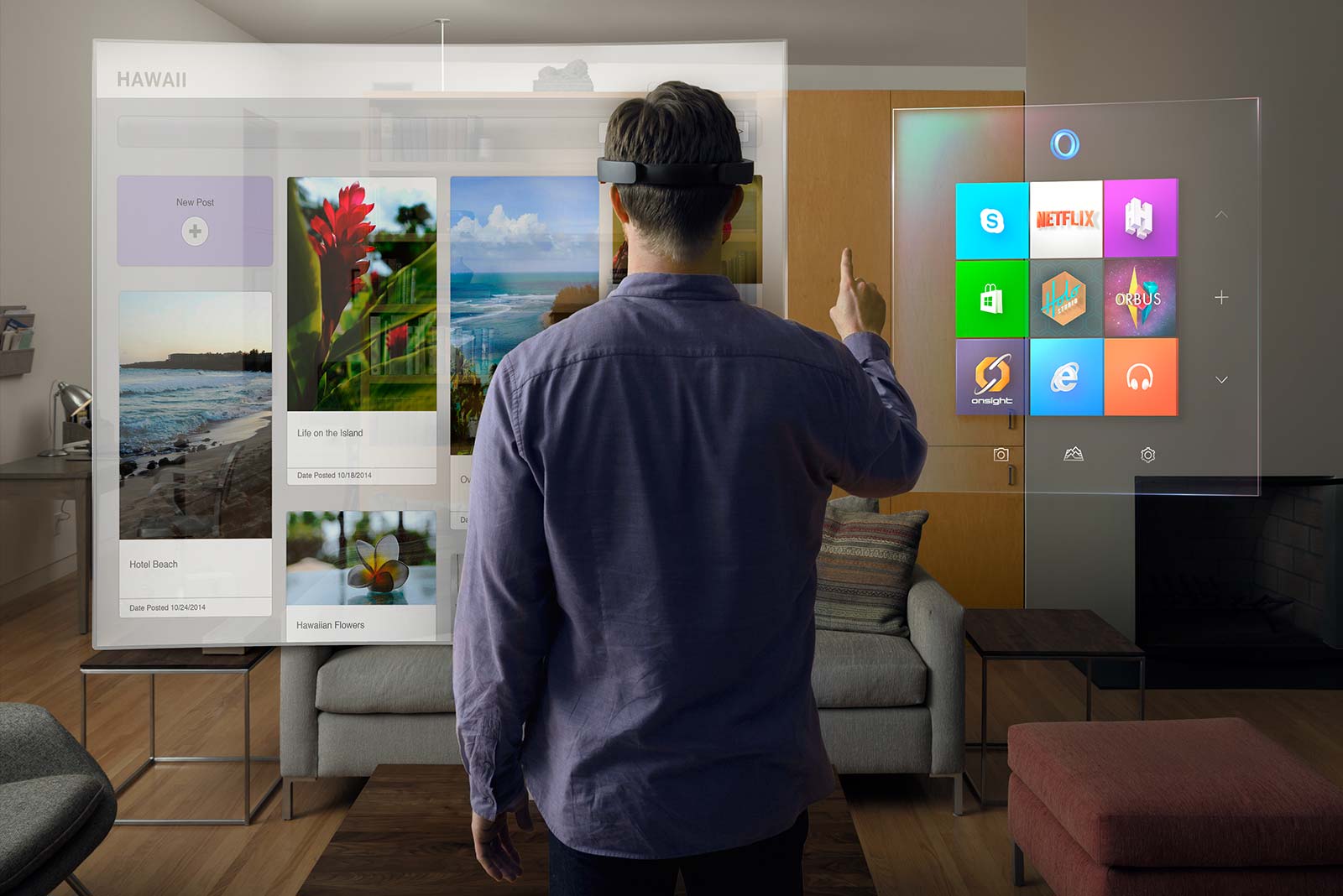
What does it mean to have holograms on Windows 10?


Windows 10 is the first platform to support holographic computing with APIs that enable gesture and environmental understanding on an untethered device. With Windows 10, holograms are Windows universal apps, and all Windows universal apps work as holograms. Holograms in Windows 10 will lead to entirely new ways for us to communicate, create, and explore.


What is Microsoft HoloLens, and how does it work?


Microsoft HoloLens is the first holographic computer running Windows 10. It is completely untethered – no wires, phones, or connection to a PC needed. Microsoft HoloLens allows you to pin holograms in your physical environment and provides a new way to see your world.


Microsoft HoloLens features see-through, holographic, high-definition lenses and spatial sound so you can see and hear holograms in the world around you. Complete with advanced sensors and a new Holographic Processing Unit (HPU) that understands the world around you, Microsoft HoloLens is able to run without any wires while processing terabytes of data from the sensors in real-time.

What is a hologram?


A hologram is an object like any other object in the real world, with only one difference: instead of being made of physical matter, a hologram is made entirely of light. Holographic objects can be viewed from different angles and distances, just like physical objects, but they do not offer any physical resistance when touched or pushed because they don’t have any mass. Holograms can be two-dimensional, like a piece of paper or a TV screen, or they can be three-dimensional, just like other physical objects in your real world. The holograms you’ll see with Microsoft HoloLens can appear life-like, and can move, be shaped, and change according to interaction with users or the physical environment in which they are visible.

Why would anyone want holograms in their real world?


While we’ve made incredible advances as an industry in the way in which we interact with computers, we are still constrained by the need to conform to the ways computers recognize our commands through mouse clicks or by touching a screen. Using holograms, you can pin your digital content, such as apps, information, and even multi-dimensional videos, in the physical space around you, so you can interact with them in the same ways that you interact with other physical objects.

How is this different from existing VR technologies?


Holographic experiences with Microsoft HoloLens are different from existing experiences, such as virtual reality (VR). With VR, the user is completely immersed in a computer-generated reality, or virtual world. While immersed in a virtual world, users are best advised to stay seated or keep still to avoid collisions with physical objects they cannot see in the real world. Holographic experiences on Windows 10 are about delivering a mixed reality that lets you enjoy your digital life while staying more connected to the world around you – transforming the ways you create, connect, and explore.

How do I learn more about designing and developing apps for Microsoft HoloLens?

Microsoft HoloLens runs on Windows 10, so developers building on Windows 10 will already know how to build for Microsoft HoloLens from a platform perspective. Having this same foundation means that developers will be familiar with the tools and benefits of the Windows Store.

The best way to get started is to become familiar with Windows 10 by joining the Windows Insider Program. Next, register for Build 2015. At Build, you’ll learn more about how to get started designing and developing for Microsoft HoloLens, receive details on the SDK, and meet members of our engineering team. If you can’t attend in person, plan to tune in via livestream or check out the recorded keynote and session presentations that will be available after the event.

HoloLens -Will Microsoft Change The Way We live in ?

Friday, January 9, 2015

Yesterday we showed you what was reported to be the first ever leaked screenshot showing an in-development build of Spartan, Microsoft’s upcoming Web browser for Windows 10 which was first rumored late last year. Today though there are a couple of new leaked images doing the rounds, and these two show us a very different design for Spartan.

That may be a good thing, given how cartoonish its interface looked in yesterday’s shot. The downside is that today’s leak is comprised of two extremely small and extremely blurry screenshots.

The actual leaked images are the first two below. Underneath you can see a mockup based on them, which is supposedly a near 1:1 replica of the browser’s UI.

An early view of Microsoft Spartan Browser For Windows 10

Wednesday, December 31, 2014

The Internet Explorer And Windows 10

Microsoft will launch Windows 10 next year, probably in late summer / early fall. The new iteration of the OS will work on many devices, from smartphones to tablets and PCs, representing a big step forward compared to Windows 8.1 and Windows Phone 8.1- that’s why Microsoft decided to name it Windows 10, eluding the Windows 9 moniker altogether. 
According to ZDNet, one of the major changes that Windows 10 will bring is a brand new browser. 
Currently codenamed Spartan, the browser will still rely on Microsoft's Chakra JavaScript engine and the Trident rendering engine (used by Internet Explorer 11). Even so, ZDNet’s sources have it that this is definitely not Internet Explorer 12, but a new and “lightweight” browser that will be available on desktop computers, tablets, and smartphones. Spartan could resemble Chrome and Firefox more than Internet Explorer as we know it.
Despite the arrival of the new browser, it’s said that Internet Explorer will still ship with Windows 10 (backward compatibility reasons being quoted), so this is not yet the death of IE - though we assume that it is the beginning of the end.
Microsoft will reveal new details about Windows 10 in January (next month), so maybe we’re going to find out more about Spartan then. 
P.S: The image above presents a well-known, humorous take on the fact that Internet 

Windows 10 might be the beginning of the end for Internet Explorer

 
Hi-Tech Talk © 2015 - Designed by Templateism.com