Showing posts with label android. Show all posts

Tuesday, June 2, 2015

ZenWatch 2

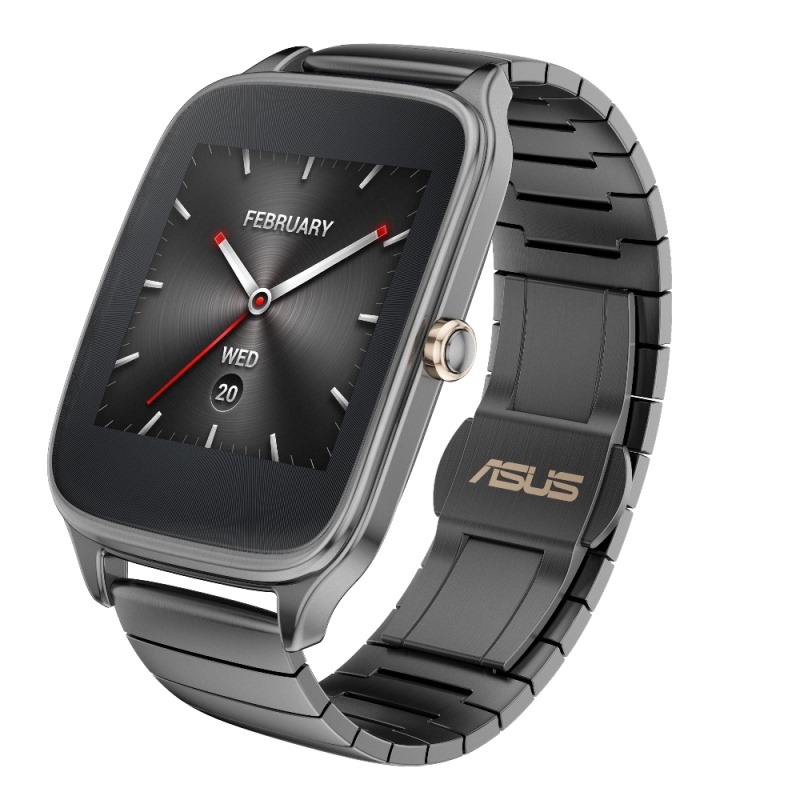
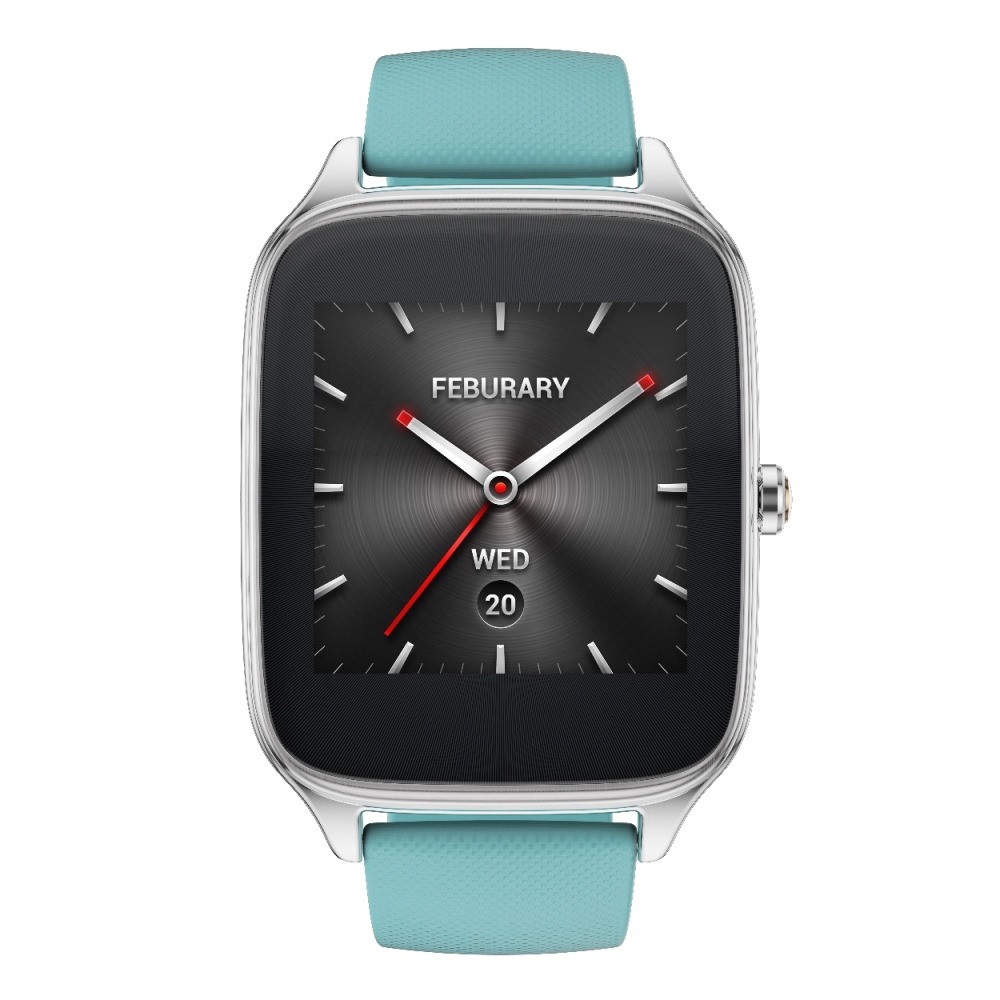
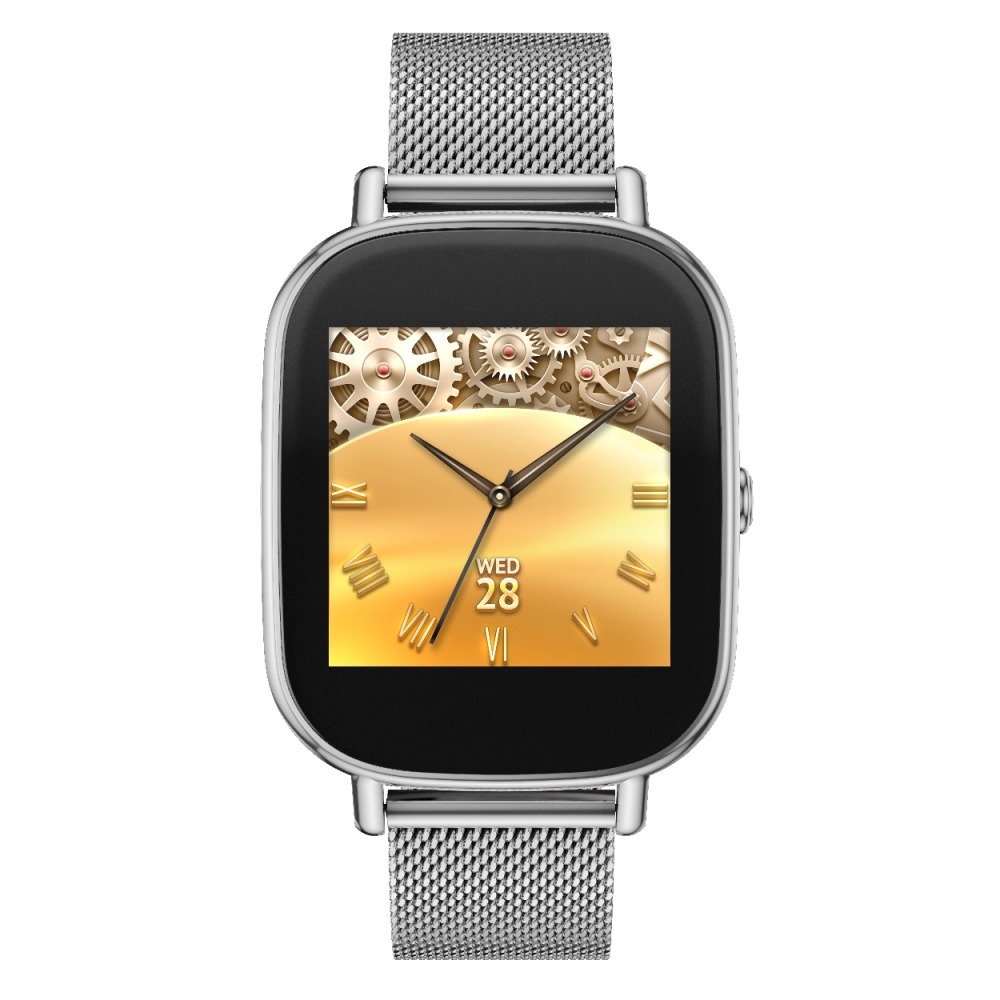
Let's get to the headliner: the big news with the ZenWatch 2 is that it now comes in two sizes - 37mm and 41mm (width). The smaller 37mm sports an 18mm strap, with the 41mm having a larger 22mm band. Both have AMOLED dipslays with Gorilla Glass 3, IP67 dust and water resistance, magnetic charging cables, and use unspecified Qualcomm processors (likely still a Snapdragon 400). The ZenWatch 2 has a crown now, too, which ASUS says adds functionality, but isn't exactly specifying how just yet. It's also not clear if the smaller ZenWatch 2 has a smaller screen, or if the case is simply shrunk down a bit.

There will be a variety of first-party straps to choose from, with rubber ones in blue, orange, red, and taupe, leather in khaki, brown, gray, blue, and orange, and a stainless steel band in silver, gunmetal, and rose gold. There will also be a Swarovski Professional leather strap with embossed diamond pattern and, you guessed it, Swarovski crystals. I'm guessing availability of all these bands with vary a lot depending on where you live. The watches themselves will be offered in three finishes matching the stainless steel bands (silver, gray, rose gold).

The new magnetic charger allegedly offers drastically improved charge times and "effortlessly attaches" to the ZenWatch 2, not that we have any illustrations just yet. The remote camera app has been updated, too, and there's a new "next-gen" Wellness app to track your activity. Availability and pricing were not announced.

ZenFone Selfie

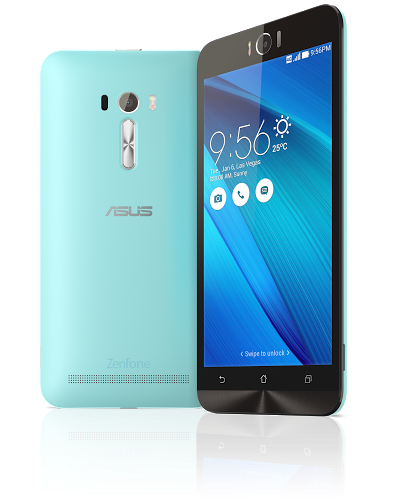
The next product on the block was ZenFone Selfie which, you guessed it, is basically a ZenFone 2 with a big fat front-facing camera for maximumselfitude. Aside from the camera, the major difference here seems to be the chipset, with ASUS having moved to the increasingly popular Snapdragon 615 octa-core chip on this device, as opposed to the Intel Atom in the ZenFone 2. The front-facing camera has an f/2.2 aperture and 88-degree field of view with 13MP of resolution.


The same 5.5" 1080p IPS display is on board, and the phone will come in seven colors (which, again: availability will vary by market). Release date and pricing were, again, unannounced.

ZenPads

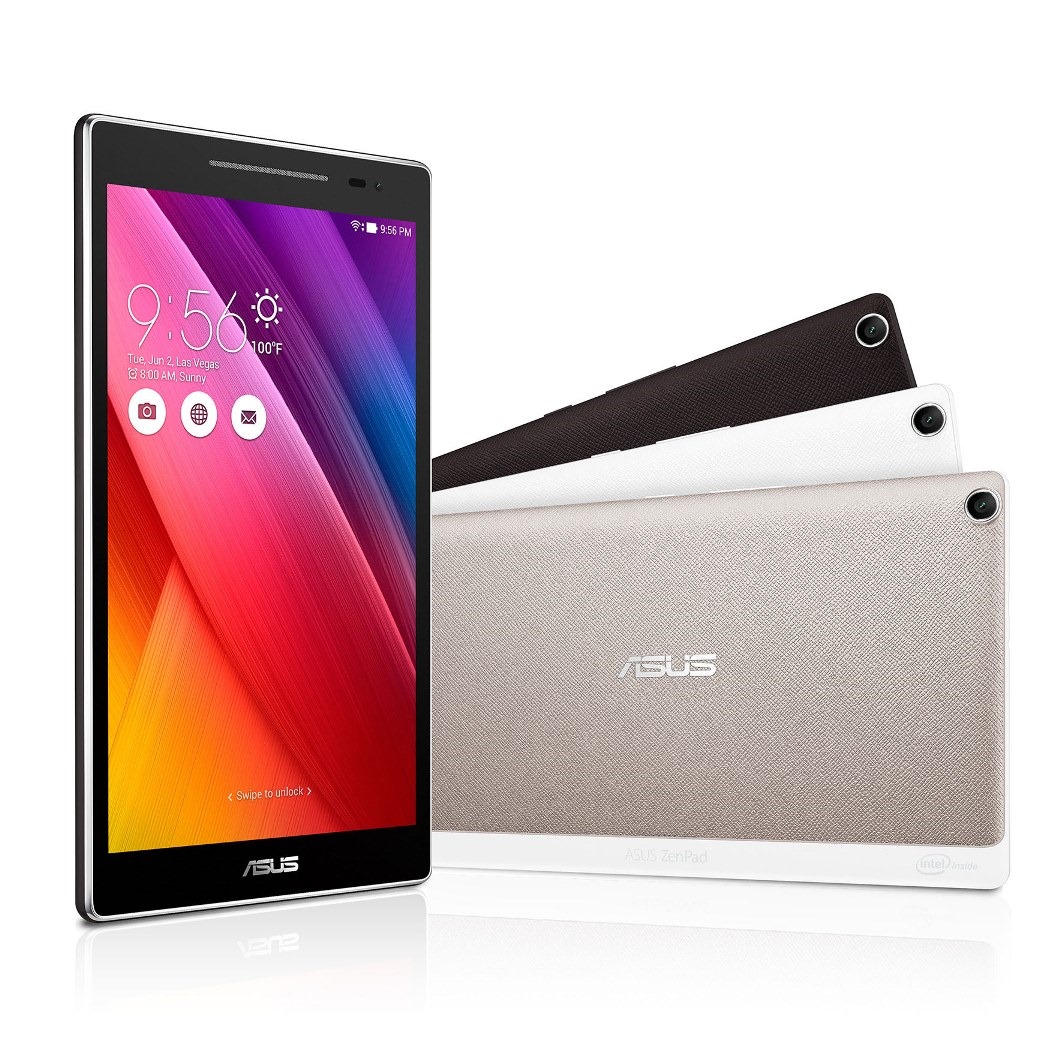
ZenPad S 8.0 rounded out ASUS' Android announcements at the event, and it actually seems pretty decent (even if the looks are... interesting). A quad-core 64-bit Intel Atom Z3580 (also found in the ZenFone 2) with 4GB of RAM, a 2K IPS display, and a rather impressive 6.6mm thinness. Other details include 16 and 32GB storage models, 5MP front and 8MP rear cameras, GPS, USB Type C connector (!), 15.2Wh battery, and a weight of 299g. Apart from a mention of a "Z Stylus," an accessory that will do stylus things, there was also a battery-boosting ZenCase and a predictably large color selection. A "normal" ZenPad 8.0 and ZenPad 7.0 were also announced, but technical details were scant. If you want to do some digging, the model numbers are: Z370C/CG/CL (7"), Z380C/KL (8" non-S), and Z580C/CA (8" S). Android 5.0 with ZenUI will be on all three. Oh, and there's also a 10.1" version that we have basically no details on other than it will have a detachable keyboard, presumably Transformer Book-style.


Models with and without LTE/mobile data connectivity are expected, and for the third time, still nothing on pricing or availability. The images above depict the standard ZenPad 8.0 (Z380C) on the left, and the ZenPad S 8.0 (Z580C) on the right.

Quite a set of announcements from ASUS this evening, or rather, this afternoon at Computex.

ASUS NEW ZENWATCH 2

Friday, May 29, 2015

New Google Photo App Launches Today, Includes Unlimited Free Storage Of High Quality Photos And Video

We already have already posted a pretty thorough preview of the features coming with the new Google Photos app, but that doesn't mean Google didn't save a couple of surprises for IO. The big bombshell is that, starting later today, users will be able to upload an unlimited number of photos and videos for free. If you weren't using Google as your primary source for photo archiving, this news may give you reason to reconsider.

Your pictures and videos won't be compressed into oblivion either, they will be stored at up to 16MP for images and 1080p for video. That's plenty big enough for most typical consumers and will still allow for high quality prints of photos.

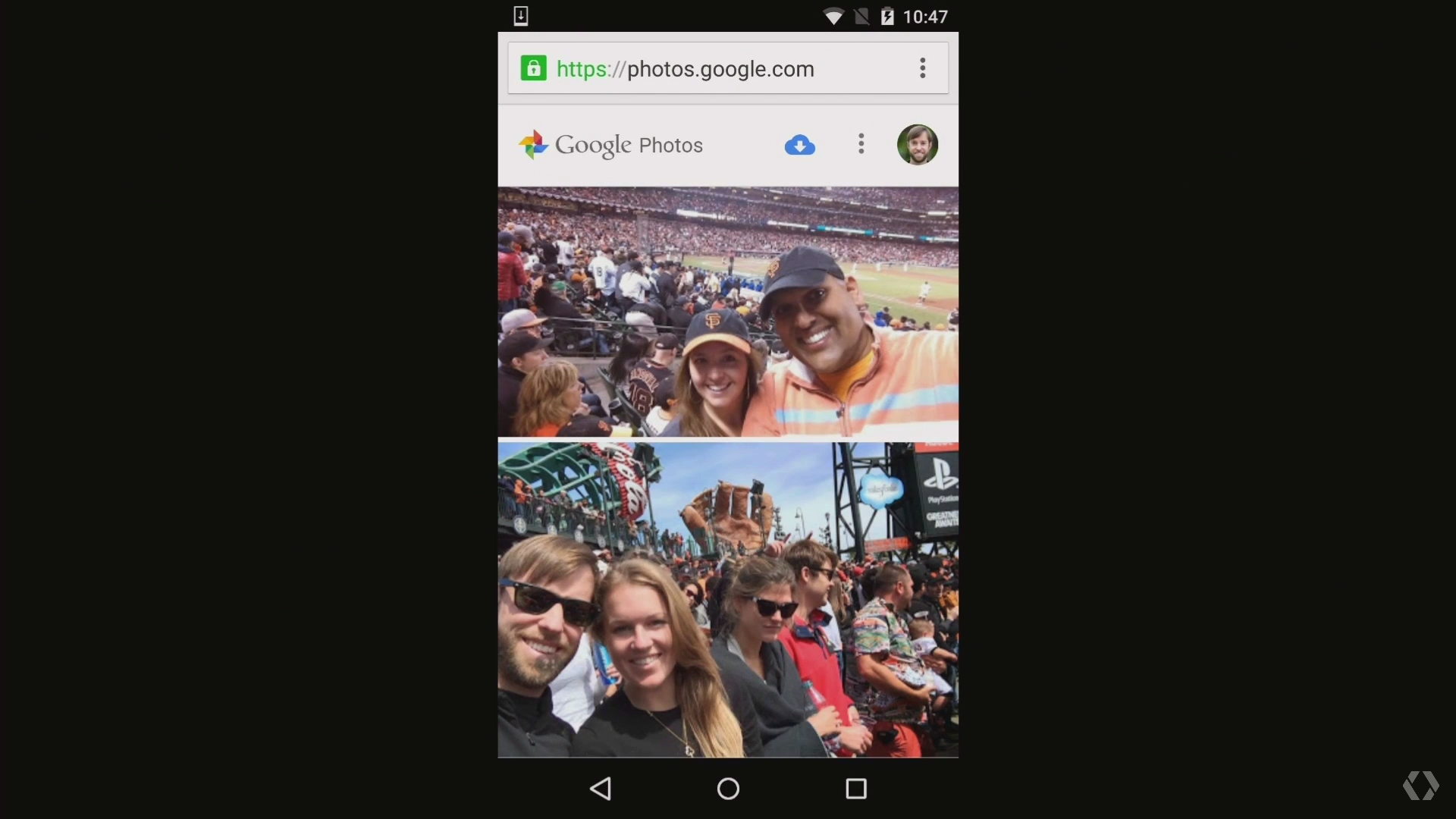
In addition to the unveiling of Google's generous new gift of unlimited photo storage, another cool feature was also announced. With the new Photos app, it will now be possible to send a group of photos by simply hitting the new "get a link" button. This will create a custom link to a web gallery of the photos you have selected. That link can be sent to anyone and opened in any web browser without having to log in or download an app.

If the recipient is logged in they will have an additional option besides just being able to view the photos. They can touch the cloud icon at the top of the image gallery and instantly import all the high quality shared photos and videos into their own library. This new feature, paired with unlimited storage, could make Google Photos one of the most compelling photo sharing and archive services on the web.

The new Google Photos will be available later today on Android, iOS and across the web.

New Google Photo App Launches

Tuesday, May 26, 2015

HTC One M9 Camera Fails In Tests: It's Worse Than A Three-Year-Old iPhone 4S

HTC has a problem, and it’s a problem it has had for some time now – failing sales. Even with Cher Wang replacing Peter Chou as leader of the company she founded, the firm has yet to find its feet. One of its biggest problems is that despite very competent hardware design, its phones are let down by a distinct lack of excitement. Its next biggest problem is the fussy UI design that comes from its Sense user interface. While the One M9 was an improvement over the M8, the difference was very slight but the new phone costs considerably more.
But HTC’s problems have worsened again with imaging experts DxOMark declaring its camera worse than the iPhone 4S and Samsung Galaxy S3 phones which are three and two-years-old respectively. That has to be seen as a problem for HTC, but first let’s take a look at some background to see how it ended up here.
HTC’s One M9 replaces the dual-camera of the M8, but with little quality increase
The big difference between the M8 and M9 was the camera, which HTC swapped from the dual sensor in the M8 to a higher megapixel version in the M9. HTC touted the dual-camera sensor as a huge advancement in cameraphones, but the truth was quite different. The 4-megapixel cameras just couldn’t keep pace with the sensors in every other camera.
And perhaps worse still, the advantages of the dual sensor were supposed to be that you could re-focus the shots after taking them, but this was so easily duplicated with a software solution that pretty much every phone with one sensor was able to do much the same process in software. And it was this that eventually led HTC to abandon the sensor and move to a 20-megapixel model. That sensor puts it close to phones like Sony’s Z3 20.7-megapixel model, and way in advance of other camera sensors, which tend to come in at around 16-megapixels. But, HTC also forgot one other thing that most other companies have included – stabilization. This is crucial in small, light phones which are easily moved and it plays a huge part in boosting the quality of images taken in poor light, allowing the phone to slow the shutter to allow in more light, while keeping the image free of shake and blur.
At 20-megapixels, this is one of the highest-specified cameras on a phone, but the results just don’t meet expectations
In their findings, the team at DxOMark said that in good light, everything was great – with good colour, detail and with the autofocus performing well. Sadly, in lower light conditions that all changes and everything becomes disappointing with them noting that colours are oversaturated and that there’s a loss of sharpness. They then give the HTC One M9 a camera score of 69.
In contrast, they rate the Samsung Galaxy S6 Edge as having the best camera, scoring 86 while the Note 4 grabs second place with 83.The iPhone 6 and 6 Plus assume the third and fourth positions with 82 points. The M9 scores the same as Amazon’s Fire Phone, but is still beaten by phones like the Note 2, Galaxy S3 and LG’s G2.
Worst of all though, HTC only just manages to beat the result of the M8, which scored 68 when tested. That’s a massive problem for a phone costing nearly twice as much money, and with scant other features to sell itself on.
With the announcement that HTC is partnering with Valve for that company’s VR offering, called Vive, perhaps the company is looking for an exit from mobiles. It isn’t a diverse company in terms of investments, so it needs to do something to shore-up disappointing sales. Unsurprisingly though, the HTC Re camera was pretty much universally panned for below-average image quality, so the firm doesn’t have a great track-record outside of phones.
Whatever HTC’s longterm chances of survival are, the message from DxOMark is simple: don’t buy an HTC One M9 for the camera.

HTC One M9 Camera Fails In Tests

HTC One M9 Camera Fails In Tests: It's Worse Than A Three-Year-Old iPhone 4S

HTC has a problem, and it’s a problem it has had for some time now – failing sales. Even with Cher Wang replacing Peter Chou as leader of the company she founded, the firm has yet to find its feet. One of its biggest problems is that despite very competent hardware design, its phones are let down by a distinct lack of excitement. Its next biggest problem is the fussy UI design that comes from its Sense user interface. While the One M9 was an improvement over the M8, the difference was very slight but the new phone costs considerably more.

But HTC’s problems have worsened again with imaging experts DxOMark declaring its camera worse than the iPhone 4S and Samsung Galaxy S3 phones which are three and two-years-old respectively. That has to be seen as a problem for HTC, but first let’s take a look at some background to see how it ended up here.

HTC’s One M9 replaces the dual-camera of the M8, but with little quality increase

The big difference between the M8 and M9 was the camera, which HTC swapped from the dual sensor in the M8 to a higher megapixel version in the M9. HTC touted the dual-camera sensor as a huge advancement in cameraphones, but the truth was quite different. The 4-megapixel cameras just couldn’t keep pace with the sensors in every other camera.

And perhaps worse still, the advantages of the dual sensor were supposed to be that you could re-focus the shots after taking them, but this was so easily duplicated with a software solution that pretty much every phone with one sensor was able to do much the same process in software. And it was this that eventually led HTC to abandon the sensor and move to a 20-megapixel model. That sensor puts it close to phones like Sony’s Z3 20.7-megapixel model, and way in advance of other camera sensors, which tend to come in at around 16-megapixels. But, HTC also forgot one other thing that most other companies have included – stabilization. This is crucial in small, light phones which are easily moved and it plays a huge part in boosting the quality of images taken in poor light, allowing the phone to slow the shutter to allow in more light, while keeping the image free of shake and blur.

At 20-megapixels, this is one of the highest-specified cameras on a phone, but the results just don’t meet expectations

In their findings, the team at DxOMark said that in good light, everything was great – with good colour, detail and with the autofocus performing well. Sadly, in lower light conditions that all changes and everything becomes disappointing with them noting that colours are oversaturated and that there’s a loss of sharpness. They then give the HTC One M9 a camera score of 69.

In contrast, they rate the Samsung Galaxy S6 Edge as having the best camera, scoring 86 while the Note 4 grabs second place with 83.The iPhone 6 and 6 Plus assume the third and fourth positions with 82 points. The M9 scores the same as Amazon’s Fire Phone, but is still beaten by phones like the Note 2, Galaxy S3 and LG’s G2.

Worst of all though, HTC only just manages to beat the result of the M8, which scored 68 when tested. That’s a massive problem for a phone costing nearly twice as much money, and with scant other features to sell itself on.

With the announcement that HTC is partnering with Valve for that company’s VR offering, called Vive, perhaps the company is looking for an exit from mobiles. It isn’t a diverse company in terms of investments, so it needs to do something to shore-up disappointing sales. Unsurprisingly though, the HTC Re camera was pretty much universally panned for below-average image quality, so the firm doesn’t have a great track-record outside of phones.

Whatever HTC’s longterm chances of survival are, the message from DxOMark is simple: don’t buy an HTC One M9 for the camera.

HTC One M9 Camera Fails In Tests

Sunday, May 24, 2015

Galaxy S6's Sales Disaster, New Samsung Galaxy Launch Date, Xperia Z4 Tablet Review

Share

Taking a look back at seven days of news across the Android world, this week’s Android Circuit highlights a number of stories including the low sales of the Samsung Galaxy S6 family, the early arrival of the Samsung Galaxy Note 5, early reviews of the Sony Xperia Z4 tablet, Microsoft Office preview for Android, the new OnePlus 2 handset is benchmarked online, Android Wear updates, MixRadio arrives on the platform, and the release of AdBlock’s Android browser.

Android Circuit is here to remind you of a few of the many things that have happened around Android in the last week (and you can read the weekly Apple news digest here).

Galaxy S6 Sales Disaster

While there are no confirmed numbers (and Samsung’s comment is “no comment”), the reporting of the first month of sales on the Galaxy S6 is not what the South Korean manufacturer would have been hoping for. Ten million is not just on the low-end of expectations, it’s crashing through the floor and have a serious effect on the finances of the parent company.

Korean news agency Yonhap reports that it has taken a month for sales of the Galaxy S6 and Galaxy S6 Edge to reach 10M. Speaking to Yonhap a ‘high-ranking Samsung official’ confirmed this figure for the first time. Trying to put a positive spin on it the official said: “The sales of the Galaxy S6 series have already surpassed 10 million.”


Samsung Galaxy S6 Edge (image: Ewan Spence)

Forbes’ Gordon Kelly expands on the detail behind that number, especially with Samsung’s focus on selling 70 million S6 branded handsets this year:

Notably the Galaxy S4 shipped 10M units in 27 days while the much criticised Galaxy S5 took 25 days to ship 10M units. In fact it was the lack of growth from the Galaxy S5 that inspired the radical reboot of the line seen in the S6es.

Consequently for combined sales of the Galaxy S6 and Galaxy S6 Edge to only pass 10M in a similar timeframe to the S5 and S4 represents a disastrous return. This is particularly true for the cheaper Galaxy S6 given Samsung has already confirmed demand for the Edge variant has been unexpectedly high.

All of which poses the obvious question: if Galaxy S6 Edge sales are performing above expectations, just how bad are Galaxy S6 sales?


I’ll be keeping a close eye on the numbers around the Galaxy S6 family. Given the crash in profits and revenue during 2014, right now Samsung’s Mobile Division looks to be a huge fiscal drag on the company’s bottom line.

Is The Galaxy Note 5 Arriving Early?

Will Samsung reveal the Galaxy Note 5 ahead of the expected annual schedule? Traditionally Berlin’s IFA event has seen the South Korean company refresh its phablet line, but sources in the supply chain point to a potential earlier release.

…Samsung is also apparently preparing to release its Galaxy Note 5 in late July, according to WhowiredKorea. It is claimed Samsung has already confirmed the final specification of the phablet and shown prototypes to global telecoms partners… For Samsung bringing forward the Galaxy Note 5 launch would make sense. Samsung Pay is set to launch in July which would unite it with the new phablet and it would also give Samsung the drop on Android rivals expected to launch their devices at the IFA tech show which is held in Berlin in September.


Given Apple’s tendency to release devices in September, Samsung may also have thought this would give it the drop on the new iPhone 6S Plus. If I was looking for an easier answer, I’d suggest Samsung want far more units available at launch than in previous years to get an immediate ‘hit’ phone.

Sony Xperia Z4 Tablet Reviews

The Guardian’s Samuel Gibbs has been taking a look at a pre-release version of Sony’s latest tablet. The Xperia Z4 Tablet doubles up as an ultraportable laptop with the keyboard cover, and continues to push the idea of a high-specification waterproof tablet:

The Xperia Z4 Tablet will be familiar to anyone who has laid eyes on a Sony smartphone or tablet made in the last couple of years: a thin, waterproof body, black bezels and a brilliant LCD screen.

The big change for the Z4 is the size of the housing. The screen is the same 10.1in, now quad HD with a pixel density of 299 pixels per inch, but the bezels around the screen have shrunk – the tablet is 12mm shorter and 5mm narrower, making it one of the smallest 10in tablets available.


While the future of Sony’s mobile division is still unclear, the hardware that is being manufactured continues to impress. We’ll have the Z4 Tablet to review on Forbes when it is released to the public.

Microsoft Office Preview App Released For Android

Following on from successful release of OneNote and Outlook, Microsoft has rolled out Office for Android as a preview application. Tony Bradley takes a look at the strategy behind Microsoft’s next encroachment into the Android world:

Initially Microsoft worked to just get some version of the Office apps out there for competing platforms like iOS and Android. The focus lately has been on ensuring the look and feel are consistent across all of the different devices and operating systems. It’s nice to be able to use the same basic tools on different devices but users shouldn’t have to re-learn how to use Word, Excel or PowerPoint depending on which device they choose. It should be simple and intuitive to use a Microsoft Office app no matter which platform it’s on.


Microsoft’s move to a cloud-based strategy has an impact on how the mobile Office app earns money. While it works as a viewer for free, the single sign-up to Office 365 will open up all the features in the application.

Microsoft has made the basic functionality of viewing and editing Microsoft Office files free for everyone. You must subscribe to Office 365, though, if you want the full range of features and capabilities. That shouldn’t really be an issue for most people—Office 365 is a much better value than buying Microsoft Office the old-fashioned way.


Next OnePlus Handset Shows Up In Benchmarking Tests

Shenzhen-based manufacturer OnePlus is expected to release its second handset by the end of the year. Named the OnePlus 2, it appears that some handsets have browsed to the online benchmarking sites to see how they compare to the competition. 9to5Google has the details:

Rumors regarding the successor the popular OnePlus One smartphone began emerging earlier this year and now a mysterious device from the company has appeared in GeekBench test results. While the results don’t reveal much, the show what is likely the OnePlus 2. The device appears to be running Android 5.1 and features an 8 core processor, likely in the 4+4 setup, clocked at 1.55GHz.

The processor is most likely the Snapdragon 810,which has been said to suffer from overheating issues since its launch. The test results show the device as carrying the model number A2001. The original OnePlus One carried the A0001 model number.


The OnePlus 2 is expected to arrive during Q3 2015, and a potential budget-priced model may appear before the end of 2015.

Google Sends Out Android Wear Update

Paul Lamkin details the changes and additions in Google’s latest release of Android Wear. Taking the platform up to Android 5.1.1, the wearable OS with a large smartwatch footprint now features improvements in the app launcher UI, connecting directly over Wi-Fi to the internet, gesture control, and emoji support.

Rather than an awkward list of task-specific commands, Google has gone back to smartphone-esque basics with a simple, icon-heavy, app launching page – easily reachable with a simple tap of the home screen. From this apps list you can scroll left for your contacts (nicely sorted with your most popular first) and, from here, you can send a text or email; or kick-start a call to start on your synced smartphone.

When you do fire up an app you’ll also notice that, much like the watch face, the display will be blacked out after a short period of time. This ‘always-on’ app feature is very handy for things like shopping lists and will help to preserve battery power.


Android Wear interaction (photo: Ewan Spence)

MixRadio Launches On Android

While Microsoft is promoting the ability for Android (and iOS) developers to port apps to Windows Phone, it is busy porting apps the other way with MixRadio the next app to jump out of the silo towards the major platforms in the market (reports The Next Web). The ad-supported streaming music app is free of charge, and while there some restrictions in place (much like any other nine streaming application, e.g. limited skips per hour, and limited number of repeating artists per hour) it’s an interesting choice to help you explore the music:

MixRadio’s expansion comes amid a hotbed of activity in the genre. A Spotify event tomorrow will likely reveal news about that service, while listeners anticipate more information about Apple’s new Beats music service. MixRadio, which is ad-supported, is free of charge.


And Finally…

AdBlock has entered the browser wars on Android with the launch of a new browser that blocks advertising on your handset. The Next Web looks at the tech behind the browser:

ABP’s developers have launched Adblock Browser for Android, which is basically Firefox 37 for Android with ABP baked in. The app is currently in beta, and you’ll need to sign up to ABP’s Google+ community to download it… Adblock Browser for Android looks and feels about the same as Firefox’s mobile browser, but it doesn’t support other add-ons or Firefox’s Sync feature. ABP claims that users will enjoy increased battery life, save on data usage and avoid malware injected into ads.


‘Android Circuit’ will round-up the news from the Android world every weekend here on Forbes. Don’t forget to follow me so you don’t miss any coverage in the future, and of course read the sister column in Apple LoopLast week’s Android Circuit can be found here, and if you have any news and links you’d like to see featured in Android Circuit, get in touch.

Galaxy S6's Sales Disaster, New Samsung Galaxy Launch Date, Xperia Z4 Tablet Review

Tuesday, May 19, 2015

T-Mobile leak reveals free smartphone offer for prepaid accounts


The idea of getting a free smartphone with service is nothing new; for years, the US market has been dominated by subsidized phone sales, and so long as you didn’t demand the latest and greatest flagships, you could always find a good number of free-on-contract options. In recent years, though, there’s been a shakeup in favor of installment plans, not to mention a rise in popularity of prepaid options, pushing the idea of free phones to the back burner. But today we learn of an upcoming deal for T-Mobile that puts the spotlight back on free phones in an unexpected way, revealing plans to give away a brand new smartphone to users with prepaid service.

We’ve already seen evidence of T-Mobile welcoming a couple new LG Androids to its lineup, the LG G Stylo and LG Leon. Now a leaked doc spells out the carrier’s plan to usher in the arrival of the LG Leon on May 20 with a free giveaway.

Subscribers on either Simple Choice No Credit plans or prepaid plans costing at least $40 a month will be able to get the LG Leon for free, according to this leak. The details differ a little – with prepaid users getting the phone for free straight away with their next $40 or better payment, and SCNC users paying a $150 deposit before getting the full cost of the phone back as a rebate after a month of service – but in either case, it works out to a free phone.

The LG Leon has a 4.5-inch FWVGA screen and runs a Snapdragon 400 SoC – not state-of-the-art by any stretch of the imagination, but free is free, right? And with word that this deal applies equally to new customers as well as existing ones, it’s hard to pass up, even if that means just keeping the Leon as a backup phone.

Source: TmoNews

FREE SMART PHONES FROM T-MOBILES

Monday, May 18, 2015


Huawei’s Nexus To Come With Kirin 930 And Metal Body

Google’s been rumored to be looking towards new manufacturers for this year’s Nexus. According to several speculations so far, the manufacturer of choice for the tech giant has been Huawei. But we’ve also heard about some news about LG considering to make the next Nexus. So while the current contender for Google’s Nexus throne this year is Huawei, its still too early to count other manufacturers out the race either. Nevertheless, we’ve manged to get some more information about the next Nexus.


Huawei’s Nexus Might Come With The Kirin 930 And 5.7 inch Display

While LG’s seemingly confirmed that its considering on manufacturing the next Nexus, the rumor mill is active on pumping more and new information about Huawei’s alleged Nexus. According to information so far, the device might be choosing to stick with the Snapdragon 810 as of now. This most likely means that overheating issues can be expected on the device and right on cue, new information suggests that Huawei might be choosing to employ its own Kirin 930 on the Nexus. The Kirin 930 is Huawei’s in house processor which can be expected to give several chipsets a run for their money.

But while the Kirin 930 might sound like a plausible option for the Nexus, Huawei might be better suited to choose the Kirin 940 or the 950 both of which feature Cortex A72 designs, meaning that you won’t have to worry about high performance on the Nexus. We also get to know more about the display size, design and screen resolution for the device. Allegedly, the next Nexus can be expected to come with a 5.7 inch display, with the device expected to be similar to Huawei’s Mate 8 expected later this year and feature a complete premium metal build. Screen resolution for the device is expected to be 2560 x 1440. That’s all that we have for you today. Stay tuned and let us know what you think in the comments section.

Kirin 930 And Metal Body -Huawei's Nexus

Tuesday, May 12, 2015

Micro SD Card Slot for Mobile ! Do you Really Need Them ?


Expandable storage on mobile phones

For a long time now, they’ve been a subject with staunch movements both for and against it. The recent removal of a microSD card slot on the Samsung Galaxy S6, as well as Xiaomi’s Hugo Barra’s statement explaining why there isn’t any expandable storage option on the new Mi 4i sparked another round of heated discussion among smartphone users.

So why do smartphone users want microSD card slots, and why are smartphone makers shying away from them? Let’s break it down.

FOR…


(Image: ZDNet)

If there’s one reason why consumers want expandable storage on their smartphones, it’s this: cost. MicroSD cards have been around since the days of feature phones, offering a cheaper alternative to store pictures, ringtones and yes, even contacts when your SIM card runs out of space. Remember those days?

Back then, offering smaller storage space with a microSD card slot means the retail price of the device is lower, too, as it pushes the cost of manufacturing down. Users can then choose to buy a microSD card of varying sizes based on their needs.

These days, with expandable storage cards getting ever cheaper, you can add significant amounts of storage to a smartphone for anywhere between RM15 to several hundred ringgit, depending on the storage size and class. Imagine, for about RM60 to RM70 you can double the storage of a 32GB smartphone. In contrast, Apple charges you RM424 more for a 64GB iPhone 6 compared to a 32GB one. Of course, there are technical differences between natively offering extra storage and expanding them via microSD, but try explaining that to the average consumer.


Take that, evil conglomerate. (Image: ephotozine.com)

It doesn’t help either that a lot of smartphones today only pack 8GB of internal storage, prompting the need for expandable storage. It is especially prevalent in lower-end smartphones – with only 8GB of storage, the actual usage storage amounts to only 4GB or less, as there are system files that also take up storage space.

A microSD card slot allows smartphones to store videos on top of pictures, songs and other files that can be downloaded or transferred to a smart device. This allows consumers to turn their smartphones into portable entertainment devices to kill time, adding convenience to an already important personal device. If a smartphone only comes with 8 or 16GB of internal storage, no problem – just get a 32GB or indulge in one of those 200GB ones that were just announced earlier this year.


Another plus point in favour of having microSD card slots is portability. With so many cloud syncing options these days, one might suggest that having a physical copy of your data is still useful, especially in areas where Internet penetration is low, or in countries where Internet data is expensive. In these places, it is far cheaper to just slot in a microSD card to store internal data; switching between devices is relatively painless too, as it just requires the user to remove the card from the old phone and into the new one.

AGAINST…


(Image: shopclues.com)

Just like the above, there’s a simple reason why smartphone makers are moving away from adding microSD card support: performance.

A slower-class card, like Class 4, will have slower read/write speeds compared to a newer Class 10 microSD card, which is also more expensive. Hence, unknowing consumers would be more likely to purchase a slower memory card without understanding the consequences of using one. It’s similar to USB 2.0 and USB 3.0 – the difference is telling, especially when microSD cards can also be used on Android devices to store apps.

And why does this matter to the smartphone maker? Let Xiaomi’s Hugo Barra explain:


You think you’re buying like a Kingston or a SanDisk but you’re actually not, and they’re extremely poor quality, they’re slow, they sometimes just stop working, and it gives people huge number of issues, apps crashing all the time, users losing data, a lot of basically complaints and customer frustration. It’s gonna be a while before you finally accept that maybe the reason why it’s not performing is because you put in an SD card, right? You’re gonna blame the phone, you’re gonna blame the manufacturer, you’re gonna shout and scream and try to get it fixed, so many different ways until you say, ‘Actually, let me just take the SD card out and see what happens.’


In other words, which company wants that kind of bad press?


On the other hand, there’s the matter of performance itself. Samsung’s Galaxy S6, for example, is fitted with a new UFS 2.0 flash memorythat’s said to be significantly faster than standard flash memory on smartphones, and closer in performance to solid-state drives (SSDs). With that levels of read/write speeds, even a Class 10 memory card would appear slow – and that of course, would lead to complaints about the device “slowing down” in future. Hence, it meant that Samsung had to remove one of its most practical features for the sake of maintaining the S6’s premium performance.

It is this same reason that Hugo Barra argues against the addition of a microSD card slot on its affordable Mi 4i smartphone. “For high performance devices, we are fundamentally against an SD card slot,” he said.


Finally, in the same vein as “portability” in the earlier segment, smartphone makers would argue that with so many cloud syncing options, there’s no need for a microSD card slot on a smartphone. These days, a smartphone can have automatic camera backups using Google Drive, Dropbox, Microsoft OneDrive, Box and many more. Android also automatically syncs app data to your Google account, so each time you use a new device, your apps would be downloaded immediately. Why worry about a flimsy and tiny card when you have the power of the cloud?

MOVING FORWARD…

(Image: noelmace.com)

This would also surprise some of you, but Google has also been against cheap memory expansion years before anyone made a big deal out of it. This report way back in 2011 details how Google began encouraging other phone makers to increase internal storage on their smartphones, and reduce dependency on expandable memory. Bits of Barra’s argument above echoes in the report, stating the failure rates of SD cards were a big reason to avoid supporting expandable memory altogether.

The feature that allows apps to be transferred to a memory card, called Apps2SD and introduced in Android 2.2 Froyo, was meant to be a stop-gap solution. However, it has endured four years on and many iterations of Android later, possibly signalling that consumers aren’t ready to let go of the cheap microSD card option just yet – or that phone makers are still offering abysmally small internal storage, propagating the need for external storage solutions.

Either way, something’s got to give.

Micro SD Slot for Mobile phones

Sunday, May 10, 2015


For anyone who dislikes the navigation bar, this tutorial will show you how to get rid of it and enable pie controls instead.

Ever since I started using the Paranoid Android custom ROM for the Nexus 4 I have fallen in love with pie controls. For those who don’t know what this means, pie controls(for Paranoid Android) would replace the navigation bar at the bottom of your screen with a new way to control them. The navigation bar on Android is the bottom bar that houses the Back, Home and Overview buttons. This used to be represented by a back arrow, a house and a couple of stacked rectangles. With pie controls, you slide your finger or thumb from the edge of the screen and a set of navigation buttons appears(check the bottom of this tutorial for a screenshot of my setup).


Now we know of the navigation bar as a triangle, a circle and a square. I personally didn’t like the new buttons when I first saw them but they have grown on me. Also, since I disable the navigation bar anyway, I just don’t see it all the time. I enjoy the pie controls method of navigation for a number of different reasons. The main one is that I want my applications to always take up the full screen. I used to like to hide the status bar too for this reasons but I have been keeping that there for a while. Now that I am writing about it, I am starting to think that I should go back to hiding the status bar too. I’ll save that for a different tutorial though.

So yes, I like all of my applications to take up as much of the display as possible. This is fantastic for games that have chosen to not add in the KitKat immersive mode feature but it goes beyond games. I even want to disable/hide the navigation bar while in messaging applications and this is something that features like Expanded Desktop for CyanogenMod doesn’t do. Anytime there is a keyboard up while Expanded Desktop is enabled, the navigation bar was still present. If that feature didn’t function that way then I would probably not have looked for this alternative way of getting Nexus 6 pie controls.

Requirements
Let’s take a look at how to disable the navigation bar on the Nexus 6 and enable pie controls. I should note that this should work on all custom ROMs and it will even work on stock Android. You will need root access, so please follow the how to root the Nexus 6 tutorial if you need help there. I also recommend that you have a custom recovery installed as well, so please follow the how to install a custom recovery on the Nexus 6 tutorial if you need help there. You don’t technically need a custom recovery installed, I just recommend it so that you can create a Nandroid backup just in case something bad goes wrong.

This modification is very small and very simple, so nothing should go wrong, but I would always rather be safe than sorry.

Nexus 6 Pie Controls
Open the Build.Prop Editor 
ApplicationGrant Root Access to the Build.Prop Editor Application if it AsksPress the Pencil Button at the Bottom(or tap the 3-dot menu at the top right and then press edit)Scroll All the Way DownCreate a New Line a the Very BottomAdd in the Following Text. . .qemu.hw.mainkeys = 1Press the Disk Icon at the Top Right to SaveGrant Root Access to the Build.Prop Editor Application if it AsksWait for the Spinning Circle to Stop(this can take some time)You Should Get a Toast Message Saying the File was SavedClose/Minimize the Build.Prop Editor ApplicationDownload and Install the Pie Control ApplicationConfigure the Pie Control Application How You Want itPress the ‘Apply’ Button at the BottomClose/Minimize the Pie Control ApplicationReboot Your Nexus 6

Explanation
Ok, so what we’re doing here is making a very small edit to your build.prop file using the Build.Prop Editor application. Be very careful about anything you do here. Changing the wrong thing here can send you into a bootloop and this is another reason why I recommend that you create a Nandroid backup of your Nexus 6beforehand. Once you open this application for the first time you will be asked if you want to grant it root access. You’ll need to allow this because it needs root in order to edit your build.prop file. There’s two ways of editing the build.prop file and I’ve seen it with two interfaces.

I first look to see if there is a pencil icon at the bottom of the application. If there is, then you can press the button and it will go into ‘edit mode’ but if there isn’t then the edit command is hidden in the overflow menu. So if you don’t see the pencil icon at the bottom then you’ll want to tap on the three-dot menu icon that you see in the top right. This will drop down a menu and inside this menu you should see an ‘edit’ option. Go ahead and tap on this and you’ll go into edit mode. Since we are adding a new entry here, you’ll want to scroll all the way down to the bottom of the build.prop file. If you need to create a new line then do so but usually there is a blank line at the bottom already.


Once you are there, you can either type in or you can copy/paste the follow code into the brand new line of the build.prop file – “qemu.hw.mainkeys = 1″. I have included a screenshot above that you can reference if you need help. What this code is doing is it is telling Android to not show the software navigation bar when it boots up. This change will only happen after you reboot so don’t be worried that your navigation bar will disappear after you save this build.prop file because it won’t. Once you have added that single line into the build.prop file then go ahead and save it and then close the app. If you didn’t get asked to grant root access to the editor when you opened it, then you will be asked when you try to save this file. Either way, grant the application root access.

You can go ahead and minimize/close the application once the file has been saved. From here, you’re going to need to download and install the Pie Control application that is linked in the tutorial above. There might be some alternatives in the Google Play Store so you can try those if you want. Just be sure you are happy with your choice before you reboot because it can be rough to navigate through Android without a navigation bar. When you install and launch Pie Control, it comes with a stock version of how it looks but it is completely customizable. I’m a minimalistic type person so this is how I set mine up.


I like it on the right side, I don’t care for the time to be there and I don’t need anything other than back, home and overview. This is just my personal preference though. If you are a fan of pie controls then I want to hear how you set it up on your smartphone or tablet. If you want, you can even include a screenshot. Just make sure it is suitable for all ages.

NEXUS PIE CONTROL

Wednesday, March 18, 2015

Activating Voice Call On Whatsapp

WhatsApp's voice calling feature is now available to all Android users. The world's most popular messaging app with over 700 million monthly active users only introduced this feature recently and rolled it out gradually to its Android users. If you are not an Android user, you'll just have to wait a little longer to get this feature. But if you use Android, and haven't yet activated voice calling on WhatsApp, what are you waiting for?

The process isn't as simple as updating WhatsApp to start using the voice calling features. It involves a couple more steps that you need to follow. We've described these below, so take a look to enable voice calling on WhatsApp for Android.
  1. Download the latest version of WhatsApp for Android from here. The latest version on WhatsApp's website is 2.12.7, but if you're downloading from Google Play, ensure that your device has version 2.11.561. Older versions don't support this feature for all users.
  2. Once you have the latest version of WhatsApp installed on your Android phone, ask someone who has WhatsApp calling enabled to make a WhatsApp call to your number.
  3. Multiple users have reported that giving a missed call doesn't work. You'll have to receive the call and wait for a few seconds before disconnecting to activate WhatsApp voice calling.
  4. When the feature is enabled on your smartphone, you'll see a new three-tab layout on WhatsApp, one each for Calls, Chats and Contacts.

How To Activate WhatsApp Voice Calling?

Friday, March 6, 2015

Now they're official, but which one wins?

Last month I wrote an article asking readerswhich phone they thought would come out ahead as the more popular device this year. Although this will be an ongoing battle between the Samsung Galaxy S6 and theHTC One M9 over the course of the year, we can now paint a much more accurate picture of which one we, the consumers, like the most.
In my article, I predicted that the Samsung Galaxy S6 would be the one that brought the most surprises and would “wow” people the most. Fast forward to today, and I feel like the Galaxy S6 did indeed steal the show over the HTC One M9.
I did write an article earlier today talking about how I felt that the design changes in the Galaxy S6 weren’t worth the two (arguably) major sacrifices that Samsung had to make in order to get there. I meant what I said, but that doesn’t mean I don’t think that the Samsung Galaxy S6 isn’t still a great device – it just happened to get rid of two very important (and seldom seen anymore) features that many people still wanted to see out of Samsung. As disappointing as that is, I can’t exactly call the Galaxy S6 or the S6 Edge “underwhelming”, which is a term I had used when discussing the HTC One M9.
I’ve been a big fan of the HTC One since the M7 made its debut in 2013, and not-so-big of a fan of the Galaxy S4 given my less-than-ideal experience with the device. In 2014, I was given the chance to do a 30-Day Challenge for the M8, and was also happy with the device (but not with the size). I’m one of the few that actually didn’t mind the UltraPixel camera, and was in fact happy with the results the pictures made. As for the Galaxy S5, I ended up feeling indifferent about it.
Visually, though, I guess I am a bit underwhelmed by the HTC One M9 this year. I think it still looks good, but when you’ve already seen it once, there’s not a whole lot of wow-ing going on.
That Galaxy S6, though. Yeah, it does look good on the outside. Like, really good – I even like the Samsung Galaxy S6 Edge, which I think makes the whole “edge” concept look better when there are two sides instead of just one. And I’ve never been a big fan of TouchWiz myself, but I do notice a bit of a clean-up going on there. Nothing as drastic as I had hoped, though.
On the spec-side of things, it’s hard to tell at this point if there’s a clear winner in how they measure up to each other. They’re about the same size (S6 has a 5.1-inch display, One has a 5-inch); each has 3GB of RAM; each uses an octa-core processor, although HTC went with Qualcomm Snapdragon 810 and Samsung went with their own Exynos 7420; the S6 has a much higher pixel density (577 ppi compared to 441); HTC has a 20-megapixel rear-facing camera vs. Samsung’s 16-megapixel, but Samsung’s uses OIS and HTC’s doesn’t (why?); Samsung took away the microSD card this year, but offers larger internal storage options, and HTC only has a 32GB option for the M9 but has a microSD card slot; the S6 features a 2550 mAh battery, and the One features a 2840. Both run on Android Lollipop.
So, either way you go you’re going to get a flagship experience. It just depends on which sacrifices you personally are willing to make if you’re looking to buy one of these two devices. Would you rather have a 16-megapixel camera with OIS over a 20-megapixel one that doesn’t, or would you rather have the opportunity to expand your memory with microSD cards? At least the two are on par when it comes to the quality of materials they’re made out of – that is no longer truly an issue.
At the end of the day, we are presented with two wonderful phones. When it comes to which one will be liked the most and produce the most sales, though, I still predict that the Galaxy S6 will continue to win over consumers despite the loss of microSD and removable battery. 

HTC One M9 vs Galaxy S6

Monday, March 2, 2015

5 can't-miss apps: 'Sheepop,' Clinique, Nat Geo View and more

IMAGE: ITUNES, SHEEPOP
Between freedom-loving llamas on the loose in Arizona and the dress that broke the Internet, you may have overlooked some of this week's best new apps.
Luckily, each weekend, we round up our favorite new and updated apps, so you won't miss out.
This week's list includes a new photo-focused app from National Geographic, a game calledSheepop that challenges you to throw sheep, and an app to help you manage all your subscription services.
Check out the gallery, below, to see all the apps that made our list of top picks. And if you're looking for more, take a look at last week'sroundup of can't-miss apps.

Clinique

Clinique came out with a revamped version of its flagship app this week that includes a fresh new design and extra personalization features.
The new stuff: The app now uses your location to provide personalized “skin forecasts” that recommend skincare routines and products based on your location and skin type. Clinique also stepped up its consultant feature, giving you the ability to video chat with one of its many makeup consultants. Available Monday through Friday from 10 a.m. to 6 p.m. ET, the consultants provide expert advice, product recommendations and tips on how to change your daily routine to fit your needs.
Keep an eye on: The app’s many tips and tricks, articles and quizzes, which provide a daily refresher on the dos and don’ts of how to get the most out of your products.
Pro tip: Take the app’s skin diagnostic test to get even more targeted recommendations for your specific skin type.
IMAGE: ELC ONLINE

Nat Geo View

Nat Geo View, the latest app from National Geographic, offers a daily digest of some of the publication’s best photos and video, as well as the story behind those images.
Why we like it: One of the best parts of National Geographic is its stunning visuals, and this app provides some of the best it has to offer in an easy-to-view format. The app also includes just the right amount of context without being overwhelming.
Keep an eye on: Archival photos that go back more than 100 years and a dedicated Instagram section, which showcases some of the best pics fromNational Geographic's feed, taken by its photographers around the world.
Pro tip: Miss a day? The menu in the app's right-hand corner enables you to go back and view posts from the previous week

SubscriptMe

If you have a paid subscription to multiple apps, SubscriptMe can help you keep tabs on all of them -- whether you signed up for a free trial, or have a recurring payment you regularly make.
How it works: SubscriptMe automatically detects all the apps on your phone that use a subscription model. Select the ones you pay for, and the app will set up a tracker that keeps tabs on how much you pay, when your bill is due and how long you’ve subscribed to the service.
Keep an eye on: The app’s insights, which provide a detailed report breaking down exactly how much you spend on apps each month and year.
Pro tip: SubscriptMe also lets users rate and review services, so if you’re debating whether or not it's worth shelling out extra money for a premium tier, check out the featured section, which shows the most popular apps and services and how others have rated them.

'Sheepop'

Sheepop's premise is deceptively simple: "just keep throwing the sheeps,” according to its App Store description.
We like it for: Jumping sheep plus large bodies of water equals whimsical sweet spot. Really simple, yet addictive gameplay makes for the perfect subway companion.
Watch out for: It might just be the most maddeningly addictive game since Flappy Bird. You could very well go crazy trying to beat your high score of “3."
Pro tip: We don’t even know. Try to get more than 3.
IMAGE: ILYAS HASSANI

OneMinute

OneMinute aims to crowdsource the answer to one question: What is everyone doing right now?
How it works: Each day, all the app’s users receive just one notification. It occurs at a different time every day, all users get the notification simultaneously. Once you receive it, you have just one minute to start snapping photos of whatever is around you. Once that minute is up, you can view what everyone else captured in the app’s feed.
Keep an eye on: The lower-right corner of the photos in the feed, where you can see the city in which the image was taken, is your only hint of the photographer's identity.
Pro tip: OneMinute crops the photos into narrow rectangles, so make sure you position the camera wisely during the one-minute window

5 can't-miss apps

Saturday, February 28, 2015

VLC gets first major release across Windows, Mac, Linux, Android, iOS, Windows Phone, Windows RT, and Android TV


VideoLAN today launched what is arguably the biggest release of VLC to date: an update for the desktop coordinated with new versions across all major mobile platforms. The world’s most used media player just got massive a cross-platform push.

The company told VentureBeat that the releases are the result of more than a year of volunteer work on the VLC engine and thelibVLC library. As a result, VLC has gained numerous new features, has seen more than 1,000 bugs fixed, and has significantly increased its scope of supported formats.

Without further ado, here are the new releases:

VLC media player 2.2.0: Download fromvideolan.org/vlcVLC 2.4.1 for iOS: Download from Apple’s App StoreVLC 1.1.0 for Android: Download fromGoogle PlayVLC 1.1.0 beta for Android TV: Download from Google PlayVLC 1.1.0 beta for Windows Phone: Download from the Windows Phone StoreVLC 1.1.0 beta for Windows RT: Download from the Windows Store

One major cross-platform addition is that VLC now automatically detects rotated videos. It can then rotate them using hardware acceleration (supported for MP4/MOV, MKV, and raw H264) for proper consumption: no more stupid vertical videos!

For all platforms, the new version adds support for Digital Cinema Package to play native movie theater formats, compatibility for “a very large number of unusual codecs,” and “vastly improved compatibility” for UltraHD video codecs like VP9 and H265, including encoding, as well as problematic files in Ogg, MP4, and WMV. Now let’s take a closer look platform-by-platform.

Windows, Mac, and Linux

First and foremost, VLC media player 2.2.0 adds a feature that has been supported on VLC mobile for quite some time: resume playback where you left off. This might not seem like a big deal at first, but if you remember all those times you’ve accidentally closed VLC, or opened a new video and lost your place in the first one, you’ll love this addition.

Although extensions have been available for a long time now, VLC for the desktop now has an in-app downloader, similar to what is available in Mozilla Firefox. Oh, and there’s also an extension specifically for downloading subtitles.

The desktop app has also gained experimental support for Interactive Menus on BluRays (BD-J). Last but not least, Mac users will notice a new interface on OS X Yosemite.

Android

VLC for Android arrived in beta back in July 2012, and while VLC 1.0.0 was released briefly on Google Play earlier this month, VideoLAN told VentureBeat that was still a prerelease build meant for testers. Now it’s finally out of beta and available as a stable version to the masses after more than 30 months of development.

The changelog is as follows:

Port to 5.0 new APIsRewrite of most viewsGamepad controller support for navigationAsync load of fragments and searchOption to show videos as list in portraitSupport pull to refreshTracknumber, DiscNumber, and AlbumArtist tags support for audio filesHandle nowplaying for streamsSet Audio and Subs delayFix parsing of metadata with spaceFix popup context menu loaded for wrong filesMore than 60 bugs fixed

The biggest highlight on Android is that the user interface has been rewritten to align with Google’s Material Design mantra.

iOS

VLC for iOS has had a long, troubled history, including launching, being pulled, and relaunching on the App Store. Most recently, it properly returned in July 2013, wasredesigned for iOS 7 in January 2014, and then disappeared again in September 2014 around when iOS 8 arrived. Now it’s back, again.

The changelog is as follows:

Download of currently stored media via WiFi in addition to uploadDetection of external subtitles when streaming media via http or ftpFolder support for GDriveSupport for streaming from GDriveNative support for Plex media serversSupport for file sharing with further apps installed on deviceOption to download media from http/ftp/https instead of direct playback when requested through third-party appFolders synced through iTunes are correctly parsed nowOption to set text encoding used for FTP connectionsOption to set default playback speedMedia library searchImproved reliability when a call comes in during playbackImproved subtitles playback reliabilitySupport for redirected downloads via HTTPSupport for audio playback and subtitles delay for manual syncAdded improved interaction with third party apps through a x-callback-url based mechanismMedia Library is no longer reset on upgradeFix browsing of a number of UPnP devices such as HDHomeRun without sorting capabilitiesFix pseudo-random playback startsImproved passcode lock appearanceMinor UI improvementsNetwork stream history allows copying URLsImproved reliability when syncing media via WiFi or iTunesStability improvements for iOS 6.1New translation to Traditional Chinese

The biggest highlight on iOS is that support for iPhone 6 and iPhone 6 Plus has been added.

Windows Phone, Windows RT, and Android TV

While it may seem odd at first to lump these three platforms together, they do share one major thing in common: VLC was only offered on them as private test builds for select testers. Now the three are all getting their first public beta release.

Apps for Windows RT and Windows Phone have been a long time coming. In fact, aKickstarter for the Windows RT version (the Metro app that also works on Windows 8) successfully concluded in December 2012. Both apps have now been merged, and while there are no major features added (just bugs fixes and stability improvements), the beta tag isn’t quite ready to come off just yet.

The Android TV app is still very basic, although a lot of the core work is done since it is based on the main Android app. The main features right now are video and audio browsing, a settings page, and recommendations.

What’s next

“I’m very happy [with] these releases,” Jean-Baptiste Kempf, lead developer and president of VideoLAN, said in a statement. “Moving VLC to the mobile world was difficult, but the difficult is done. VLC runs everywhere, plays everything. We’re working on many new features for VLC 3.0.0 to finish what we’ve started here.”

VLC 3.0.0 is currently slated for release “later this year.” This next major release will bring hardware decoding and acceleration to more platforms, better support for MP4, adaptive streaming, and TS streams, as well as basic Google Chromecast integration.

VLC gets first major release across all platforms

Saturday, February 21, 2015

We’ve certainly seen some awesome projectorsin the tech world lately, but none quite like this. The Beam smart projector is powered by your Android device, and has a ton of functionality like waking you up in the morning with the latest news, showing you your social updates when you come home, and much more. But that’s not the most interesting aspect of this projector. Beam can screw into any size light socket so you can view your media wherever you’d like. Of course, you can use the included power cable to plug it into any wall outlet, but what’s the fun in that?
Why would you want a projector that screws into your light socket? The crowdfunding page has a few insights for you:
With Beam you can watch TV on your bedroom ceiling, play games using your phone or a Bluetooth controller, project recipes on your kitchen counter, stream content from your network drive, listen to music through its speakers, play projected board-games on your dining table, show a presentation or even use it in a restaurant to show the menu and turn the walls into digital paintings.

If you aren’t sold on this idea yet, Beam also runs Android. You can download any app from the Google Play Store to use on the projector, and it can all be controlled by your Android or iOS device. The projector is also borrowing a few functionality traits from the popular IFTTT service, allowing you to set up certain rules for the projector to follow. Take a look at the examples shown below:
Beam isn’t the beefiest projector we’ve seen on the market. It has a max brightness of 100 lumens, an 854 x 480 resolution, two 2-watt speakers, 8GB of storage, along with Wifi and Bluetooth capabilities. The company behind Beam will add a version with 16GB of storage if the product reaches $800K, new colored cables if it reaches $900K, a new Beam color if it reaches $1 million and the company will include Beam colored LED lights with the software control kit if it reaches $2 million.
Even for the specs, you’ll have to spend a pretty penny if you want to get your hands on one. Since all of the early bird specials are gone, you’ll have to pledge $399 to get yourself a Beam. They’ll even throw in a Beam hoodie if you spend $450.
This projector has been doing quite well so far. It’s already surpassed its goal of $200K with 31 days to go. If you’re interested in this smart projector, head to the Kickstarter page below for more info.

Beam is an Android-powered projector that fits into a light socket

Wednesday, February 18, 2015

Just over two weeks ago, we delivered the first version of Outlook for iOS and Android devices. We’ve heard from many of you that enjoy how Outlook brings together the core tools you need to get things done—your email, calendar, contacts and files—helping you get more done even on the smallest screen.
We promised to deliver updates to Outlook every few weeks and we’ve been listening closely to your feedback. Today, we are happy to share some of the features we’ve added over the past two weeks.

IT controls

While our first release focused on bringing a great end-user experience to market, we are also well underway building the IT controls that our business customers require.

PIN lock

Outlook now implements password enforcement using Exchange ActiveSync. If your company email policy requires that devices have a password in order to sync mail, Outlook will enforce this at the device level. How this works on iOS and Android devices varies slightly, based on the available controls provided by Apple and Google.
On iOS devices, Outlook will check to make sure a passcode is properly set. In the event a passcode is not set, it will prompt users to set one up in iOS settings. Until the passcode is setup, the user will be unable to access Outlook.
Outlook for iOS only runs on iOS 8.0 or later. These devices are shipped with built-in encryption, which Outlook uses once the passcode is enabled to encrypt all the data Outlook stores locally on the device. Therefore, iOS devices will be encrypted whether the Office 365 or Exchange policy requires this or not.
Outlook for iOS enforces simple passcode. Encryption is enabled by default.
On Android devices, Outlook will enforce screen lock rules. Further, Google provides controls that allow Outlook to honor additional Office 365 and Exchange policies regarding password length and complexity requirements and the number of allowable screen-unlock attempts before wiping the phone. It will also encourage storage encryption if it is not enabled. Outlook will guide users through this process with a step-by-step walkthrough.
Devices that do not support these security settings will not be able to connect to an account.
Outlook for Android enforces passwords including length and complexity requirements, storage encryption and will monitor screen-unlock attempts to prevent un-authorized access.

Quicker remote wipe execution

We’ve also made improvements to how quickly admin-led remote wipes are executed—they now happen within seconds. As before, this is an app-level wipe, not a device wipe. The Outlook app will reset and Outlook email, calendar, contacts and files data will be removed from the device, as well as from Outlook’s cloud components. The wipe will not affect any of the user’s personal apps and information.

User-focused features

We’ve also delivered on several of the top feature requests we’ve received in the past two weeks.

IMAP support

Outlook now supports the ability to sync mail from email providers that support IMAP, like AOL.com and Comcast.net. We use IDLE whenever possible, which means Outlook can provide push-like behavior even with IMAP accounts. If the IMAP server doesn’t support IDLE, Outlook will sync every few minutes.
Outlook now connects to email services that support IMAP.

Toggle conversation view for iOS

By default, Outlook organizes your email into conversations, where all messages with the same subject line are grouped together. In iOS, you can now turn this feature off if you’d prefer to see each email individually in your mailbox. Just go toSettings > Organize Mail by Thread and adjust the toggle to match your desired preference.
Use ‘Organize Mail by Thread’ to toggle conversation view on/off.
We expect to bring this capability to Android soon.

Customize swipe gestures on Android

Outlook’s swipe gestures make rapid email triage literally a one touch experience. You can swipe right or left to take actions like archive, delete, move, flag, mark as read/unread or schedule. Unlike other email apps, Outlook lets you personalize these swipe gestures to match your unique email habits. Customization was previously only available on iOS, and is now available on Android.
Go to Settings > Swipe Options to customize your swipe gestures.
Customize your swipe gestures to match your email habits in Settings.

Change folders for swipe gestures

For the Archive and Schedule swipe gestures, you can now choose and change your default folders at any time. Previously, Outlook prompted you to choose a folder for these actions during first use. Now when your email habits change, you can adjust these by going to Settings > Choose an account > Advanced Settings > System Folders.
Set your Archive folder and change it later if necessary in Settings.

What’s next?

Over the coming weeks and months, we will deliver additional security and management features that matter to IT as well as user-focused features to help you get even more done while on the go.
Coming IT controls:
Support for Microsoft Intune mobile device managementMoving Outlook’s cloud service from Amazon Web Service to Microsoft Azure
Coming user-focused features:
Support local syncing of contactsRemoving ‘Preview’ label from Outlook for AndroidImproving localization for all 30 supported languages
In addition to feature improvements, we are working on adding more documentation about Outlook’s architecture, security, and administrative controls. For now, you can read Javier Soltero’s post about these topics in our Office 365 Network on Yammer. The Outlook product team also recently held a YamJam to discuss these topics. If you couldn’t join us, read the summary here.
Have a feature request? Let us know right from Outlook by navigating to Settings > Help > Contact Support, as this will help us triage and prioritize.
Stay tuned for much more to come!
Frequently asked questions

Q. The native Mail application on iOS enforces Office 365 and Exchange policies for password length and complexity requirements. Why doesn’t Outlook?

A. Outlook takes advantage of the controls available to Microsoft as a 3rd party application developer. As we enable support for Microsoft Intune mobile device management and as Apple makes more controls available, we will continue to improve this capability.

Q. OWA for iPhone/iPad/Android enforced PIN lock at the app-level. Why is Outlook enforcing PIN at the device level?

A. After talking with our customers and evaluating iOS and Android capabilities, we believe a device-level PIN is the best experience for customers for both convenience and security. An app-level PIN means you often have to enter two different PINs in order to access your email, which is cumbersome. Further, a device level PIN means we can take advantage of features like native device encryption, TouchID on iOS and Smart Lock on Android. Remote Wipe is still implemented at the app-level, which means your personal applications and data will be unaffected when Outlook is wiped. We will evaluate this approach in response to your feedback and as we enable support for Microsoft Intune mobile device management.

PIN lock and other updates to Outlook for iOS and Android

 
Hi-Tech Talk © 2015 - Designed by Templateism.com