Showing posts with label Microsoft. Show all posts

Thursday, June 4, 2015


Microsoft Surface Pro 3 (Photo : Microsoft (http://www.microsoft.com/surface/en-us/products/surface-pro-3))

The much awaited Microsoft Surface Pro 4 is rumored to come out with the new Lumia 940 and Lumia 940 XL, according to a recent Cross Map report. The article also says that the new devices would likely be unveiled during the release date of the Windows 10, which is reportedly going to happen in July.

"We believe the best time to bring those flagship devices to market is when we have our very latest flagship software experience available. We're focusing our flagship development for slightly later when Windows 10 is available," Microsoft Phone Marketing Director Neil Broadley was quoted in the report saying.

Broadley did not mention any specific handsets but Cross Map bets it's going to be the Lumia 940 and Lumia 940 XL. In our previous report, we detailed about the new devices' possible specs and features. The Lumia 940 is believed to be a 5.2-incher device with a 1920 x 1080 resolution, Snapdragon 808 processor, 32 GB of storage, 3GB of RAM, and 17/20-megapixel main camera. The Lumia 940 XL meanwhile is a larger version of the device.

Going back to the Surface Pro 4, Cross Map said that the device is expected to be released in August or September, though there are also speculations that it would be in October.

The International Business Times earlier reported that it is likely that the new laplet would come out this July, during the launch of the Windows 10. The July launch of the Windows 10 was confirmed by The Verge citing AMD president and CEO Lisa Su who said: "With the Windows 10 launch at the end of July, we are watching sort of the impact of that on the back-to-school season, and expect that it might have a bit of a delay to the normal back-to-school season inventory build-up."

Industry analyst Paul Mueller however was quoted in an Inquisitr report saying that the new Surface Pro 4 would likely arrive in October. "The Surface Pro 3 is selling just as well as it did when it first came out. Even though people expected a June or July release for the Pro 4, it probably won't happen until Windows 10 is released. That way, Microsoft could capitalize on both Windows 10 and the new Surface Pro at the same time," Mueller was quoted as saying.

BGR speculated that the new Microsoft laplet would be available in two size options -- a 12-inch one and a 14-inch one. It is said to have an Intel Core i5 processor or a Core i7 processor and a 16 GB of RAM. There were also reports that it might be LTE-capable. Microsoft has not yet confirmed any of these speculations.

Microsoft Surface Pro 4. Release Date and spec

Tuesday, February 24, 2015

Microsoft today announced a major update for Microsoft Band with support for biking, Wordflow virtual keyboard, voice dictation replies and more. Read more about it here. Apart from this, Microsoft also made some big announcements regarding their health platform.
First, they are releasing Microsoft Band SDK for iOS, Windows and Android developers. Developers can download design guidelines for developing apps for Band here.Second, they are releasing Microsoft Health web dashboard. The new web dashboard will act as a central hub for all your activities using Microsoft Health platform. For now, you can now enjoy all the data from Microsoft Band on the web to get new insights and more. The best part is the Observations tab where Microsoft will present some interesting facts about your data. Take a look at the example from my sleep data.Their, Microsoft Health data can be now connected with Microsoft Healthvault platform. Microsoft HealthVault is a trusted place for people to gather, store, use, and share health information online.If you connect your other accounts to your Microsoft account, Microsoft will exchange fitness data (e.g. activity duration, calories burned, heart rate, run distance) with the connected applications. This may include activity and fitness data from all current and future Microsoft fitness services you use such as Microsoft Health and Xbox Fitness.
I think Microsoft is progressing well with their Health platform. What do you think?

Microsoft Launches The Much Awaited Health Dashboard On The Web

Friday, February 20, 2015

Microsoft has been doing a lot of work in building more popularity for its online services, since we know that it’s Satya Nadella’s main focus for the company going forward. In that challenge we’ve seen the company do some odd moves in sharing some of its love with iOS and Android, even before bringing the functionality to its own platforms. Bing is one of those services that also seems forgotten lately, and the company has taken some measures.

Microsoft recently launched a deal that would give users a crazy 100GB of OneDrive storage for free, for two years. All you had to do was register yourself for a Bing Rewards account, and that was it. The only problem with the deal is that it initially was only available for US users. If you were left out in the cold with this deal, Microsoft has decided to change the rules of the game and expand the deal across the globe to a certain degree. The reason why there is a limitation is either because there’s some sort of glitch in the service, or the service is only available where Bing allows you to create a Rewards account. To give you an example, I’m currently in Guatemala City and the link didn’t work for me.
Still, hit the source link at the bottom, and if it works for you, make sure you share your country in the comments down bellow.
Source: Microsoft

100GB of free OneDrive storage goes international, sort of

Wednesday, February 18, 2015

Just over two weeks ago, we delivered the first version of Outlook for iOS and Android devices. We’ve heard from many of you that enjoy how Outlook brings together the core tools you need to get things done—your email, calendar, contacts and files—helping you get more done even on the smallest screen.
We promised to deliver updates to Outlook every few weeks and we’ve been listening closely to your feedback. Today, we are happy to share some of the features we’ve added over the past two weeks.

IT controls

While our first release focused on bringing a great end-user experience to market, we are also well underway building the IT controls that our business customers require.

PIN lock

Outlook now implements password enforcement using Exchange ActiveSync. If your company email policy requires that devices have a password in order to sync mail, Outlook will enforce this at the device level. How this works on iOS and Android devices varies slightly, based on the available controls provided by Apple and Google.
On iOS devices, Outlook will check to make sure a passcode is properly set. In the event a passcode is not set, it will prompt users to set one up in iOS settings. Until the passcode is setup, the user will be unable to access Outlook.
Outlook for iOS only runs on iOS 8.0 or later. These devices are shipped with built-in encryption, which Outlook uses once the passcode is enabled to encrypt all the data Outlook stores locally on the device. Therefore, iOS devices will be encrypted whether the Office 365 or Exchange policy requires this or not.
Outlook for iOS enforces simple passcode. Encryption is enabled by default.
On Android devices, Outlook will enforce screen lock rules. Further, Google provides controls that allow Outlook to honor additional Office 365 and Exchange policies regarding password length and complexity requirements and the number of allowable screen-unlock attempts before wiping the phone. It will also encourage storage encryption if it is not enabled. Outlook will guide users through this process with a step-by-step walkthrough.
Devices that do not support these security settings will not be able to connect to an account.
Outlook for Android enforces passwords including length and complexity requirements, storage encryption and will monitor screen-unlock attempts to prevent un-authorized access.

Quicker remote wipe execution

We’ve also made improvements to how quickly admin-led remote wipes are executed—they now happen within seconds. As before, this is an app-level wipe, not a device wipe. The Outlook app will reset and Outlook email, calendar, contacts and files data will be removed from the device, as well as from Outlook’s cloud components. The wipe will not affect any of the user’s personal apps and information.

User-focused features

We’ve also delivered on several of the top feature requests we’ve received in the past two weeks.

IMAP support

Outlook now supports the ability to sync mail from email providers that support IMAP, like AOL.com and Comcast.net. We use IDLE whenever possible, which means Outlook can provide push-like behavior even with IMAP accounts. If the IMAP server doesn’t support IDLE, Outlook will sync every few minutes.
Outlook now connects to email services that support IMAP.

Toggle conversation view for iOS

By default, Outlook organizes your email into conversations, where all messages with the same subject line are grouped together. In iOS, you can now turn this feature off if you’d prefer to see each email individually in your mailbox. Just go toSettings > Organize Mail by Thread and adjust the toggle to match your desired preference.
Use ‘Organize Mail by Thread’ to toggle conversation view on/off.
We expect to bring this capability to Android soon.

Customize swipe gestures on Android

Outlook’s swipe gestures make rapid email triage literally a one touch experience. You can swipe right or left to take actions like archive, delete, move, flag, mark as read/unread or schedule. Unlike other email apps, Outlook lets you personalize these swipe gestures to match your unique email habits. Customization was previously only available on iOS, and is now available on Android.
Go to Settings > Swipe Options to customize your swipe gestures.
Customize your swipe gestures to match your email habits in Settings.

Change folders for swipe gestures

For the Archive and Schedule swipe gestures, you can now choose and change your default folders at any time. Previously, Outlook prompted you to choose a folder for these actions during first use. Now when your email habits change, you can adjust these by going to Settings > Choose an account > Advanced Settings > System Folders.
Set your Archive folder and change it later if necessary in Settings.

What’s next?

Over the coming weeks and months, we will deliver additional security and management features that matter to IT as well as user-focused features to help you get even more done while on the go.
Coming IT controls:
Support for Microsoft Intune mobile device managementMoving Outlook’s cloud service from Amazon Web Service to Microsoft Azure
Coming user-focused features:
Support local syncing of contactsRemoving ‘Preview’ label from Outlook for AndroidImproving localization for all 30 supported languages
In addition to feature improvements, we are working on adding more documentation about Outlook’s architecture, security, and administrative controls. For now, you can read Javier Soltero’s post about these topics in our Office 365 Network on Yammer. The Outlook product team also recently held a YamJam to discuss these topics. If you couldn’t join us, read the summary here.
Have a feature request? Let us know right from Outlook by navigating to Settings > Help > Contact Support, as this will help us triage and prioritize.
Stay tuned for much more to come!
Frequently asked questions

Q. The native Mail application on iOS enforces Office 365 and Exchange policies for password length and complexity requirements. Why doesn’t Outlook?

A. Outlook takes advantage of the controls available to Microsoft as a 3rd party application developer. As we enable support for Microsoft Intune mobile device management and as Apple makes more controls available, we will continue to improve this capability.

Q. OWA for iPhone/iPad/Android enforced PIN lock at the app-level. Why is Outlook enforcing PIN at the device level?

A. After talking with our customers and evaluating iOS and Android capabilities, we believe a device-level PIN is the best experience for customers for both convenience and security. An app-level PIN means you often have to enter two different PINs in order to access your email, which is cumbersome. Further, a device level PIN means we can take advantage of features like native device encryption, TouchID on iOS and Smart Lock on Android. Remote Wipe is still implemented at the app-level, which means your personal applications and data will be unaffected when Outlook is wiped. We will evaluate this approach in response to your feedback and as we enable support for Microsoft Intune mobile device management.

PIN lock and other updates to Outlook for iOS and Android

Friday, February 13, 2015

There’s a lot to like about the Surface Pro 3, making it little surprise that Microsoft’s been selling a boatload of the tablets. Beyond the full-blown Windows experience that the tablet offers, making it a prime tool for mobile productivity, one of the Pro 3’s real stand-out features is the Surface Pen, a precision pressure-sensitive active stylus tracked by the tablet’s digitizer panel. If you were already a fan of what the Surface Pen delivered, there’s good reason for you to be excited about future Surface tablets, as Microsoft is reported to be in discussions to purchase the firm behind the Pro 3’s stylus.

Though not yet confirmed, Microsoft may be about to snatch-up N-trig, the Israeli company that delivered the tech for the Pro 3’s Surface Pen. If the deal goes through as described, Microsoft would pay about $200 million for N-trig, and then integrate its staff into a new Microsoft Israel development center.
What this means for other companies like Sony and Lenovo that currently use N-trig to fulfill their stylus needs isn’t yet clear, but it’s entirely possible that they may find themselves shopping for new stylus hardware for future products.

Microsoft may be acquiring firm behind Surface Pro 3’s stylus

Tuesday, February 10, 2015

Cyanogen, the startup seeking to offer a version of Android stripped of Google services, has sought funding from a wide range of technology companies for its next round of financing.

The company has talked to a broad range of companies that includes Amazon and Microsoft, people familiar with the discussions revealed. Cyanogen is hoping to appeal to strategic investors seeking a legitimate alternative to Google’s version of the Android mobile operating system. For this same reason, some potential investors have backed off for fear of reprisal from Google.
Google develops Android and releases the core version of the software under an open source license. However, those that want to use any of Google’s services — YouTube, Gmail, Chrome or the Google Play store — have to agree to use all of them, in addition to prominent placement of those apps on the home screen. Cyanogen’s vision is a more open version of Android that could come bundled with services from other companies. Open source versions of Android have made inroads in China, while Amazon has also used the open source version to power its Kindle Fire line of tablets.
Cyanogen is currently looking to raise a Series C round that would value the company at hundreds of millions of dollars, up from a valuation of around $100 million in its prior financing round, sources said.
Microsoft is seen as a likely investor, although it has not finalized a deal, and Amazon is less likely to play a part in this round, one source said. Cyanogen declined to comment on its fundraising efforts, as did representatives of Microsoft and Amazon. The Wall Street Journal reported that Microsoft would invest in a roughly $70 million financing round for Cyanogen. Sources say that figure is in the ballpark, but could vary depending on which strategic investors end up taking part.
This is not the first time Microsoft has explored trying to use Android for its own purposes. The company inherited a product as part of its Nokia deal, theNokia X, which was based on open source Android but used Microsoft’s services in place of those from Google. It updated the product once after the deal closed, but then scrapped Nokia Xas part of a series of cutbacks last year.
Beyond who ends up signing up for the round, Cyanogen’s valuation is significant, especially for a company that has yet to show how it can make significant revenue from its efforts. As with Google’s flavor of Android, the core of Cyanogen’s offering — CyanogenMod — is free and open source. Cyanogen the company, meanwhile, could make money by bundling other services and software on top of the open source core.
In theory, it could put together a flavor of Android that bundled together services from, say, Amazon, Facebook and Microsoft, in much the same way the Google version of Android bundles YouTube, Chrome, Gmail and the Google Play store, among other services.
The company’s most significant deal is one to provide its software on phones sold by India’s Micromax. It has alsomade a number of high-profile hires in the last year as it expands both its technical and business ranks.
Cyanogen has raised more than $30 million, having raised $23 million in a Series B round that closed in December 2013; it was led by Andreessen Horowitz and included Tencent, Benchmark and Redpoint. Benchmark and Redpoint were part of Cyanogen’s $7 million Series A round that closed in April 2013.

Cyanogen Tapping Tech Giants to Build War Chest for a Non-Google Android

Friday, January 23, 2015


VIRTUAL ASSISTANTS, NEW WEB BROWSERS, SEAMLESS GAMING


With its new version of Windows, Microsoft has done the seemingly impossible: It skipped right over version 9 and straight to 10. Really, though, the maker of the world's most popular operating system dropped a lot of major announcements during its press event about Windows 10 on Wednesday. Here are the top five most interesting decisions by Microsoft for its next OS update—not including the holograms.

Windows 10 is free!


When was the last time you paid for an operating system? Because it might have been the last time... period. Just as Apple has begun making OS X free -- iOS, Android, and Windows Phone updates have always been free -- Windows has finally joined the gratis club. Well, mostly: Microsoft says it will let customers of Windows 7, 8.1, and Windows Phone 8.1 upgrade to Windows 10 for free for the first year of Windows 10's availability. (There is, unsurprisingly, some fine print.) Once you've upgraded, though, you're supported on Windows 10 for life.


"We think of Windows as a Service," wrote Terry Myerson, Microsoft's executive vice president of operating systems. It's clear that Microsoft wants to push its customers to Windows 10 as much as possible, which would mean fewer platforms for both the company and its developers to support. A low, low price tag helps make that happen.

Cortana


As rumored, the virtual assistant Cortana from Windows Phone will debut on the desktop in Windows 10. You mainly interact with Cortana via a search box next to the Start button, and it can retrieve information when prompted, either by typing or by vocalizing your search terms. Besides searching your computer and the Internet, Cortana can retrieve specific information about things like flight information, appointments, weather, and more; it even learns about what you're interested in so it can provide tailored results. Additionally, the assistant is seamless across devices, so what it learns on your Windows Phone, it also knows on your desktop PC.

Universal experience

Microsoft is trying hard to prove that Windows is the same Windowseverywhere. Case in point: No matter which platform you're talking about, it's just "Windows 10"; the "Windows Phone" moniker has bitten the dust. The company also redesigned its apps, music, photos, mail, calendar, messaging, and so on to look and work similarly across all of its devices. The company's goal is to keep a consistent experience between its mobile platforms and desktop PCs, allowing users to seamlessly transition between the two. It's even rolling out a universal version of Office apps for tablet, phone, and PC, in which it elevates touch interfaces to the level of traditional keyboard and mouse input. Some people may balk at creating an Excel spreadsheet with a touch of the finger, but once you learn it one place, you'll know how to do it everywhere.

Project Spartan


Microsoft has finally realized that its Internet Explorer web browser seriously lags behind the rest of the competition, so the company has issued a brand new browser that's code named Project Spartan. While Microsoft didn't delve too deep into its capabilities, it called out a few, such as an engine built on modern web technology; its support for annotation via keyboard or stylus; and an updated and simplified layout that puts the emphasis on the content itself. The company said Spartan will make it to Windows Phone, too, but wasn't ready to demo it today.

Xbox App


Xbox on Windows 10

Want to play your Xbox games on your PC? No problemo. Windows 10includes an Xbox app that lets you stream games from your Xbox One to your Windows 10-compatible tablets and PCs, capture gameplay footage on your PC with Game DVR, and—perhaps best of all—provides full interoperability with the Xbox Live service. The feature finally lets you play games on your PC against your friends on their Xbox One consoles, as well as message and chat

THE 5 MOST INTERESTING ANNOUNCEMENTS FROM MICROSOFT'S WINDOWS 10 EVENT

What does it mean to have holograms on Windows 10?


Windows 10 is the first platform to support holographic computing with APIs that enable gesture and environmental understanding on an untethered device. With Windows 10, holograms are Windows universal apps, and all Windows universal apps work as holograms. Holograms in Windows 10 will lead to entirely new ways for us to communicate, create, and explore.


What is Microsoft HoloLens, and how does it work?


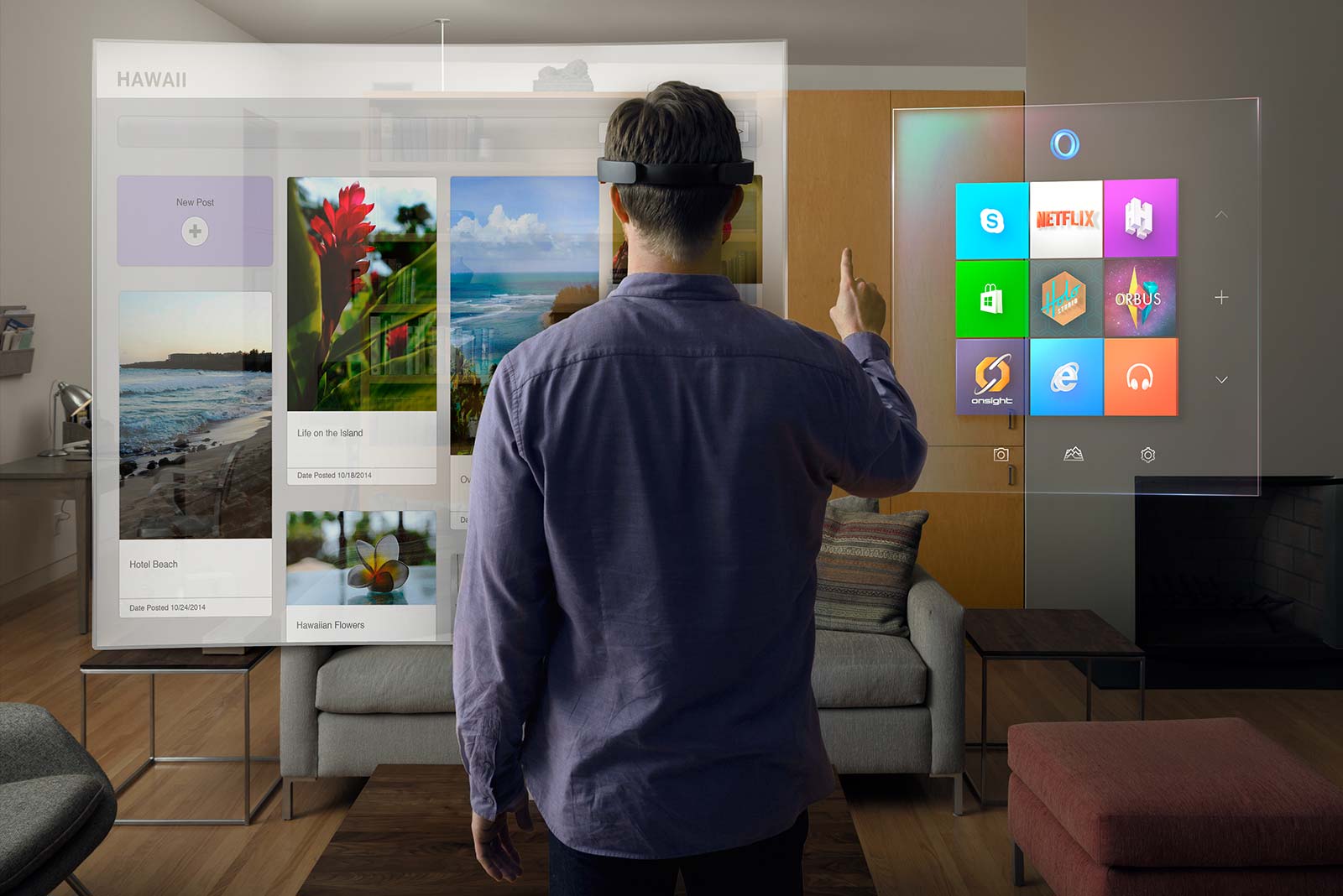
Microsoft HoloLens is the first holographic computer running Windows 10. It is completely untethered – no wires, phones, or connection to a PC needed. Microsoft HoloLens allows you to pin holograms in your physical environment and provides a new way to see your world.


Microsoft HoloLens features see-through, holographic, high-definition lenses and spatial sound so you can see and hear holograms in the world around you. Complete with advanced sensors and a new Holographic Processing Unit (HPU) that understands the world around you, Microsoft HoloLens is able to run without any wires while processing terabytes of data from the sensors in real-time.

What is a hologram?


A hologram is an object like any other object in the real world, with only one difference: instead of being made of physical matter, a hologram is made entirely of light. Holographic objects can be viewed from different angles and distances, just like physical objects, but they do not offer any physical resistance when touched or pushed because they don’t have any mass. Holograms can be two-dimensional, like a piece of paper or a TV screen, or they can be three-dimensional, just like other physical objects in your real world. The holograms you’ll see with Microsoft HoloLens can appear life-like, and can move, be shaped, and change according to interaction with users or the physical environment in which they are visible.

Why would anyone want holograms in their real world?


While we’ve made incredible advances as an industry in the way in which we interact with computers, we are still constrained by the need to conform to the ways computers recognize our commands through mouse clicks or by touching a screen. Using holograms, you can pin your digital content, such as apps, information, and even multi-dimensional videos, in the physical space around you, so you can interact with them in the same ways that you interact with other physical objects.

How is this different from existing VR technologies?


Holographic experiences with Microsoft HoloLens are different from existing experiences, such as virtual reality (VR). With VR, the user is completely immersed in a computer-generated reality, or virtual world. While immersed in a virtual world, users are best advised to stay seated or keep still to avoid collisions with physical objects they cannot see in the real world. Holographic experiences on Windows 10 are about delivering a mixed reality that lets you enjoy your digital life while staying more connected to the world around you – transforming the ways you create, connect, and explore.

How do I learn more about designing and developing apps for Microsoft HoloLens?

Microsoft HoloLens runs on Windows 10, so developers building on Windows 10 will already know how to build for Microsoft HoloLens from a platform perspective. Having this same foundation means that developers will be familiar with the tools and benefits of the Windows Store.

The best way to get started is to become familiar with Windows 10 by joining the Windows Insider Program. Next, register for Build 2015. At Build, you’ll learn more about how to get started designing and developing for Microsoft HoloLens, receive details on the SDK, and meet members of our engineering team. If you can’t attend in person, plan to tune in via livestream or check out the recorded keynote and session presentations that will be available after the event.

HoloLens -Will Microsoft Change The Way We live in ?

Thursday, January 22, 2015

Microsoft HoloLens


It’s the end of October, when the days have already grown short in Redmond, Washington, and gray sheets of rain are just beginning to let up. In several months, Microsoft will unveil its most ambitious undertaking in years, a head-mounted holographic computer called Project HoloLens. But at this point, even most people at Microsoft have never heard of it. I walk through the large atrium of Microsoft’s Studio C to meet its chief inventor, Alex Kipman.

The headset is still a prototype being developed under the codename Project Baraboo, or sometimes just “B.” Kipman, with shoulder-length hair and severely cropped bangs, is a nervous inventor, shifting from one red Converse All-Star to the other. Nervous, because he’s been working on this pair of holographic goggles for five years. No, even longer. Seven years, if you go back to the idea he first pitched to Microsoft, which became Kinect. When the motion-sensing Xbox accessory was released, just in time for the 2010 holidays, it became the fastest-selling consumer gaming device of all time. Right from the start, he makes it clear that Baraboo will make Kinect seem minor league.

Kipman leads me into a briefing room with a drop-down screen, plush couches, and a corner bar stocked with wine and soda (we abstain). He sits beside me, then stands, paces a bit, then sits down again. His wind-up is long. He gives me an abbreviated history of computing, speaking in complete paragraphs, with bushy, expressive eyebrows and saucer eyes that expand as he talks. The next era of computing, he explains, won’t be about that original digital universe. “It’s about the analog universe,” he says. “And the analog universe has a fundamentally different rule set.”
Translation: you used to compute on a screen, entering commands on a keyboard. Cyberspace was somewhere else. Computers responded to programs that detailed explicit commands. In the very near future, you’ll compute in the physical world, using voice and gesture to summon data and layer it atop physical objects. Computer programs will be able to digest so much data that they’ll be able to handle far more complex and nuanced situations. Cyberspace will be all around you.

What will this look like? Well, holograms.

First Impressions


That’s when I get my first look at Baraboo. Kipman cues a concept video in which a young woman wearing the slate gray headset moves through a series of scenarios, from collaborating with coworkers on a conference call to soaring, Oculus-style, over the Golden Gate Bridge. I watch the video, while Kipman watches me watch the video, while Microsoft’s public relations executives watch Kipman watch me watch the video. And the video is cool, but I’ve seen too much sci-fi for any of it to feel believable yet. I want to get my hands on the actual device. So Kipman pulls a box onto the couch. Gingerly, he lifts out a headset. “First toy of the day to show you,” he says, passing it to me to hold. “This is the actual industrial design.”

Oh Baraboo! It’s bigger and more substantial than Google Glass, but far less boxy than the Oculus Rift. If I were a betting woman, I’d say it probably looks something like the goggles made by Magic Leap, the mysterious Google-backed augmented reality startup that has $592 million in funding. But Magic Leap is not yet ready to unveil its device. Microsoft, on the other hand, plans to get Project HoloLens into the hands of developers by the spring.

Kipman’s prototype is amazing. It amplifies the special powers that Kinect introduced, using a small fraction of the energy. The depth camera has a field of vision that spans 120 by 120 degrees—far more than the original Kinect—so it can sense what your hands are doing even when they are nearly outstretched. Sensors flood the device with terabytes of data every second, all managed with an onboard CPU, GPU and first-of-its-kind HPU (holographic processing unit). Yet, Kipman points out, the computer doesn’t grow hot on your head, because the warm air is vented out through the sides. On the right side, buttons allow you to adjust the volume and to control the contrast of the hologram.


Microsoft’s Lorraine Bardeen demonstrates HoloLens at the Windows 10 event at the company’s headquarters in Redmond, Washington on Wednesday, Jan. 21, 2015.

Tricking Your Brain


Project HoloLens’ key achievement—realistic holograms—works by tricking your brain into seeing light as matter. “Ultimately, you know, you perceive the world because of light,” Kipman explains. “If I could magically turn the debugger on, we’d see photons bouncing throughout this world. Eventually they hit the back of your eyes, and through that, you reason about what the world is. You essentially hallucinate the world, or you see what your mind wants you to see.”

To create Project HoloLens’ images, light particles bounce around millions of times in the so-called light engine of the device. Then the photons enter the goggles’ two lenses, where they ricochet between layers of blue, green and red glass before they reach the back of your eye. “When you get the light to be at the exact angle,” Kipman tells me, “that’s where all the magic comes in.”

Thirty minutes later, after we’ve looked at another prototype and some more concept videos and talked about the importance of developers (you always have to talk about the importance of developers when launching a new product these days), I get to sample that magic. Kipman walks me across a courtyard and through the side door of a building that houses a secret basement lab. Each of the rooms has been outfitted as a scenario to test Project HoloLens.

A Quick Trip to Mars


The first is deceptively simple. I enter a makeshift living room, where wires jut from a hole in the wall where there should be a lightswitch. Tools are strewn on the West Elm sideboard just below it. Kipman hands me a HoloLens prototype and tells me to install the switch. After I put on the headset, an electrician pops up on a screen that floats directly in front of me. With a quick hand gesture I’m able to anchor the screen just to the left of the wires. The electrician is able to see exactly what I’m seeing. He draws a holographic circle around the voltage tester on the sideboard and instructs me to use it to check whether the wires are live. Once we establish that they aren’t, he walks me through the process of installing the switch, coaching me by sketching holographic arrows and diagrams on the wall in front of me. Five minutes later, I flip a switch, and the living room light turns on.

Another scenario lands me on a virtual Mars-scape. Kipman developed it in close collaboration with NASA rocket scientist Jeff Norris, who spent much of the first half of 2014 flying back and forth between Seattle and his Southern California home to help develop the scenario. With a quick upward gesture, I toggle from computer screens that monitor the Curiosity rover’s progress across the planet’s surface to the virtual experience of being on the planet. The ground is a parched, dusty sandstone, and so realistic that as I take a step, my legs begin to quiver. They don’t trust what my eyes are showing them. Behind me, the rover towers seven feet tall, its metal arm reaching out from its body like a tentacle. The sun shines brightly over the rover, creating short black shadows on the ground beneath its legs.


Microsoft

Norris joins me virtually, appearing as a three-dimensional human-shaped golden orb in the Mars-scape. (In reality, he’s in the room next door.) A dotted line extends from his eyes toward what he is looking at. “Check that out,” he says, and I squat down to see a rock shard up close. With an upward right-hand gesture, I bring up a series of controls. I choose the middle of three options, which drops a flag there, theoretically a signal to the rover to collect sediment.

After exploring Mars, I don’t want to remove the headset, which has provided a glimpse of a combination of computing tools that make the unimaginable feel real. NASA felt the same way. Norris will roll out Project HoloLens this summer so that agency scientists can use it to collaborate on a mission.

A Long Way Yet


Kipman’s voice eventually brings me back to Redmond. As I remove the goggles, he reminds me that it’s still early days for the project. This isn’t the kind of thing that will be, say, a holiday best seller. It’s a new interface, controlled by voice and gesture, and the controls have to work flawlessly before it will be commercially viable. I get that. I love voice controls, and I talk to Siri all the time. But half the time, she doesn’t give me a good answer and I have to pull up my keyboard to find what I’m looking for more quickly. Project HoloLens won’t have a keyboard. If the voice and gesture controls don’t work perfectly the first time, consumers will write it off. Quickly.

That said, there are no misfires during three other demos. I play a game in which a character jumps around a real room, collecting coins sprinkled atop a sofa and bouncing off springs placed on the floor. I sculpt a virtual toy (a fluorescent green snowman) that I can then produce with a 3-D printer. And I collaborate with a motorcycle designer Skyping in from Spain to paint a three-dimensional fender atop a physical prototype.

As I make my way through each, Kipman seems less nervous than when we began, but no less focused. It has been three hours since we met. In each scenario, he watches a screen that shows him what I am seeing, and he watches me trying to use his device for the first time. His eyebrows draw down in deep concentration as he checks to see if every calculation is perfect—noting the touch of my thumb and forefinger as I make an upward gesture, the words I reach for instinctively to instruct the computer. Seven years in, he is trying to see Project HoloLens as if for the first time. To see it through the eyes of a 30-something female New Yorker. But that is one thing his magical head-mounted holographic computer cannot do. At least not yet.

Project HoloLens: Our Exclusive Hands-On With Microsoft’s Holographic Goggles

 
Hi-Tech Talk © 2015 - Designed by Templateism.com