The World OF USB Chargers
When you buy a USB charger, how do you know if you're getting a safe, high-quality charger for your money? You can't tell from the outside if a charger provides silky-smooth power or if it is a dangerous charger that emits noisy power that cause touchscreen malfunctions[1] and could self-destruct. In this article, I carefully measure the performance of a dozen different chargers, rate their performance in multiple categories, and determine the winners and losers.
Summary of ratings
The chargers are rated from 1 to 5 energy bolts, with 5 bolts the best. The overall rating below is the average of the ratings in nine different categories, based on my measurements of efficiency, power stability, power quality, and power output. The quick summary is that phone manufacturers provide pretty good chargers, the aftermarket chargers are worse, and $2 counterfeit chargers are pretty much junk. Much to my surprise, the HP TouchPad charger (which isn't sold any more) turned out to have the best overall score. The counterfeit iPhone charger set a new low for bad quality, strikingly worse than the other two counterfeits.
| | Model | Overall rating |
|---|
Apple iPhone
| Apple A1265 |  |
|---|
Samsung oblong
| Samsung travel adapter ETA0U60JBE | |
|---|
Samsung cube
| Samsung travel adapter ETA0U80JBE | |
|---|
Apple iPad
| Apple 10W USB Power Adapter A1357 | |
|---|
HP TouchPad
| Hewlett Packard LPS AC/DC Adaptor P/N 157-10157-00 |  |
|---|
Counterfeit iPhone
| Fake Apple A1265 "Designed by California" |  |
|---|
Monoprice
| Monoprice Switching Mode Power Supply MIPTC1A | |
|---|
Counterfeit UK
| Fake Apple A1299 |  |
|---|
Counterfeit iPad
| Fake Apple 10W USB Power Adapter A1357 | |
|---|
Belkin
| Belkin UTC001 |  |
|---|
KMS
| KMS-AC09 | |
|---|
Motorola
| Motorola AC Power Supply DC4050US0301 | |
|---|
Inside a charger
These chargers cram a lot of complex circuitry into a small package, as you can see from the iPhone charger below. (See my iPhone charger teardown for more details.) The small size makes it challenging to make an efficient, high-quality charger, while the commoditization of chargers and the demand for low prices pressure manufacturers to make the circuit as simple as possible and exclude expensive components, even if the power quality is worse. The result is a wide variation in the quality of the chargers, most of which is invisible to the user, who may believe "a charger is a charger".
Inside the iPhone charger
Internally a charger is an amazingly compact switching power supply that efficiently converts line AC into 5 volt DC output. The input AC is first converted to high-voltage DC. The DC is chopped up tens of thousands of times a second and fed into a tiny flyback transformer. The output of the transformer is converted to low-voltage DC, filtered, and provided as the 5 volt output through the USB port. A feedback mechanism regulates the chopping frequency to keep the output voltage stable. Name-brand chargers use a specialized control IC to run the charger, while cheap chargers cut corners by replacing the IC with a cheap, low-quality feedback circuit.
[4]
A poor design can suffer several problems. If the output voltage is not filtered well, there will be noise and spikes due to the high-frequency switching. At extreme levels this could damage your phone, but the most common symptom is the touchscreen doesn't work while the charger is plugged in.
[1] A second problem is the output voltage can be affected by the AC input, causing 120 Hz "ripple".
[5] Third, the charger is supposed to provide a constant voltage. A poor design can cause the voltage to sag as the load increases. Your phone will take longer to charge if the charger doesn't provide enough power. Finally, USB chargers are not all interchangeable; the wrong type of charger may not work with your device.
[6]
Counterfeits
Counterfeit chargers pose a safety hazard as well as a hazard to your phone. You can buy a charger that looks just like an Apple charger for about $2, but the charger is nothing like an Apple charger internally. The power is extremely bad quality (as I will show below). But more importantly, these chargers ignore safety standards. Since chargers have hundreds of volts internally, there's a big risk if a charger doesn't have proper insulation. You're putting your phone, and more importantly yourself, at risk if you use one of these chargers. I did a teardown of a counterfeit charger, which shows the differences in detail.
I've taken apart several counterfeit chargers and readers have sent me
photos of
others. Surprisingly, the counterfeit chargers I've examined all use different circuitry internally. If you get a counterfeit, it could be worse or better than what I've seen.
How do you tell if a charger is counterfeit? The fakes are very similar; it's hard for me to tell, even after studying many chargers. There's a
video on how to distinguish real and fake chargers through subtle differences. You can also weigh the charger (if you have an accurate scale), and compare with the weights I give above. The easiest way to get a genuine Apple charger is fork over $29 to an Apple store. If you buy a $2 "Original Genuine Apple" charger on eBay shipped from China, I can guarantee it's counterfeit. On the other hand, I've succeeded in buying genuine
used chargers from US resellers for a moderate price on eBay, but you're taking a chance.
The following picture shows a counterfeit charger that burned up. The safety issues with counterfeits are not just theoretical; when hundreds of volts short out, the results can be spectacular.
Photo by Anool Mahidharia. Used with permission
Indicated charger type
A device being charged can detect what type of charger is being used through specific voltages on the USB data pins.[6] Because of this, some devices only work with their own special chargers. For instance, an "incorrect" charger may be rejected by an iPhone 3GS or later with the message "Charging is not supported with this accessory".[7]
There are many different charger types, but only a few are used in the chargers I examined. A USB charger that follows the standard is known as a "dedicated USB charger". However, some manufacturers (such as Apple, Sony, and HP) don't follow the USB standard but implement their own proprietary charger types. Apple has separate charger types for 1 amp (iPhone) and 2 amp (iPad) chargers. HP has a special type for the HP TouchPad.
The point is that USB chargers are not interchangeable, and devices may not work if the charger type doesn't match what the device expects. The table below shows the type of charger, the current that the label claims the charger provides, the current it actually provides, and the charger type it indicates to the device.
The types of the counterfeit chargers are a mess, as they advertise one power level, actually supply a different power level, and have the charger type for a third level. For example, the counterfeit iPhone charger is advertised as supplying 1 amp, but has the 2A charger type, so an iPad will expect 2 amps but not obtain enough power. On the other hand, the counterfeit iPad charger claims to supply 2 amps, but really only supplies 1 amp and has a 1A type.
| | Charger type | Label | Measured current | Weight |
|---|
| Apple iPhone | Apple 1A charger | 5V 1A | 1.79A | 23.0g |
|---|
| Samsung oblong | dedicated USB charger | 5V 0.7A | .80A | 33.1g |
|---|
| Samsung cube | dedicated USB charger | 5V 1A | 1.17A | 23.2g |
|---|
| Apple iPad | Apple 2A charger | 5.1V 2.1A | 2.3A | 67.5g |
|---|
| HP TouchPad | HP TouchPad charger | 5.3V 2.0A | 2.4A | 54.8g |
|---|
| Counterfeit iPhone | Apple 2A charger | 5V 1A | .94A | 18.8g |
|---|
| Monoprice | Apple dock | 5V 1A | 1.22A | 67.8g |
|---|
| Counterfeit UK | dedicated USB charger | 5V 1A | .57A | 29.4g |
|---|
| Counterfeit iPad | Apple 1A charger | 5.1V 2.1A | 1.2A | 43.4g |
|---|
| Belkin | Apple 1A charger | 5V 1A | 1.27A | 43.0g |
|---|
| KMS | Apple 2A charger | 5V 2.1A | 3.4A | 99.5g |
|---|
| Motorola | dedicated USB charger | 5.1V .85A | .82A | 38.6g |
|---|
Efficiency
People often wonder how much power their charger is wasting while it's idle, and if they should unplug their charger when not in use. I measured this "vampire" power usage and found the chargers varied by more than a factor of 20 in their idle power usage. The Samsung oblong charger came in best, using just 19 mW; this was so low compared to the other chargers that I measured it again a different way to make sure I hadn't made an error. On the other extreme, the fake iPhone charger used 375 mW. The Apple iPhone charger performed surprisingly badly at 195 mW. If plugged in for a year, this would cost you about 21 cents in electricity, so it's probably not worth worrying about.[8] In the following table, I use the official charger Star Rating System (yes, there actually is such a thing).[9][10]
I also measured efficiency of the chargers under load.
[11] One of the benefits of switching power supplies over simpler linear supplies is they are much more efficient at converting the input power to output. The chargers I measured all did pretty well, with 63% to 80% efficiency. The HP charger was the winner here.
| | Vampire | milliwatts | Efficiency | Percent |
|---|
| Apple iPhone | | 195 | | 74 |
|---|
| Samsung oblong | | 19 | | 76 |
|---|
| Samsung cube | | 86 | | 77 |
|---|
| Apple iPad | | 62 | | 78 |
|---|
| HP TouchPad | | 91 | | 80 |
|---|
| Counterfeit iPhone | | 375 | | 63 |
|---|
| Monoprice | | 78 | | 72 |
|---|
| Counterfeit UK | | 103 | | 63 |
|---|
| Counterfeit iPad | | 95 | | 66 |
|---|
| Belkin | | 234 | | 66 |
|---|
| KMS | | 179 | | 69 |
|---|
| Motorola | | 59 | | 75 |
|---|
The chargers up close
Apple iPhone and counterfeit
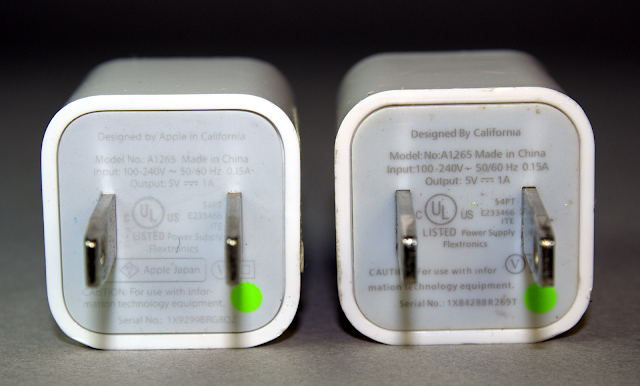
The above photo shows a real iPhone charger (left) and a counterfeit (right); the two chargers are almost identical, down to the green dot. If you look closely, the genuine one says "Designed by Apple in California", while the counterfeit has the puzzling text "Designed by California". The counterfeit also removed the "Apple Japan" text below the plug. I've seen another counterfeit that says "Designed by Abble" (not Apple). I assume the word "Apple" is removed for legal or trademark reasons, since the word "Apple" is often (but not always) missing from counterfeits.
Samsung oblong
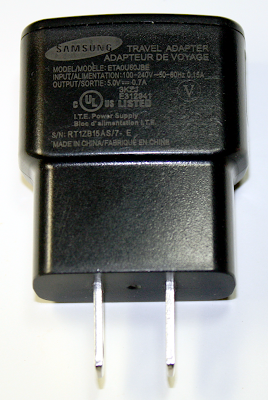
I call this charger the Samsung oblong charger, to distinguish it from the Samsung cube charger.
Samsung cube

The Samsung cube charger is shaped very similarly to the Apple iPhone charger. Internally, however, it turns out to be entirely different.
Apple iPad and counterfeit

The photo above shows a real iPad charger (left) and a counterfeit (right). The counterfeit has almost identical text, but without "Designed by Apple in California. Assembled in China", "Listed" under UL, and the manufacturer "Foxlink". Inexplicably this sanitization left "TM and © 2010 Apple Inc".
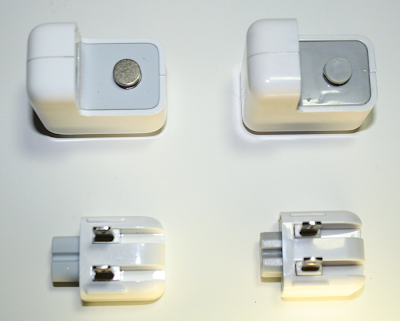
The above photo shows a real iPad charger on the left and a fake iPad charger on the right, with the plug removed. The most visible difference is the real charger has a round metal grounding post, while the fake has plastic. (The US plug isn't grounded, but in other countries the lack of ground in the counterfeit could pose a safety hazard.)
HP TouchPad
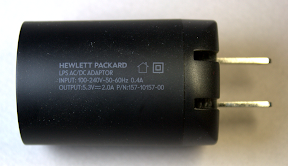
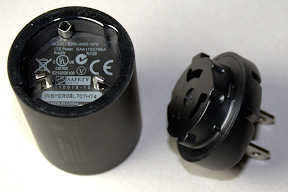
The HP TouchPad charger has a very unusual cylindrical shape, which is striking if perhaps not practical. The charger twists apart, allowing the plug to be replaced for different countries. (It took me weeks to discover this feature.)
Monoprice

The Monoprice charger isn't a USB charger, but instead has a 30-pin iPhone dock connector attached. It is a relatively large charger.
Counterfeit UK
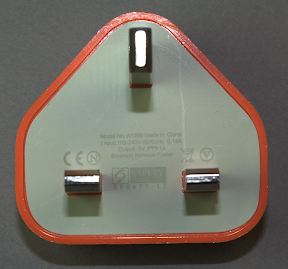
This charger is a counterfeit of the Apple UK iPhone charger. They've removed Apple from the text, but left Emerson Network Power, which I'm sure is not the actual manufacturer. The genuine Apple UK charger can be distinguished by a serial number inside the USB connector.
Belkin

The Belkin charger eschews the minimal design styling of most chargers, with a roughly oval cross section, curves and ribs, and a cover over the USB port.
KMS
The KMS charger is unusual in providing 4 USB ports. It also gives off a blue glow while in use. The plug can be removed and replaced for use in different countries, similar to the iPad and HP TouchPad chargers. I couldn't find any UL safety approval on this charger, but I did find a
report of one catching fire.
Motorola
The Motorola charger has the lowest listed power output, 850mA. The back of it has a holographic sticker (like a credit card), which may ward off counterfeiters, even though it's unlikely for anyone to counterfeit this charger. I wonder though why Apple doesn't use holograms or other anti-counterfeiting techniques, given the large number of counterfeit Apple chargers being sold.
Delivery of advertised power
Each charger has an advertised power output, but some chargers produce considerably more and some produce much less. Your device will take longer to charge, if the charger can't put out enough power. This table shows each charger's ability to deliver the rated power, based on my measurements of maximum power. While most chargers meet or exceed the power rating, there are some exceptions.
The counterfeit chargers perform extremely poorly, putting out a fraction of the expected power. Charging your device with one of these chargers will be a slow, frustrating experience. In particular, the counterfeit UK charger only produces a third of the expected power. Although the label claims the charger works on 100-240 volts, it's clearly not designed to work on US power.
The iPad is a surprise, putting out less power than expected. Despite being nominally a 10 watt charger, the label says it provides 5.1V and 2.1A, which works out to 10.7 watts. However, the maximum power I measured is 10.1 watts (4.4 volts at 2.3 amps, as shown in the Power section below). Since the measured power is slightly less than advertised, it only gets four bolts.
| | Rating | Label | Watts from label | Measured watts |
|---|
| Apple iPhone | | 5V 1A | 5.0 | 6.0 |
|---|
| Samsung oblong | | 5V 0.7A | 3.5 | 4.0 |
|---|
| Samsung cube | | 5V 1A | 5.0 | 5.5 |
|---|
| Apple iPad | | 5.1V 2.1A | 10.7 | 10.1 |
|---|
| HP TouchPad | | 5.3V 2.0A | 10.6 | 11.4 |
|---|
| Counterfeit iPhone | | 5V 1A | 5.0 | 2.7 |
|---|
| Monoprice | | 5V 1A | 5.0 | 5.7 |
|---|
| Counterfeit UK | | 5V 1A | 5.0 | 1.7 |
|---|
| Counterfeit iPad | | 5.1V 2.1A | 10.7 | 5.9 |
|---|
| Belkin | | 5V 1A | 5.0 | 5.6 |
|---|
| KMS | | 5V 2.1A | 10.5 | 10.9 |
|---|
| Motorola | | 5.1V .85A | 4.3 | 4.3 |
|---|
Power quality
In this section, I measure the quality of the power produced by the different chargers. I analyze it for voltage spikes, high frequency noise, and line-frequency ripple. The following table summarizes the results in three categories. Spikes indicates extremely brief large voltage spikes in the output, while Noise indicates high-frequency noise in the output, and Ripple indicates low-frequency (120 Hz) fluctuations in the output.[12]
| | Spikes | Noise | Ripple |
|---|
| Apple iPhone | | | |
|---|
| Samsung oblong | | | |
|---|
| Samsung cube | | | |
|---|
| Apple iPad | | | |
|---|
| HP TouchPad | | | |
|---|
| Counterfeit iPhone | | | |
|---|
| Monoprice | | | |
|---|
| Counterfeit UK | | | |
|---|
| Counterfeit iPad | | | |
|---|
| Belkin | | | |
|---|
| KMS | | | |
|---|
| Motorola | | | |
|---|
The following oscilloscope traces show the output signal (yellow) and frequency spectrum (orange). The left images provide high-frequency information on the output voltage. The right images show the low-frequency information on the output voltage.
[13]
The desired voltage graph is a flat, thin yellow line indicating totally smooth power. However, some factors mess this up. First, any ripple from the power line will show up as 5 sinusoidal peaks in the first (high-frequency) yellow line. High-frequency noise will widen the yellow line. Voltage spikes will appear as vertical spikes in the yellow line.
The plots also show the frequency spectrum in orange, from 0 at the left to 230 kHz at the right. The desired graph would have the orange spectrum near the bottom of the screen. Thus, the power quality exponentially gets worse as the orange line gets higher. The left (high frequency) spectrum generally shows noise at the switching frequency of the charger (and harmonics). The right (low frequency) spectrum typically shows spikes at multiples of 120 Hz, caused by ripple from the 60 Hz power.
[5]
Apple iPhone

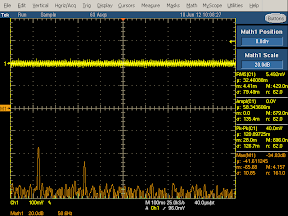
The ripple is clearly visible as the waves in the yellow trace on the left and as the spikes (at 120 Hz and 240 Hz) in the orange trace on the right.
The iPhone charger performs extremely well at filtering out spikes and noise, the best of the chargers I measured. Apart from the 120 Hz spikes, the noise spectrum (orange) is flat and very low. The power quality is so good, I checked the results several times to make sure I wasn't missing something.
Samsung oblong


The Samsung charger's output has a lot more noise than the iPhone charger. This is visible in the thickness and jaggedness of the yellow output curves. The orange frequency spectrum on the left shows large peaks at harmonics of the switching frequency. The 120 Hz spike on the right is a bit lower than the iPhone charger, so the ripple filtering is a bit better.
Samsung cube


The Samsung cube charger shows some noise in the output (yellow). The frequency spectrum shows wide peaks at multiples of the the switching frequency, about 90kHz. There's some ripple.
Apple iPad

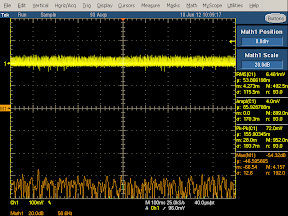
The iPad charger almost eliminates the ripple; only a small blip is visible in the orange spectrum on the right. The noise level is low, although appreciably worse than the iPhone.
HP TouchPad
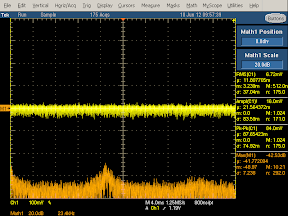
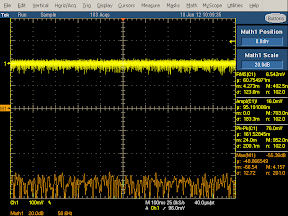
There's no ripple visible in the HP charger spectrum on the right. The overall noise level is good.
Counterfeit iPhone

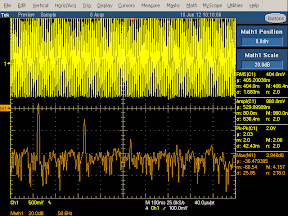
The output from this counterfeit charger is a wall of noise. In order to fit the waveform in the display, I had to double the scale on the left and increase it by a factor of 5 on the right, so the yellow curve is actually much worse than it appears. On the left, note the huge ripple with massive high-frequency noise on top. This output is not something you want to feed into your phone.
Monoprice
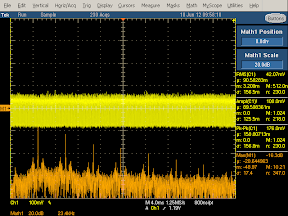
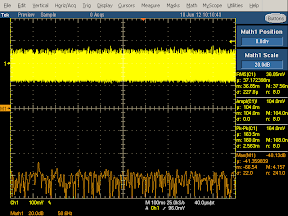
The output from this charger is very noisy, as you can see from the thickness of the yellow line. Note that the frequency spectrum (left) has very tall but narrow spikes at harmonics of the 28kHz switching frequency, showing a lot of high-frequency noise. On the positive side, there is hardly any ripple.
Counterfeit UK
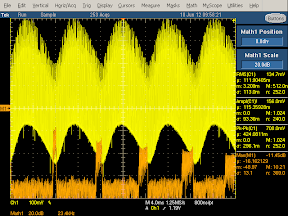
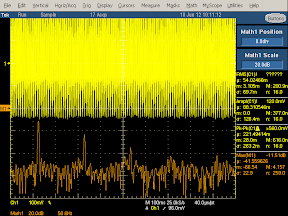
This charger has very bad output. The large degree of ripple is visible in the waveform (yellow, left) and the very large spikes in the spectrum (orange, right). The thickness of the yellow waveform shows the large amount of high-frequency noise, which is also visible in the very high peaks in the spectrum (orange, left).
Counterfeit iPad

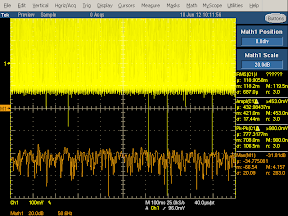
This counterfeit charger has so much noise in the output that I had to double the scale on the left to get it to fit. Note the very large spikes in the output (yellow). The spectrum (orange, left) is much higher everywhere, indicating noise at all frequencies. Surprisingly, it has only a moderate amount of ripple; the manufacturer seems to have done at least one thing right.
Belkin

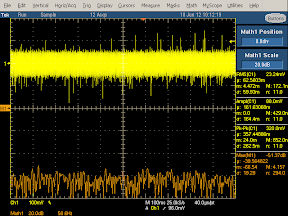
The Belkin charger does well at eliminating ripple, but has a lot of noise otherwise. The spectrum (orange, left) shows large peaks. The yellow output is wide, showing a lot of noise, combined with many large voltage spikes of about 1/3 volt.
KMS
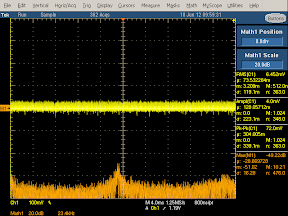

The KMS charger has fairly good output, with a small peak in the spectrum (orange, left) at the switching frequency. It has no detectable ripple. However, it has many large voltage spikes in the output, over half a volt, as can be seen on the right.
Motorola
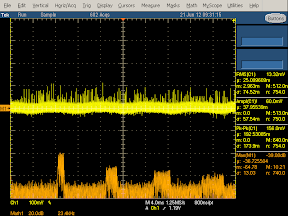
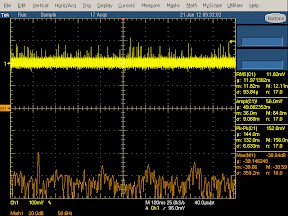
The Motorola charger has a lot of spikes in the output (yellow) . The spectrum (orange, left) shows high frequency noise at the switching frequencies. There's a moderate amount of ripple (yellow, left and orange, right).
Summary
The quality of the output power is radically different between chargers. The counterfeit chargers are uniformly bad, with hardly any effort at filtering the output. The other chargers vary in quality with the iPhone charger setting the standard for noise-free power, but surprisingly poor filtering of ripple. The power quality is a key factor that affects the performance of chargers; spikes and noise are known to interfere with touchscreens.[1]
Power curve
In this section I look at the voltage and current output by the charger as the load increases. The first rating is Voltage Sag, which is the undesired drop in output voltage as the load increases. The second rating is Current Sag, which shows how the current fluctuates as load increases. Finally,Regulation shows the overall stability of the output from the charger.
| | Voltage sag | Current sag | Regulation |
|---|
| Apple iPhone | | | |
|---|
| Samsung oblong | | | |
|---|
| Samsung cube | | | |
|---|
| Apple iPad | | | |
|---|
| HP TouchPad | | | |
|---|
| Counterfeit iPhone | | | |
|---|
| Monoprice | | | |
|---|
| Counterfeit UK | | | |
|---|
| Counterfeit iPad | | | |
|---|
| Belkin | | | |
|---|
| KMS | | | |
|---|
| Motorola | | | |
|---|
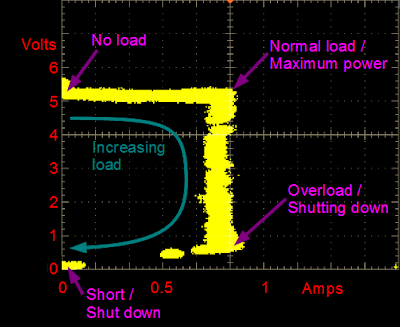
The graphs in this section need a bit of explanation, which is provided in the diagram below. The voltage/current load curve shows the performance of the charger under different loads. Each point on the curve shows the current (X axis) and voltage (Y axis) produced by the charger under a particular load condition. Follow the yellow curve clockwise from the upper left to the lower left to see the effect of increasing load. The upper left point of the curve shows the voltage produced by the charger when there is no load on the charger. As the load increases, the charger is supposed to keep a constant voltage and increase the current (i.e. horizontal line), until it reaches the maximum power (upper right). If the load continues increasing, the charger switches to a constant current mode, dropping the voltage while continuing to provide the maximum current (i.e. vertical line).
[14] At the lower right, the charger has reached its shutdown point due to excessive load, and rapidly drops to no output in the lower left corner to avoid damage.
Apple iPhone
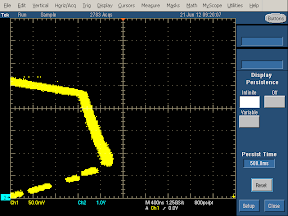
The output from the Apple iPhone charger is surprisingly non-constant under load. The charger starts off with 5.2 volts with no load, dropping to 4.6 volts as the load increases, resulting in the downwards slope of the top yellow line. As the load increases, the current keeps increasing, resulting in the slope of the right yellow line. Note however that the yellow line is relatively thin, so the regulation is pretty good at each point.
Note that because this charger has a high current output, this chart has a different current (horizontal) scale than most of the charts to fit the whole trace in the image. Stretch it horizontally to compare with other graphs.
Samsung oblong
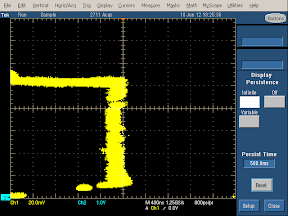
For this charger, the voltage is approximately flat, except for a bump under no load (upper left) which is probably a measurement artifact. The vertical yellow line shows the current stays nearly constant as the load increases. The charger shows good voltage and current stability under changing load. The yellow line is a bit wider than the iPhone charger, showing a bit less regulation for a fixed load.
Samsung cube
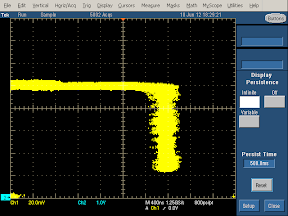
The voltage curve sags slightly under load. The right hand curve shows the current stays stable, but the line is moderately wide, showing a bit of weakness in regulation.
Apple iPad
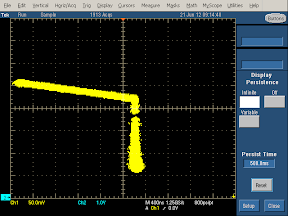
Similar to the iPhone charger, the iPad charger shows a lot of voltage sag. The voltage is about 5.1 V unloaded, dropping to 4.4 volts and 2.3 A (10.1 W) at the corner. Unlike the iPhone charger, the iPad charger has pretty good current stability. The regulation is solid, as shown by the narrowness of the yellow trace. Note the scale change due to the high current output.
I'm puzzled by the steep voltage sag on both the iPhone and iPad charger. Since the designers of the Apple charger went to a great deal of effort to build a high quality charger, I conclude they must not consider voltage sag worth worrying about. Or, more interestingly, maybe they built this sag as a feature for some reason. In any case, the chargers lose points on this.
HP TouchPad
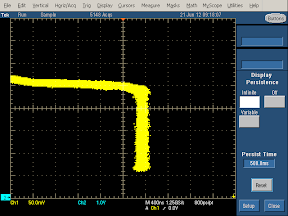
The charger has some voltage sag, but the current (vertical) is nice and constant. The yellow line is relatively thin, showing good regulation. Note the scale change due to the high current output.
Counterfeit iPhone
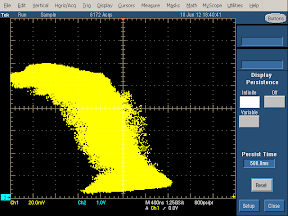
This counterfeit charger shows extremely poor regulation, as shown by the very wide yellow line. It's hard to fit a voltage-current curve to this picture. The amount of power supplied by this charger seems almost random.
Monoprice

The Monoprice charger shows reasonably straight voltage and current lines showing good constant voltage and current outputs. The vertical line shows some width and noise, suggesting the regulation isn't totally stable.
Counterfeit UK
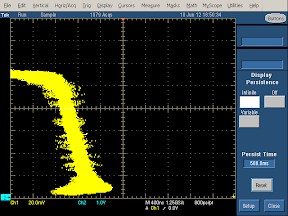
For this charger, the upper line doesn't get very far, showing that this charger doesn't output much current. My suspicion is that it was only tested with 240 volts so it performs poorly with 120 volts, even though the label says it takes 100 to 240 volts. The width of the yellow line shows very poor regulation.
Counterfeit iPad
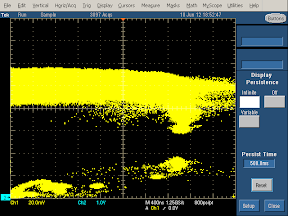
The output of this counterfeit charger is so poorly regulated that it's hard to tell exactly what's happening with the voltage and current. It looks like the voltage is roughly constant underneath all the noise.
Belkin
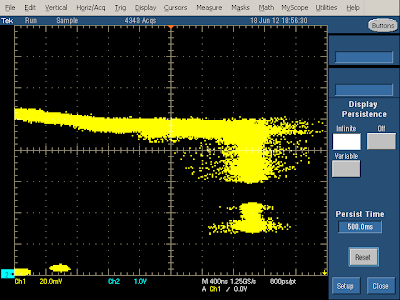
The Belkin charger shows voltage sag as the current increases. In addition, the output is fairly noisy.
KMS
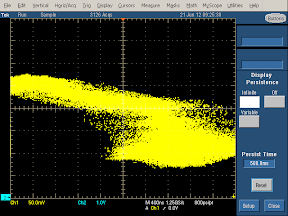
The KMS charger shows a lot of voltage sag as the load increases. In addition, the output is all over the place, showing very poor regulation, more like what I'd expect from a counterfeit charger. Note the scale change due to the high current output.
Motorola
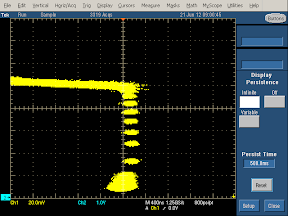
The Motorola charger shows a bit of voltage sag, but good current stability. The regulation is good but not perfect, as shown by the width of the yellow line. (The gaps in the vertical line are just measurement artifacts.) Note that the maximum current output of this charger is fairly low (as advertised).
Conclusions
So what charger should you spend your hard-earned money on? First, make sure the charger will work with your phone - for instance, newer iPhones only work with certain chargers. Second, don't buy a counterfeit charger; the price is great, but it's not worth risking your expensive device or your safety. Beyond that, it's your decision on how much quality is worth versus price, and I hope the data here helps you make a decision.
P.S. How about some teardowns?
My previous iPhone charger and fake charger teardowns were surprisingly popular, but if you were hoping for teardowns on the full set of chargers, you'll need to wait for a future blog post. I haven't torn the chargers apart yet; if I need to take more measurements, I don't want to have just a pile of parts. But I do have some preview pictures to hold you over until my teardown article.

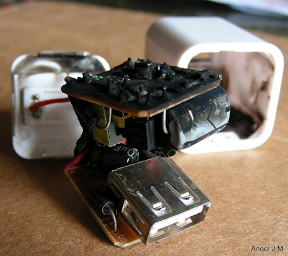
The above picture shows the internals of a counterfeit Apple iPhone cube charger. The two boards stack to form the compact cube shape. This charger blatantly tries to pass as a genuine Apple charger; unlike the "Designed by California" charger, this one exactly copies the "Designed by Apple in California" text from the real charger. Note the very simple circuitry
[4] - there are no components on the other side of the board, no controller IC, and very little filtering. Also look at the terrible mounting of the transistor on the front right; clearly the build quality of this charger is poor. Finally, note the overall lack of insulation; this charger wouldn't meet UL safety standards and could easily short out. But on the plus side, this charger only cost a couple dollars.

The above $2 charger is notable for its low-profile design; it's about as thin as you can make a charger and still fit the power prongs and the USB port. The transformer is very short to fit into this charger. Like the previous charger, it uses a very simple circuit,
[4] has little filtering, and almost no safety insulation.
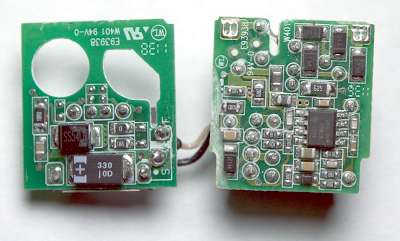
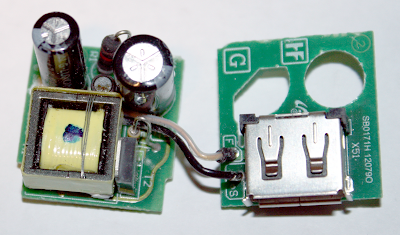
Finally, the above pictures show the internals of the Samsung cube charger, which has circuit boards packed with tiny components and is much more advanced than the counterfeits (although slightly less complex than the Apple charger). Despite being very similar to the Apple charger on the outside, the Samsung charger uses an entirely different design and circuitry internally. One interesting design feature is the filter capacitors fit through the cut-out holes in the secondary circuit board, allowing the large filter capacitors to fit in the charger.




 and a cube
  . The
. The  has an unusual cylindrical shape. Next is a counterfeit iPhone charger, which appears identical to the real thing but only costs a couple dollars. In the upper right, the
  .
.




 Posts
Posts


