Showing posts with label Apple. Show all posts

Thursday, June 11, 2015


THE HOME SCREEN has always been at the center of the iPhone experience. At WWDC, Apple signaled that we’re moving on.

With iOS 9, the bulk of interaction will happen elsewhere, dispersed among intelligent notification panels, powerful search tools, and context-specific suggestions that put relevant apps a flick away. The dependable home screen will still exist, but for the first time, it feels secondary. These days, the smartphone experience is just too fast and fluid to be pinned to a grid.

From birth, the home screen was the iPhone’s face to the world. It was the first thing that popped up when Steve Jobs swiped his finger across the first iPhone’s lock screen on stage in 2007. Looking back at that event, it’s remarkable how little has changed. Today’s home screen has more real estate and less gloss, but beyond that, the two are identical.

In the early days, the home screen was crucial to the iPhone’s appeal. For a gadget that was many gadgets in one—a phone, an iPod, and an Internet communicator, not to mention a camera, a map, and more—the orderly grid of icons organized functionality in a perfectly uncomplicated way. To someone coming from a PC, the home screen was the desktop and Start button all in one. It was so important that it got its own dedicated button. No matter what you were doing on your phone, if you pressed the thumb-sized disc below the screen, you were safely shuttled home.

 APPLE

But as we became familiar with smartphones, we came to care less about the tidy comforts of the home screen. Gradually, Apple gave us new ways to move around. The multitasking tray offered a quick shortcut for jumping between apps instead of returning to the central hub of the home screen every time. As iPhone users accumulated pages of apps, Spotlight became a quick way to find the desired one.

More recently, we’ve seen interaction shift to the lock screen. Interactive notifications let iPhone users bypass the home screen and go straight to the relevant app. The brilliant camera shortcut, which lets you access the lens just by swiping up on the lock screen, is another example. These changes reflect one basic fact: Mobile life is too fast to be routed through the home screen.

The next version of iOS clearly reflects this reality. The tentpole feature is Proactive Assistant. Following Google Now’s lead, iOS 9 will try to anticipate what you need when you need it. If you fire up NYT Now each morning right when you wake up, iOS 9 will endeavor to note the habit and make the app available in the morning as a shortcut on the lock screen. When you plug in headphones, the new OS will serve up music based on your location, eliminating the need to find the music app. These new features join the lock screen’s current offerings for circumventing the home screen grid: the swipe-up control center and swipe-down “today” window.

Aside from these shortcuts, iOS 9 will offer a new interactive hub in the form of a personalized search panel. Here, sitting to the left of the home screen, you’ll see shortcuts for contacts and apps, both filtered by context. It’s like the Home Screen 2.0—instead of a dumb grid, it guesses who you might want to talk to or what you might want to do, based on where you are, what time it is, and what you’re doing. It’s worth noting that the Apple Watchalready works like this. On the wrist, notifications and messaging shortcuts take precedent over the bubbly home screen of apps.

The most important part of the new panel is a souped-up version of search. In terms of how we use our phones, it could prove the most transformative feature of all. Search in iOS 9 will pull information and functionality out of apps themselves and drop it right into the results. A search for a sports score, for example, will give you a live card with the score, just like Google does on the web. Thanks to a new API, third-party apps can make their own content available. Meanwhile, Siri will gain new powers, like the ability to “deep link” reminders and messages to specific packets of content inside other apps.

All of this represents a big shift. Answers, info, and functionality that once existed only as icons on your home screen soon will be baked right into search, through both text and voice, via Siri. Back in the day, if you wanted to look up a movie review, you opened the Rotten Tomatoes app. If you wanted to convert cups to quarts, you opened your favorite conversion app. If you wanted to set a reminder … well, you get it. Soon, search will be the easiest way to do all of these things. Not just to access these apps but to actually use them. And when the act of checking a sports score or reading a movie review is fully subsumed into search, you’re not just talking about the end of the home screen—you’re talking about the end of apps themselves.

This is still a ways off. Apps will hang around for the foreseeable future. Apple will still champion bite-size software and make life-affirming TV ads showing off stargazing applications and deep sea-diving applications and applications that analyze your baseball swing. But for most of the stuff you do on your phone every day, you can expect to see functionality extracted and repackaged and sprinkled throughout your phone’s interface. Little by little, apps will soften and dissolve. Siri and search will become more and more capable. Utility will continue to leave the home screen and settle in other places where it’s slightly more convenient.

For now, the stoic home screen is still around, still right there at the heart of the iPhone. But chances are you’ll see it less and less. Increasingly, the action is buzzing around above it, beside it, above it, and underneath it. We’ve come a long way in a short time on mobile. We’re no longer homebodies.

APPLE IS GOING TO KILL THE HOME SCREEN

Friday, June 5, 2015

The iOS faithful who already received their shiny new Pebble Time smartwatches are likely more than a little disappointed. The wearable is shipping to Kickstarter backers, but there's one big problem: the Pebble Time Watch iOS app hasn't been approved by Apple yet. Despite pushing minor bug fixes for approval on May 22nd, and asking that the folks in Cupertino fast-track the request, the software needed to get the gadget up and running isn't in the App Store. Even though a version of the app was approved on May 18th, it can't be released "due to quirks in the App Store submission process and rules."

The company says it considered adding features for the Time to the existing Pebble iPhone app, but a new version of that software has been waiting on approval for over a month. For now, Pebble advises owners to find a pal with an Android device to sort the initial setup, and to bug Apple about the issue. You still won't be able to leverage any apps that require the device to be paired with a smartphone, though, and that's a major bummer.

We reached out to Apple on the matter and we'll be sure to update this post if he hear back.

Pebble Time's iOS app hasn't been approved by Apple yet

Tuesday, May 26, 2015

HTC One M9 Camera Fails In Tests: It's Worse Than A Three-Year-Old iPhone 4S

HTC has a problem, and it’s a problem it has had for some time now – failing sales. Even with Cher Wang replacing Peter Chou as leader of the company she founded, the firm has yet to find its feet. One of its biggest problems is that despite very competent hardware design, its phones are let down by a distinct lack of excitement. Its next biggest problem is the fussy UI design that comes from its Sense user interface. While the One M9 was an improvement over the M8, the difference was very slight but the new phone costs considerably more.
But HTC’s problems have worsened again with imaging experts DxOMark declaring its camera worse than the iPhone 4S and Samsung Galaxy S3 phones which are three and two-years-old respectively. That has to be seen as a problem for HTC, but first let’s take a look at some background to see how it ended up here.
HTC’s One M9 replaces the dual-camera of the M8, but with little quality increase
The big difference between the M8 and M9 was the camera, which HTC swapped from the dual sensor in the M8 to a higher megapixel version in the M9. HTC touted the dual-camera sensor as a huge advancement in cameraphones, but the truth was quite different. The 4-megapixel cameras just couldn’t keep pace with the sensors in every other camera.
And perhaps worse still, the advantages of the dual sensor were supposed to be that you could re-focus the shots after taking them, but this was so easily duplicated with a software solution that pretty much every phone with one sensor was able to do much the same process in software. And it was this that eventually led HTC to abandon the sensor and move to a 20-megapixel model. That sensor puts it close to phones like Sony’s Z3 20.7-megapixel model, and way in advance of other camera sensors, which tend to come in at around 16-megapixels. But, HTC also forgot one other thing that most other companies have included – stabilization. This is crucial in small, light phones which are easily moved and it plays a huge part in boosting the quality of images taken in poor light, allowing the phone to slow the shutter to allow in more light, while keeping the image free of shake and blur.
At 20-megapixels, this is one of the highest-specified cameras on a phone, but the results just don’t meet expectations
In their findings, the team at DxOMark said that in good light, everything was great – with good colour, detail and with the autofocus performing well. Sadly, in lower light conditions that all changes and everything becomes disappointing with them noting that colours are oversaturated and that there’s a loss of sharpness. They then give the HTC One M9 a camera score of 69.
In contrast, they rate the Samsung Galaxy S6 Edge as having the best camera, scoring 86 while the Note 4 grabs second place with 83.The iPhone 6 and 6 Plus assume the third and fourth positions with 82 points. The M9 scores the same as Amazon’s Fire Phone, but is still beaten by phones like the Note 2, Galaxy S3 and LG’s G2.
Worst of all though, HTC only just manages to beat the result of the M8, which scored 68 when tested. That’s a massive problem for a phone costing nearly twice as much money, and with scant other features to sell itself on.
With the announcement that HTC is partnering with Valve for that company’s VR offering, called Vive, perhaps the company is looking for an exit from mobiles. It isn’t a diverse company in terms of investments, so it needs to do something to shore-up disappointing sales. Unsurprisingly though, the HTC Re camera was pretty much universally panned for below-average image quality, so the firm doesn’t have a great track-record outside of phones.
Whatever HTC’s longterm chances of survival are, the message from DxOMark is simple: don’t buy an HTC One M9 for the camera.

HTC One M9 Camera Fails In Tests

HTC One M9 Camera Fails In Tests: It's Worse Than A Three-Year-Old iPhone 4S

HTC has a problem, and it’s a problem it has had for some time now – failing sales. Even with Cher Wang replacing Peter Chou as leader of the company she founded, the firm has yet to find its feet. One of its biggest problems is that despite very competent hardware design, its phones are let down by a distinct lack of excitement. Its next biggest problem is the fussy UI design that comes from its Sense user interface. While the One M9 was an improvement over the M8, the difference was very slight but the new phone costs considerably more.

But HTC’s problems have worsened again with imaging experts DxOMark declaring its camera worse than the iPhone 4S and Samsung Galaxy S3 phones which are three and two-years-old respectively. That has to be seen as a problem for HTC, but first let’s take a look at some background to see how it ended up here.

HTC’s One M9 replaces the dual-camera of the M8, but with little quality increase

The big difference between the M8 and M9 was the camera, which HTC swapped from the dual sensor in the M8 to a higher megapixel version in the M9. HTC touted the dual-camera sensor as a huge advancement in cameraphones, but the truth was quite different. The 4-megapixel cameras just couldn’t keep pace with the sensors in every other camera.

And perhaps worse still, the advantages of the dual sensor were supposed to be that you could re-focus the shots after taking them, but this was so easily duplicated with a software solution that pretty much every phone with one sensor was able to do much the same process in software. And it was this that eventually led HTC to abandon the sensor and move to a 20-megapixel model. That sensor puts it close to phones like Sony’s Z3 20.7-megapixel model, and way in advance of other camera sensors, which tend to come in at around 16-megapixels. But, HTC also forgot one other thing that most other companies have included – stabilization. This is crucial in small, light phones which are easily moved and it plays a huge part in boosting the quality of images taken in poor light, allowing the phone to slow the shutter to allow in more light, while keeping the image free of shake and blur.

At 20-megapixels, this is one of the highest-specified cameras on a phone, but the results just don’t meet expectations

In their findings, the team at DxOMark said that in good light, everything was great – with good colour, detail and with the autofocus performing well. Sadly, in lower light conditions that all changes and everything becomes disappointing with them noting that colours are oversaturated and that there’s a loss of sharpness. They then give the HTC One M9 a camera score of 69.

In contrast, they rate the Samsung Galaxy S6 Edge as having the best camera, scoring 86 while the Note 4 grabs second place with 83.The iPhone 6 and 6 Plus assume the third and fourth positions with 82 points. The M9 scores the same as Amazon’s Fire Phone, but is still beaten by phones like the Note 2, Galaxy S3 and LG’s G2.

Worst of all though, HTC only just manages to beat the result of the M8, which scored 68 when tested. That’s a massive problem for a phone costing nearly twice as much money, and with scant other features to sell itself on.

With the announcement that HTC is partnering with Valve for that company’s VR offering, called Vive, perhaps the company is looking for an exit from mobiles. It isn’t a diverse company in terms of investments, so it needs to do something to shore-up disappointing sales. Unsurprisingly though, the HTC Re camera was pretty much universally panned for below-average image quality, so the firm doesn’t have a great track-record outside of phones.

Whatever HTC’s longterm chances of survival are, the message from DxOMark is simple: don’t buy an HTC One M9 for the camera.

HTC One M9 Camera Fails In Tests

Wednesday, May 20, 2015

Now Control Your Home with Apple's HomeKit : Promise comes True in June


A year ago, Apple announced it would make your home a lot smarter with its Siri-controlled HomeKit.
iOS 8 introduces HomeKit, a high-level device connectivity framework enabling apps to interact with physical accessories in the world around us.

App Developers

If your iOS app is primarily designed to provide home configuration or home automation services such as turning on a light or opening a garage door. HomeKit APIs used for communicating with HomeKit accessories.
Apple announced to make it soon. Now, it seems that promise is coming true in just a few weeks. Third-party devices enabled with HomeKit are slated to come to market in June, an Apple spokesman told the newspaper.
The HomeKit app works off of iOS and a remote control for operating home gadgets such as thermostats, garage doors, lights and cameras.
The comments from the Apple spokesman contrast with a report on Thursday that stated HomeKit would be delayed until September.
HomeKit is a framework in iOS 8 for communicating with and controlling connected accessories in a user’s home. You can enable users to discover HomeKit accessories in their home and configure them, or you can create actions to control those devices. Users can group actions together and trigger them using Siri.

Hardware Developers

If you’re interested in creating a HomeKit-enabled hardware accessory, you need to be an MFi licensee to access the resources for manufacturing hardware that integrates HomeKit technology. MFi licensees receive:
HomeKit technical specificationsMFi Logos and Identity GuidelinesHardware technical support
To join the MFi Program, you will need to create or register a business Apple ID, submit an enrollment form, complete a credit review, and execute an MFi License.

APPLE'S HOMEKIT TO CONTROL YOUR HOME

Tuesday, May 19, 2015

Apple acquires high-accuracy GPS firm Coherent Navigation

 theleetgeeks, via Flickr

Apple Maps might be tracking you more closely soon. The Cupertino, Calif., company has acquired Coherent Navigation, a developer of highly accurate GPS services, according to reports that surfaced over the weekend.

Coherent Navigation’s biggest technology combines standard GPS satellite information with data from low-Earth satellites owned by Iridium, a voice and data provider. While consumer GPS can be accurate to within three to five feet, Coherent’s High Integrity GPS can be accurate to a few centimeters.

MacRumors first reported that a few of the Bay Area startup’s employees, including CEO John Lego, have been working at Apple since the beginning of the year. Their website, which previously boasted about relationships with Boeing and the Department of Defense, has been taken down.

While this technology would be great for knowing which side of the street you’re on (maybe for transit directions?), high-accuracy GPS could also be a boon for autonomous cars. That would fit well withApple’s reported plans to challenge Google andTesla in autonomous driving. According to the New York Times, it wouldn’t be the first time Coherent’s technology was used for autonomous navigation.

However, many of Coherent’s past employees who are now at at Apple are working in location engineering or with the Maps team, according to LinkedIn profiles.

Apple acquires Coherent Navigation For accurate GPS

Tuesday, May 12, 2015

Micro SD Card Slot for Mobile ! Do you Really Need Them ?


Expandable storage on mobile phones

For a long time now, they’ve been a subject with staunch movements both for and against it. The recent removal of a microSD card slot on the Samsung Galaxy S6, as well as Xiaomi’s Hugo Barra’s statement explaining why there isn’t any expandable storage option on the new Mi 4i sparked another round of heated discussion among smartphone users.

So why do smartphone users want microSD card slots, and why are smartphone makers shying away from them? Let’s break it down.

FOR…


(Image: ZDNet)

If there’s one reason why consumers want expandable storage on their smartphones, it’s this: cost. MicroSD cards have been around since the days of feature phones, offering a cheaper alternative to store pictures, ringtones and yes, even contacts when your SIM card runs out of space. Remember those days?

Back then, offering smaller storage space with a microSD card slot means the retail price of the device is lower, too, as it pushes the cost of manufacturing down. Users can then choose to buy a microSD card of varying sizes based on their needs.

These days, with expandable storage cards getting ever cheaper, you can add significant amounts of storage to a smartphone for anywhere between RM15 to several hundred ringgit, depending on the storage size and class. Imagine, for about RM60 to RM70 you can double the storage of a 32GB smartphone. In contrast, Apple charges you RM424 more for a 64GB iPhone 6 compared to a 32GB one. Of course, there are technical differences between natively offering extra storage and expanding them via microSD, but try explaining that to the average consumer.


Take that, evil conglomerate. (Image: ephotozine.com)

It doesn’t help either that a lot of smartphones today only pack 8GB of internal storage, prompting the need for expandable storage. It is especially prevalent in lower-end smartphones – with only 8GB of storage, the actual usage storage amounts to only 4GB or less, as there are system files that also take up storage space.

A microSD card slot allows smartphones to store videos on top of pictures, songs and other files that can be downloaded or transferred to a smart device. This allows consumers to turn their smartphones into portable entertainment devices to kill time, adding convenience to an already important personal device. If a smartphone only comes with 8 or 16GB of internal storage, no problem – just get a 32GB or indulge in one of those 200GB ones that were just announced earlier this year.


Another plus point in favour of having microSD card slots is portability. With so many cloud syncing options these days, one might suggest that having a physical copy of your data is still useful, especially in areas where Internet penetration is low, or in countries where Internet data is expensive. In these places, it is far cheaper to just slot in a microSD card to store internal data; switching between devices is relatively painless too, as it just requires the user to remove the card from the old phone and into the new one.

AGAINST…


(Image: shopclues.com)

Just like the above, there’s a simple reason why smartphone makers are moving away from adding microSD card support: performance.

A slower-class card, like Class 4, will have slower read/write speeds compared to a newer Class 10 microSD card, which is also more expensive. Hence, unknowing consumers would be more likely to purchase a slower memory card without understanding the consequences of using one. It’s similar to USB 2.0 and USB 3.0 – the difference is telling, especially when microSD cards can also be used on Android devices to store apps.

And why does this matter to the smartphone maker? Let Xiaomi’s Hugo Barra explain:


You think you’re buying like a Kingston or a SanDisk but you’re actually not, and they’re extremely poor quality, they’re slow, they sometimes just stop working, and it gives people huge number of issues, apps crashing all the time, users losing data, a lot of basically complaints and customer frustration. It’s gonna be a while before you finally accept that maybe the reason why it’s not performing is because you put in an SD card, right? You’re gonna blame the phone, you’re gonna blame the manufacturer, you’re gonna shout and scream and try to get it fixed, so many different ways until you say, ‘Actually, let me just take the SD card out and see what happens.’


In other words, which company wants that kind of bad press?


On the other hand, there’s the matter of performance itself. Samsung’s Galaxy S6, for example, is fitted with a new UFS 2.0 flash memorythat’s said to be significantly faster than standard flash memory on smartphones, and closer in performance to solid-state drives (SSDs). With that levels of read/write speeds, even a Class 10 memory card would appear slow – and that of course, would lead to complaints about the device “slowing down” in future. Hence, it meant that Samsung had to remove one of its most practical features for the sake of maintaining the S6’s premium performance.

It is this same reason that Hugo Barra argues against the addition of a microSD card slot on its affordable Mi 4i smartphone. “For high performance devices, we are fundamentally against an SD card slot,” he said.


Finally, in the same vein as “portability” in the earlier segment, smartphone makers would argue that with so many cloud syncing options, there’s no need for a microSD card slot on a smartphone. These days, a smartphone can have automatic camera backups using Google Drive, Dropbox, Microsoft OneDrive, Box and many more. Android also automatically syncs app data to your Google account, so each time you use a new device, your apps would be downloaded immediately. Why worry about a flimsy and tiny card when you have the power of the cloud?

MOVING FORWARD…

(Image: noelmace.com)

This would also surprise some of you, but Google has also been against cheap memory expansion years before anyone made a big deal out of it. This report way back in 2011 details how Google began encouraging other phone makers to increase internal storage on their smartphones, and reduce dependency on expandable memory. Bits of Barra’s argument above echoes in the report, stating the failure rates of SD cards were a big reason to avoid supporting expandable memory altogether.

The feature that allows apps to be transferred to a memory card, called Apps2SD and introduced in Android 2.2 Froyo, was meant to be a stop-gap solution. However, it has endured four years on and many iterations of Android later, possibly signalling that consumers aren’t ready to let go of the cheap microSD card option just yet – or that phone makers are still offering abysmally small internal storage, propagating the need for external storage solutions.

Either way, something’s got to give.

Micro SD Slot for Mobile phones

Tuesday, February 17, 2015


There are reports of a massive project at Apple, with hundreds of executives working on an electric minivan. Additionally, an Apple self-driving car has been spotted on the roads.

Elon has been very public in saying that in order to complete the mission at Tesla he needs to get the third generation car out.

Jason believes Apple would be desperate to buy Tesla between when the Gen 3 is announced but before it is delivered, because once the Model 3 hits the road Tesla’s market cap would make a deal with Apple a merger -- not an acquisition.

Nextbigfuture agrees that it would be good for Apple to buy Tesla and Apple could offer to buy it. 

Nextbigfuture sees little reason for Elon Musk to agree to do it. 


Calacanis predicts that Apple will buy Tesla Motors

Saturday, January 24, 2015

Google is among the most sought after employers in the world. Engineers are the rock stars at Google — and they’re paid like one.

Interns start at $70,000 to $90,000 salaries, while software engineers pull in $118,000 and senior software engineers make an average of $152,985. But one does not simply walk into the Googleplex.

The company receives upwards of 2.5 million job applications a year, but only hires about 4,000 people.

For would-be Googlers, the Google in Education team has released a list of skills that they want to see in potential engineers.

“Having a solid foundation in computer science is important in being a successful software engineer,” the company says. “This guide is a suggested path for university students to develop their technical skills academically and non-academically through self-paced, hands-on learning.”

Here are the skills Google wants its tech talent to master, complete with online resources to get you started…

1. Learn To Code

Learn to code in at least one object-oriented programming language, like C++, Java, or Python. Consult MIT or Udacity.

2. Test Your Code

It’s not just important to know how to code. You should also be able to test code, because Google wants you to be able to ‘catch bugs, create tests, and break your software.’

3. Have Some Background In Abstract Math

It is important to have some background in abstract math, like logical reasoning and discrete math, which lots of computer science draws on.

4. Get To Know Operating Systems

Get to know operating systems, for they’ll be where you do much of your work.

5. Become Familiar With Artificial Intelligence

Become familiar with artificial intelligence beacuse Google loves robots.

6. Understand Algorithms And Data Structures

Google wants you to learn about fundamental data types like stacks, queues and bags as well as grasp sorting algorithms like quicksort, mergesort and heapsort.

7. Learn Cryptography

Learn cryptography. Remember, cybersecurity is crucial and important for security.

8. Learn How To Build Compilers

Stanford says that when you do that, ‘you will learn how a program written in a high-level language designed for humans is systematically translated into a program written in low-level assembly more suited to machines.’

9. Learn Other Programming Languages

Add Java Script, CSS, Ruby and HTML to your skillset. W3school and CodeAcademy are there to help.

10. Learn Parallel Programming

Also, learn parallel programming because being able to carry out tons of computations at the same time is powerful.

10 Skills You Need To Get A Job At Google

Sunday, December 28, 2014


Productive meetings - Steve Jobs


Justin SullivanAmerican businesses lose an estimated $37 billion a year due to meeting mistakes.

Steve Jobs made sure that Apple wasn't one of those companies.

Here are three ways the iconic CEO made meetings super productive.

1. He kept meetings as small as possible.


In his book "Insanely Simple," longtime Jobs collaborator Ken Segall detailed what it was like to work with him.

In one story, Jobs was about to start a weekly meeting with Apple's ad agency.

Then Jobs spotted someone new.

"He stopped cold," Segall writes. "His eyes locked on to the one thing in the room that didn't look right. Pointing to Lorrie, he said, 'Who are you?'"

Calmly, she explained that she was asked to the meeting because she was a part of related marketing projects.

Jobs heard her, and then politely told her to get out.

"I don't think we need you in this meeting, Lorrie. Thanks," he said.

He was similarly ruthless with himself. When Barack Obama asked him to join a small gathering of tech moguls, Jobs declined - the President invited too many people for his taste.


2. He made sure someone was responsible for each item on the agenda.


In a 2011 feature investigating Apple's culture, Fortune reporter Adam Lashinsky detailed a few of the formal processes that Jobs used, which led Apple to become the world's most valuable company.

At the core of Job's mentality was the "accountability mindset" - meaning that processes were put in place so that everybody knew who was responsible for what.

As Lachinsky described:

"Internal Applespeak even has a name for it, the "DRI," or directly responsible individual. Often the DRI's name will appear on an agenda for a meeting, so everybody knows who is responsible. "Any effective meeting at Apple will have an action list," says a former employee. "Next to each action item will be the DRI." A common phrase heard around Apple when someone is trying to learn the right contact on a project: "Who's the DRI on that?"

The process works. Gloria Lin moved from the iPod team at Apple to leading the product team at Flipboard - and she brought DRIs with her.

They're hugely helpful in a startup situation.

"In a fast-growing company with tons of activity, important things get left on the table not because people are irresponsible but just because they're really busy," she wrote on Quora. "When you feel like something is your baby, then you really, really care about how it's doing."

3. He wouldn't let people hide behind PowerPoint.


Walter Isaacson, author of the "Steve Jobs" biography, said, "Jobs hated formal presentations, but he loved freewheeling face-to-face meetings."

Every Wednesday afternoon, he had an agenda-less meeting with his marketing and advertising team.

Slideshows were banned because Jobs wanted his team to debate passionately and think critically, all without leaning on technology.

"I hate the way people use slide presentations instead of thinking," Jobs told Isaacson. "People would confront a problem by creating a presentation. I wanted them to engage, to hash things out at the table, rather than show a bunch of slides. People who know what they're talking about don't need PowerPoint."

3 Ways Steve Jobs Made Meetings Insanely Productive - And Often Terrifying

Thursday, December 25, 2014

The World OF USB Chargers


When you buy a USB charger, how do you know if you're getting a safe, high-quality charger for your money? You can't tell from the outside if a charger provides silky-smooth power or if it is a dangerous charger that emits noisy power that cause touchscreen malfunctions[1] and could self-destruct. In this article, I carefully measure the performance of a dozen different chargers, rate their performance in multiple categories, and determine the winners and losers.
The above picture shows the twelve chargers I analyzed.[2] The charger in the upper-left is the cube-shaped Apple iPhone charger. Next is an oblong Samsung adapter and a cube Samsung adapter. The Apple iPad power adapter is substantially larger[3] than the iPhone charger but provides twice the power. The HP TouchPad power charger has an unusual cylindrical shape. Next is a counterfeit iPhone charger, which appears identical to the real thing but only costs a couple dollars. In the upper right, the Monoprice iPhone charger has a 30-pin dock connector, not USB. The colorful orange charger is a counterfeit of the Apple UK iPhone charger. Next is a counterfeit iPad charger that looks just like the real one. The Belkin power adapter is oval shaped. The KMS power supply provides four USB ports. The final charger is a Motorola Charger.

Summary of ratings

The chargers are rated from 1 to 5 energy bolts, with 5 bolts the best. The overall rating below is the average of the ratings in nine different categories, based on my measurements of efficiency, power stability, power quality, and power output. The quick summary is that phone manufacturers provide pretty good chargers, the aftermarket chargers are worse, and $2 counterfeit chargers are pretty much junk. Much to my surprise, the HP TouchPad charger (which isn't sold any more) turned out to have the best overall score. The counterfeit iPhone charger set a new low for bad quality, strikingly worse than the other two counterfeits.
 ModelOverall rating

Apple iPhone

Apple A1265

Samsung oblong

Samsung travel adapter ETA0U60JBE

Samsung cube

Samsung travel adapter ETA0U80JBE

Apple iPad

Apple 10W USB Power Adapter A1357

HP TouchPad

Hewlett Packard LPS AC/DC Adaptor P/N 157-10157-00

Counterfeit iPhone

Fake Apple A1265 "Designed by California"

Monoprice

Monoprice Switching Mode Power Supply MIPTC1A

Counterfeit UK

Fake Apple A1299

Counterfeit iPad

Fake Apple 10W USB Power Adapter A1357

Belkin

Belkin UTC001

KMS

KMS-AC09

Motorola

Motorola AC Power Supply DC4050US0301

Inside a charger

These chargers cram a lot of complex circuitry into a small package, as you can see from the iPhone charger below. (See my iPhone charger teardown for more details.) The small size makes it challenging to make an efficient, high-quality charger, while the commoditization of chargers and the demand for low prices pressure manufacturers to make the circuit as simple as possible and exclude expensive components, even if the power quality is worse. The result is a wide variation in the quality of the chargers, most of which is invisible to the user, who may believe "a charger is a charger".
The circuitry inside the Apple iPhone USB charger
Inside the iPhone charger
Internally a charger is an amazingly compact switching power supply that efficiently converts line AC into 5 volt DC output. The input AC is first converted to high-voltage DC. The DC is chopped up tens of thousands of times a second and fed into a tiny flyback transformer. The output of the transformer is converted to low-voltage DC, filtered, and provided as the 5 volt output through the USB port. A feedback mechanism regulates the chopping frequency to keep the output voltage stable. Name-brand chargers use a specialized control IC to run the charger, while cheap chargers cut corners by replacing the IC with a cheap, low-quality feedback circuit.[4]
A poor design can suffer several problems. If the output voltage is not filtered well, there will be noise and spikes due to the high-frequency switching. At extreme levels this could damage your phone, but the most common symptom is the touchscreen doesn't work while the charger is plugged in.[1] A second problem is the output voltage can be affected by the AC input, causing 120 Hz "ripple".[5] Third, the charger is supposed to provide a constant voltage. A poor design can cause the voltage to sag as the load increases. Your phone will take longer to charge if the charger doesn't provide enough power. Finally, USB chargers are not all interchangeable; the wrong type of charger may not work with your device.[6]

Counterfeits

Counterfeit chargers pose a safety hazard as well as a hazard to your phone. You can buy a charger that looks just like an Apple charger for about $2, but the charger is nothing like an Apple charger internally. The power is extremely bad quality (as I will show below). But more importantly, these chargers ignore safety standards. Since chargers have hundreds of volts internally, there's a big risk if a charger doesn't have proper insulation. You're putting your phone, and more importantly yourself, at risk if you use one of these chargers. I did a teardown of a counterfeit charger, which shows the differences in detail.
I've taken apart several counterfeit chargers and readers have sent me photos of others. Surprisingly, the counterfeit chargers I've examined all use different circuitry internally. If you get a counterfeit, it could be worse or better than what I've seen.
How do you tell if a charger is counterfeit? The fakes are very similar; it's hard for me to tell, even after studying many chargers. There's a video on how to distinguish real and fake chargers through subtle differences. You can also weigh the charger (if you have an accurate scale), and compare with the weights I give above. The easiest way to get a genuine Apple charger is fork over $29 to an Apple store. If you buy a $2 "Original Genuine Apple" charger on eBay shipped from China, I can guarantee it's counterfeit. On the other hand, I've succeeded in buying genuine used chargers from US resellers for a moderate price on eBay, but you're taking a chance.
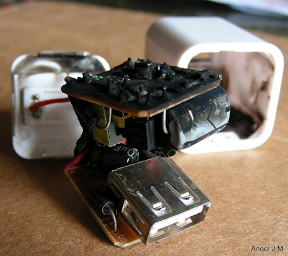
The following picture shows a counterfeit charger that burned up. The safety issues with counterfeits are not just theoretical; when hundreds of volts short out, the results can be spectacular.
Counterfeit iPhone charger that burned up
Photo by Anool Mahidharia. Used with permission

Indicated charger type

A device being charged can detect what type of charger is being used through specific voltages on the USB data pins.[6] Because of this, some devices only work with their own special chargers. For instance, an "incorrect" charger may be rejected by an iPhone 3GS or later with the message "Charging is not supported with this accessory".[7]
There are many different charger types, but only a few are used in the chargers I examined. A USB charger that follows the standard is known as a "dedicated USB charger". However, some manufacturers (such as Apple, Sony, and HP) don't follow the USB standard but implement their own proprietary charger types. Apple has separate charger types for 1 amp (iPhone) and 2 amp (iPad) chargers. HP has a special type for the HP TouchPad.
The point is that USB chargers are not interchangeable, and devices may not work if the charger type doesn't match what the device expects. The table below shows the type of charger, the current that the label claims the charger provides, the current it actually provides, and the charger type it indicates to the device.
The types of the counterfeit chargers are a mess, as they advertise one power level, actually supply a different power level, and have the charger type for a third level. For example, the counterfeit iPhone charger is advertised as supplying 1 amp, but has the 2A charger type, so an iPad will expect 2 amps but not obtain enough power. On the other hand, the counterfeit iPad charger claims to supply 2 amps, but really only supplies 1 amp and has a 1A type.
 Charger typeLabelMeasured currentWeight
Apple iPhoneApple 1A charger5V 1A1.79A23.0g
Samsung oblongdedicated USB charger5V 0.7A.80A33.1g
Samsung cubededicated USB charger5V 1A1.17A23.2g
Apple iPadApple 2A charger5.1V 2.1A2.3A67.5g
HP TouchPadHP TouchPad charger5.3V 2.0A2.4A54.8g
Counterfeit iPhoneApple 2A charger5V 1A.94A18.8g
MonopriceApple dock5V 1A1.22A67.8g
Counterfeit UKdedicated USB charger5V 1A.57A29.4g
Counterfeit iPadApple 1A charger5.1V 2.1A1.2A43.4g
BelkinApple 1A charger5V 1A1.27A43.0g
KMSApple 2A charger5V 2.1A3.4A99.5g
Motoroladedicated USB charger5.1V .85A.82A38.6g

Efficiency

People often wonder how much power their charger is wasting while it's idle, and if they should unplug their charger when not in use. I measured this "vampire" power usage and found the chargers varied by more than a factor of 20 in their idle power usage. The Samsung oblong charger came in best, using just 19 mW; this was so low compared to the other chargers that I measured it again a different way to make sure I hadn't made an error. On the other extreme, the fake iPhone charger used 375 mW. The Apple iPhone charger performed surprisingly badly at 195 mW. If plugged in for a year, this would cost you about 21 cents in electricity, so it's probably not worth worrying about.[8] In the following table, I use the official charger Star Rating System (yes, there actually is such a thing).[9][10]
I also measured efficiency of the chargers under load.[11] One of the benefits of switching power supplies over simpler linear supplies is they are much more efficient at converting the input power to output. The chargers I measured all did pretty well, with 63% to 80% efficiency. The HP charger was the winner here.
 VampiremilliwattsEfficiencyPercent
Apple iPhone19574
Samsung oblong1976
Samsung cube8677
Apple iPad6278
HP TouchPad9180
Counterfeit iPhone37563
Monoprice7872
Counterfeit UK10363
Counterfeit iPad9566
Belkin23466
KMS17969
Motorola5975

The chargers up close

Apple iPhone and counterfeit
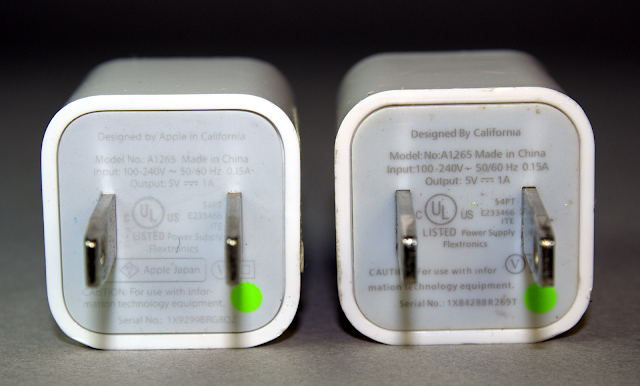
A real Apple iPhone charger (left) and a counterfeit charger (right
The above photo shows a real iPhone charger (left) and a counterfeit (right); the two chargers are almost identical, down to the green dot. If you look closely, the genuine one says "Designed by Apple in California", while the counterfeit has the puzzling text "Designed by California". The counterfeit also removed the "Apple Japan" text below the plug. I've seen another counterfeit that says "Designed by Abble" (not Apple). I assume the word "Apple" is removed for legal or trademark reasons, since the word "Apple" is often (but not always) missing from counterfeits.

Samsung oblong
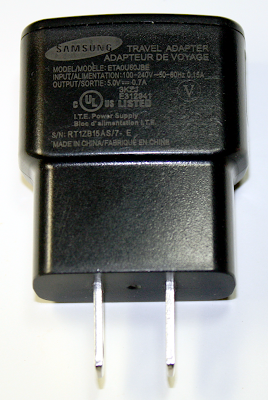
The Samsung oblong charger.
I call this charger the Samsung oblong charger, to distinguish it from the Samsung cube charger.

Samsung cube


The Samsung cube charger is shaped very similarly to the Apple iPhone charger. Internally, however, it turns out to be entirely different.

Apple iPad and counterfeit

A real Apple iPad charger (left) and a counterfeit charger (right
The photo above shows a real iPad charger (left) and a counterfeit (right). The counterfeit has almost identical text, but without "Designed by Apple in California. Assembled in China", "Listed" under UL, and the manufacturer "Foxlink". Inexplicably this sanitization left "TM and © 2010 Apple Inc".
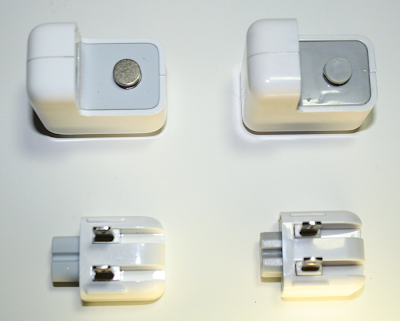
Real (left) and counterfeit (right) iPad chargers
The above photo shows a real iPad charger on the left and a fake iPad charger on the right, with the plug removed. The most visible difference is the real charger has a round metal grounding post, while the fake has plastic. (The US plug isn't grounded, but in other countries the lack of ground in the counterfeit could pose a safety hazard.)

HP TouchPad

HP TouchPad charger HP TouchPad charger
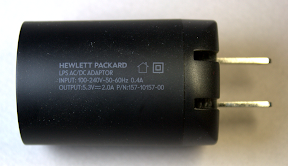
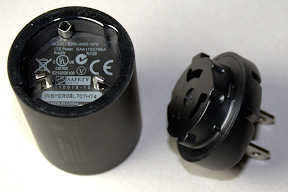
The HP TouchPad charger has a very unusual cylindrical shape, which is striking if perhaps not practical. The charger twists apart, allowing the plug to be replaced for different countries. (It took me weeks to discover this feature.)

Monoprice

Monoprice USB charger
The Monoprice charger isn't a USB charger, but instead has a 30-pin iPhone dock connector attached. It is a relatively large charger.

Counterfeit UK
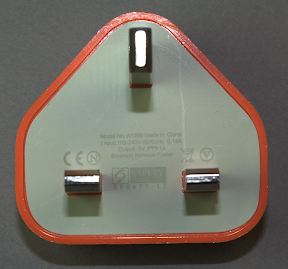
Counterfeit Apple UK iPhone charger
This charger is a counterfeit of the Apple UK iPhone charger. They've removed Apple from the text, but left Emerson Network Power, which I'm sure is not the actual manufacturer. The genuine Apple UK charger can be distinguished by a serial number inside the USB connector.

Belkin

Belkin phone charger
The Belkin charger eschews the minimal design styling of most chargers, with a roughly oval cross section, curves and ribs, and a cover over the USB port.

KMS

KMS 4-port USB charger with plug detached
The KMS charger is unusual in providing 4 USB ports. It also gives off a blue glow while in use. The plug can be removed and replaced for use in different countries, similar to the iPad and HP TouchPad chargers. I couldn't find any UL safety approval on this charger, but I did find a report of one catching fire.

Motorola

Motorola phone charger
The Motorola charger has the lowest listed power output, 850mA. The back of it has a holographic sticker (like a credit card), which may ward off counterfeiters, even though it's unlikely for anyone to counterfeit this charger. I wonder though why Apple doesn't use holograms or other anti-counterfeiting techniques, given the large number of counterfeit Apple chargers being sold.

Delivery of advertised power

Each charger has an advertised power output, but some chargers produce considerably more and some produce much less. Your device will take longer to charge, if the charger can't put out enough power. This table shows each charger's ability to deliver the rated power, based on my measurements of maximum power. While most chargers meet or exceed the power rating, there are some exceptions.
The counterfeit chargers perform extremely poorly, putting out a fraction of the expected power. Charging your device with one of these chargers will be a slow, frustrating experience. In particular, the counterfeit UK charger only produces a third of the expected power. Although the label claims the charger works on 100-240 volts, it's clearly not designed to work on US power.
The iPad is a surprise, putting out less power than expected. Despite being nominally a 10 watt charger, the label says it provides 5.1V and 2.1A, which works out to 10.7 watts. However, the maximum power I measured is 10.1 watts (4.4 volts at 2.3 amps, as shown in the Power section below). Since the measured power is slightly less than advertised, it only gets four bolts.
 RatingLabelWatts from labelMeasured watts
Apple iPhone5V 1A5.06.0
Samsung oblong5V 0.7A3.54.0
Samsung cube5V 1A5.05.5
Apple iPad5.1V 2.1A10.710.1
HP TouchPad5.3V 2.0A10.611.4
Counterfeit iPhone5V 1A5.02.7
Monoprice5V 1A5.05.7
Counterfeit UK5V 1A5.01.7
Counterfeit iPad5.1V 2.1A10.75.9
Belkin5V 1A5.05.6
KMS5V 2.1A10.510.9
Motorola5.1V .85A4.34.3

Power quality

In this section, I measure the quality of the power produced by the different chargers. I analyze it for voltage spikes, high frequency noise, and line-frequency ripple. The following table summarizes the results in three categories. Spikes indicates extremely brief large voltage spikes in the output, while Noise indicates high-frequency noise in the output, and Ripple indicates low-frequency (120 Hz) fluctuations in the output.[12]
 SpikesNoiseRipple
Apple iPhone
Samsung oblong
Samsung cube
Apple iPad
HP TouchPad
Counterfeit iPhone
Monoprice
Counterfeit UK
Counterfeit iPad
Belkin
KMS
Motorola
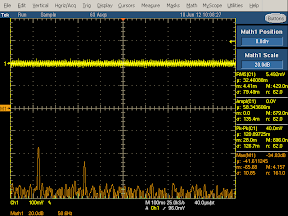
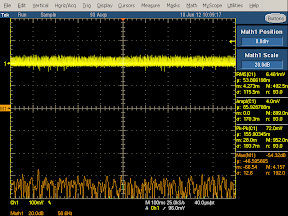
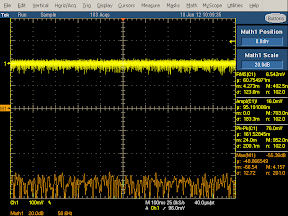
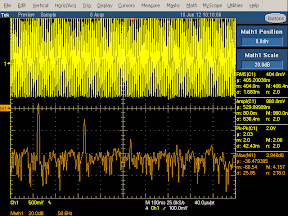
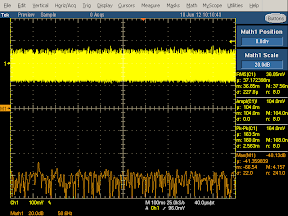
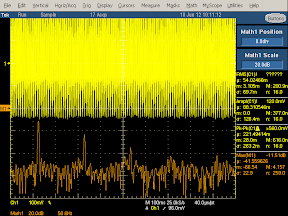
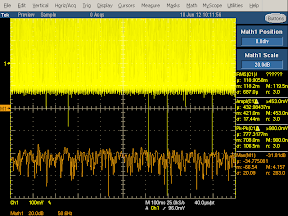
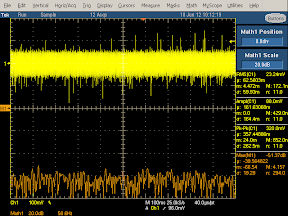
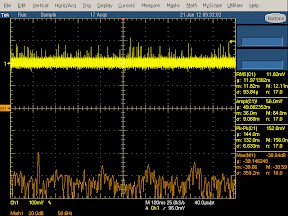
The following oscilloscope traces show the output signal (yellow) and frequency spectrum (orange). The left images provide high-frequency information on the output voltage. The right images show the low-frequency information on the output voltage.[13]
The desired voltage graph is a flat, thin yellow line indicating totally smooth power. However, some factors mess this up. First, any ripple from the power line will show up as 5 sinusoidal peaks in the first (high-frequency) yellow line. High-frequency noise will widen the yellow line. Voltage spikes will appear as vertical spikes in the yellow line.
The plots also show the frequency spectrum in orange, from 0 at the left to 230 kHz at the right. The desired graph would have the orange spectrum near the bottom of the screen. Thus, the power quality exponentially gets worse as the orange line gets higher. The left (high frequency) spectrum generally shows noise at the switching frequency of the charger (and harmonics). The right (low frequency) spectrum typically shows spikes at multiples of 120 Hz, caused by ripple from the 60 Hz power.[5]

Apple iPhone

High frequency oscilloscope trace from Apple iPhone charger Low frequency oscilloscope trace from Apple iPhone charger
The ripple is clearly visible as the waves in the yellow trace on the left and as the spikes (at 120 Hz and 240 Hz) in the orange trace on the right.
The iPhone charger performs extremely well at filtering out spikes and noise, the best of the chargers I measured. Apart from the 120 Hz spikes, the noise spectrum (orange) is flat and very low. The power quality is so good, I checked the results several times to make sure I wasn't missing something.

Samsung oblong

High frequency oscilloscope trace from Samsung oblong charger Low frequency oscilloscope trace from Samsung oblong charger
The Samsung charger's output has a lot more noise than the iPhone charger. This is visible in the thickness and jaggedness of the yellow output curves. The orange frequency spectrum on the left shows large peaks at harmonics of the switching frequency. The 120 Hz spike on the right is a bit lower than the iPhone charger, so the ripple filtering is a bit better.

Samsung cube

High frequency oscilloscope trace from Samsung cube charger Low frequency oscilloscope trace from Samsung cube charger
The Samsung cube charger shows some noise in the output (yellow). The frequency spectrum shows wide peaks at multiples of the the switching frequency, about 90kHz. There's some ripple.

Apple iPad

High frequency oscilloscope trace from Apple iPad charger Low frequency oscilloscope trace from Apple iPad charger
The iPad charger almost eliminates the ripple; only a small blip is visible in the orange spectrum on the right. The noise level is low, although appreciably worse than the iPhone.

HP TouchPad
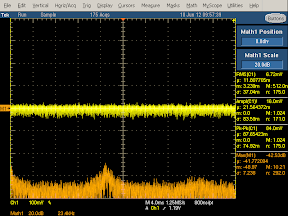
High frequency oscilloscope trace from HP TouchPad charger Low frequency oscilloscope trace from HP TouchPad charger
There's no ripple visible in the HP charger spectrum on the right. The overall noise level is good.

Counterfeit iPhone

High frequency oscilloscope trace from counterfeit iPhone charger Low frequency oscilloscope trace from counterfeit iPhone charger
The output from this counterfeit charger is a wall of noise. In order to fit the waveform in the display, I had to double the scale on the left and increase it by a factor of 5 on the right, so the yellow curve is actually much worse than it appears. On the left, note the huge ripple with massive high-frequency noise on top. This output is not something you want to feed into your phone.

Monoprice
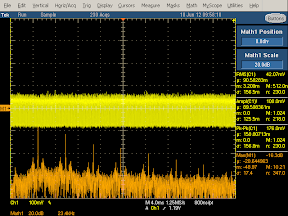
High frequency oscilloscope trace from Monoprice USB charger Low frequency oscilloscope trace from Monoprice USB charger
The output from this charger is very noisy, as you can see from the thickness of the yellow line. Note that the frequency spectrum (left) has very tall but narrow spikes at harmonics of the 28kHz switching frequency, showing a lot of high-frequency noise. On the positive side, there is hardly any ripple.

Counterfeit UK
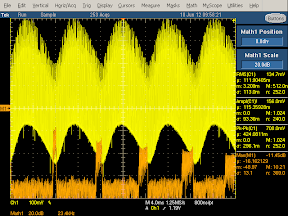
High frequency oscilloscope trace from counterfeit UK iPhone charger Low frequency oscilloscope trace from counterfeit UK iPhone charger
This charger has very bad output. The large degree of ripple is visible in the waveform (yellow, left) and the very large spikes in the spectrum (orange, right). The thickness of the yellow waveform shows the large amount of high-frequency noise, which is also visible in the very high peaks in the spectrum (orange, left).

Counterfeit iPad

High frequency oscilloscope trace from counterfeit iPad charger Low frequency oscilloscope trace from counterfeit iPad charger
This counterfeit charger has so much noise in the output that I had to double the scale on the left to get it to fit. Note the very large spikes in the output (yellow). The spectrum (orange, left) is much higher everywhere, indicating noise at all frequencies. Surprisingly, it has only a moderate amount of ripple; the manufacturer seems to have done at least one thing right.

Belkin

High frequency oscilloscope trace from Belkin phone charger Low frequency oscilloscope trace from Belkin phone charger
The Belkin charger does well at eliminating ripple, but has a lot of noise otherwise. The spectrum (orange, left) shows large peaks. The yellow output is wide, showing a lot of noise, combined with many large voltage spikes of about 1/3 volt.

KMS
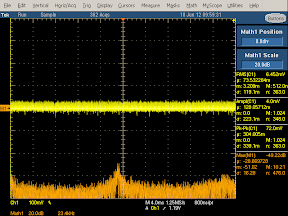
High frequency oscilloscope trace from KMS charger Low frequency oscilloscope trace from KMS charger
The KMS charger has fairly good output, with a small peak in the spectrum (orange, left) at the switching frequency. It has no detectable ripple. However, it has many large voltage spikes in the output, over half a volt, as can be seen on the right.

Motorola
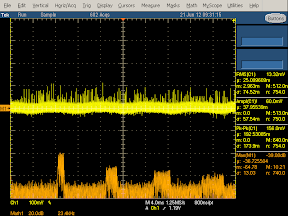
High frequency oscilloscope trace from Motorola phone charger Low frequency oscilloscope trace from Motorola phone charger
The Motorola charger has a lot of spikes in the output (yellow) . The spectrum (orange, left) shows high frequency noise at the switching frequencies. There's a moderate amount of ripple (yellow, left and orange, right).

Summary

The quality of the output power is radically different between chargers. The counterfeit chargers are uniformly bad, with hardly any effort at filtering the output. The other chargers vary in quality with the iPhone charger setting the standard for noise-free power, but surprisingly poor filtering of ripple. The power quality is a key factor that affects the performance of chargers; spikes and noise are known to interfere with touchscreens.[1]

Power curve

In this section I look at the voltage and current output by the charger as the load increases. The first rating is Voltage Sag, which is the undesired drop in output voltage as the load increases. The second rating is Current Sag, which shows how the current fluctuates as load increases. Finally,Regulation shows the overall stability of the output from the charger.
 Voltage sagCurrent sagRegulation
Apple iPhone
Samsung oblong
Samsung cube
Apple iPad
HP TouchPad
Counterfeit iPhone
Monoprice
Counterfeit UK
Counterfeit iPad
Belkin
KMS
Motorola
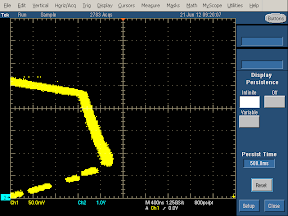
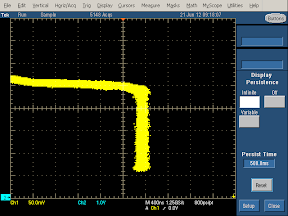
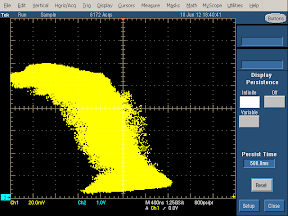
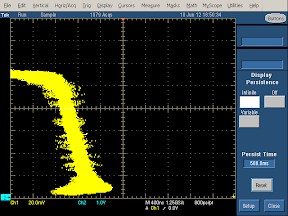
The graphs in this section need a bit of explanation, which is provided in the diagram below. The voltage/current load curve shows the performance of the charger under different loads. Each point on the curve shows the current (X axis) and voltage (Y axis) produced by the charger under a particular load condition. Follow the yellow curve clockwise from the upper left to the lower left to see the effect of increasing load. The upper left point of the curve shows the voltage produced by the charger when there is no load on the charger. As the load increases, the charger is supposed to keep a constant voltage and increase the current (i.e. horizontal line), until it reaches the maximum power (upper right). If the load continues increasing, the charger switches to a constant current mode, dropping the voltage while continuing to provide the maximum current (i.e. vertical line).[14] At the lower right, the charger has reached its shutdown point due to excessive load, and rapidly drops to no output in the lower left corner to avoid damage.
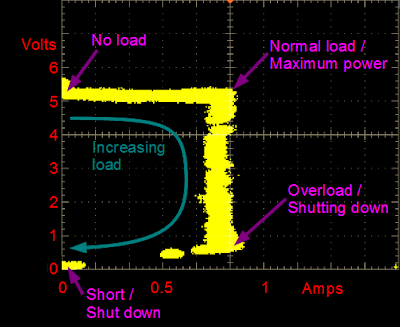
Example Voltage vs Current graph for a phone charger

Apple iPhone

Voltage vs Current curve for Apple iPhone charger
The output from the Apple iPhone charger is surprisingly non-constant under load. The charger starts off with 5.2 volts with no load, dropping to 4.6 volts as the load increases, resulting in the downwards slope of the top yellow line. As the load increases, the current keeps increasing, resulting in the slope of the right yellow line. Note however that the yellow line is relatively thin, so the regulation is pretty good at each point.
Note that because this charger has a high current output, this chart has a different current (horizontal) scale than most of the charts to fit the whole trace in the image. Stretch it horizontally to compare with other graphs.

Samsung oblong
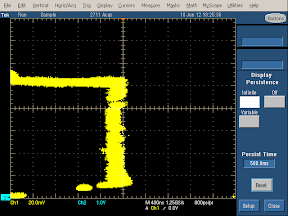
Voltage vs Current curve for Samsung oblong charger
For this charger, the voltage is approximately flat, except for a bump under no load (upper left) which is probably a measurement artifact. The vertical yellow line shows the current stays nearly constant as the load increases. The charger shows good voltage and current stability under changing load. The yellow line is a bit wider than the iPhone charger, showing a bit less regulation for a fixed load.

Samsung cube
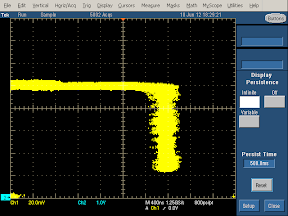
Voltage vs Current curve for Samsung cube charger
The voltage curve sags slightly under load. The right hand curve shows the current stays stable, but the line is moderately wide, showing a bit of weakness in regulation.

Apple iPad
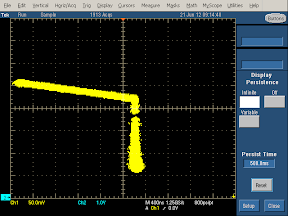
Voltage vs Current curve for Apple iPad charger
Similar to the iPhone charger, the iPad charger shows a lot of voltage sag. The voltage is about 5.1 V unloaded, dropping to 4.4 volts and 2.3 A (10.1 W) at the corner. Unlike the iPhone charger, the iPad charger has pretty good current stability. The regulation is solid, as shown by the narrowness of the yellow trace. Note the scale change due to the high current output.
I'm puzzled by the steep voltage sag on both the iPhone and iPad charger. Since the designers of the Apple charger went to a great deal of effort to build a high quality charger, I conclude they must not consider voltage sag worth worrying about. Or, more interestingly, maybe they built this sag as a feature for some reason. In any case, the chargers lose points on this.

HP TouchPad
Voltage vs Current curve for HP TouchPad charger
The charger has some voltage sag, but the current (vertical) is nice and constant. The yellow line is relatively thin, showing good regulation. Note the scale change due to the high current output.

Counterfeit iPhone
Voltage vs Current curve for counterfeit iPhone charger
This counterfeit charger shows extremely poor regulation, as shown by the very wide yellow line. It's hard to fit a voltage-current curve to this picture. The amount of power supplied by this charger seems almost random.

Monoprice

Voltage vs Current curve for Monoprice charger
The Monoprice charger shows reasonably straight voltage and current lines showing good constant voltage and current outputs. The vertical line shows some width and noise, suggesting the regulation isn't totally stable.

Counterfeit UK
Voltage vs Current curve for counterfeit UK iPhone charger
For this charger, the upper line doesn't get very far, showing that this charger doesn't output much current. My suspicion is that it was only tested with 240 volts so it performs poorly with 120 volts, even though the label says it takes 100 to 240 volts. The width of the yellow line shows very poor regulation.

Counterfeit iPad
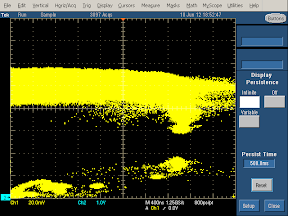

The output of this counterfeit charger is so poorly regulated that it's hard to tell exactly what's happening with the voltage and current. It looks like the voltage is roughly constant underneath all the noise.

Belkin
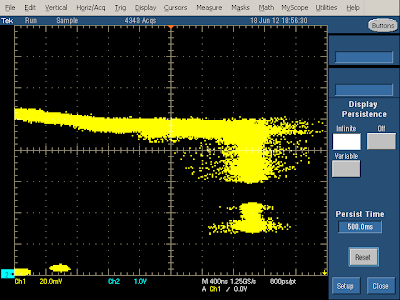
Voltage vs Current curve for Belkin phone charger
The Belkin charger shows voltage sag as the current increases. In addition, the output is fairly noisy.

KMS
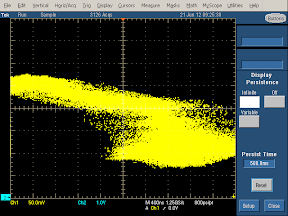
Voltage vs Current curve for KNS phone charger
The KMS charger shows a lot of voltage sag as the load increases. In addition, the output is all over the place, showing very poor regulation, more like what I'd expect from a counterfeit charger. Note the scale change due to the high current output.

Motorola
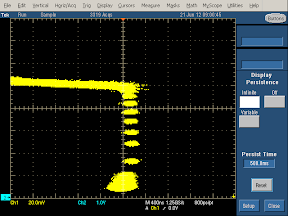
Voltage vs Current curve for Motorola phone charger
The Motorola charger shows a bit of voltage sag, but good current stability. The regulation is good but not perfect, as shown by the width of the yellow line. (The gaps in the vertical line are just measurement artifacts.) Note that the maximum current output of this charger is fairly low (as advertised).

Conclusions

So what charger should you spend your hard-earned money on? First, make sure the charger will work with your phone - for instance, newer iPhones only work with certain chargers. Second, don't buy a counterfeit charger; the price is great, but it's not worth risking your expensive device or your safety. Beyond that, it's your decision on how much quality is worth versus price, and I hope the data here helps you make a decision.

P.S. How about some teardowns?

My previous iPhone charger and fake charger teardowns were surprisingly popular, but if you were hoping for teardowns on the full set of chargers, you'll need to wait for a future blog post. I haven't torn the chargers apart yet; if I need to take more measurements, I don't want to have just a pile of parts. But I do have some preview pictures to hold you over until my teardown article.
Counterfeit Apple iPhone charger internals
The above picture shows the internals of a counterfeit Apple iPhone cube charger. The two boards stack to form the compact cube shape. This charger blatantly tries to pass as a genuine Apple charger; unlike the "Designed by California" charger, this one exactly copies the "Designed by Apple in California" text from the real charger. Note the very simple circuitry[4] - there are no components on the other side of the board, no controller IC, and very little filtering. Also look at the terrible mounting of the transistor on the front right; clearly the build quality of this charger is poor. Finally, note the overall lack of insulation; this charger wouldn't meet UL safety standards and could easily short out. But on the plus side, this charger only cost a couple dollars.
Inside a cheap USB charger
The above $2 charger is notable for its low-profile design; it's about as thin as you can make a charger and still fit the power prongs and the USB port. The transformer is very short to fit into this charger. Like the previous charger, it uses a very simple circuit,[4] has little filtering, and almost no safety insulation.
The complex circuit inside a Samsung cube USB charger Circuit boards of a Samsung cube USB charger, showing the transformer, switching transistor, filter capacitors, and other large components
Finally, the above pictures show the internals of the Samsung cube charger, which has circuit boards packed with tiny components and is much more advanced than the counterfeits (although slightly less complex than the Apple charger). Despite being very similar to the Apple charger on the outside, the Samsung charger uses an entirely different design and circuitry internally. One interesting design feature is the filter capacitors fit through the cut-out holes in the secondary circuit board, allowing the large filter capacitors to fit in the charger.

A dozen USB chargers in the lab: Apple is very good, but not quite the best

 
Hi-Tech Talk © 2015 - Designed by Templateism.com