Thursday, February 12, 2015

It’s been a long time since we got some specialAdobe Camera Raw color profiles for the Lumia 1020 and 1520. That was great for the RAW DNG photographers out there, but what we really need are some lens correction profiles. That never happened, so I decided to make my own geometric distortion, chromatic aberration, and vignetting fall off models to use with my Nokia Lumia 1020 and its awesome 41 megapixel camera. Of course, you can do it with whatever camera you want, too.
First off, Adobe already makes a bunch of lens correction profiles for a large variety of popular DSLR camera and lens combinations. In most cases, you can turn on the “Lens Profile Corrections” checkbox in Adobe Camera Raw or Lightroom and it will automatically recognize your lens and camera body combination along with its zoom focal length and aperture settings.  Then it will use those settings to reference the profile’s geometric distortion, chromatic aberrations, and vignetting models in order to automatically compensate for the lens’ flaws.  Those flaws can vary significantly between apertures and focal lengths as well, so the correction profile really needs a pretty large amount of data about how the lens behaves.
Luckily, the Lumia 1020 that I’ll be using in this example has only one focal length in the lens and only one aperture size. That will make creating lens correction models much easier, but it will still be a lot of work. If you don’t feel like actually learning how to do it and just want to download the profile I made, feel free to skip to the end.
Download the Adobe Lens Profile Creator
First, you’ve got to download the Adobe Lens Profile Creator. It’s a combination of grids that you’ll have to print out along with some software for analyzing the results and some documentation.  It’s available for Mac and Windows PCs. Once you download the ZIP file, you’ll find all the folders clearly labeled and there will be an application that you can run once you have a good set of RAW DNG photos to import.
Photographing the calibration prints
First, you need to photograph some checkerboard prints. I chose to use the “Landscape Letter – 8.50 In x 11.00 In (Square Print Dimension 54 Pts, Version 9 x 13)” chart.  Simply print it out and either mount it to some stiff card board or tape it to a wall.  It has to be flat in order to work properly. Don’t print it on glossy paper or put it behind glass since that could cause reflections that will interfere with the checkerboard pattern.
Mount the camera on a tripod that’s just about even with the same plane as your checkerboard print. You want to place it close enough so that the grid pattern fills between 25 – 50% of the frame. I made my frame a little smaller still, but the overlap seemed to be plenty. Set the camera to manual control so that everything stays consistent because you’re going to be taking at least 9 shots.  It’s most important that you set the ISO level to its lowest number.  You don’t want extra noise interfering. Don’t forget to set the file format to the camera’s RAW format.  You could do this with JPGs or TIFs too, but if you’re interested in lens correction profiles, you’re probably already shooting in RAW format and the RAW data will give you extra flexibility anyway. And if you’re going to shoot JPGs, do not use digital zoom at all ever! The DNG RAW files won’t include your digital zoom level on phones like the Lumia 1020, but if you’re shooting something as JPGs, just remember not to zoom because that will be cropping the image to a different part of where the lens is capturing data and therefore your lens correction profile won’t be correcting the correct parts of the image. It’s also important to keep the lighting constant and consistent.  Ideally you would put two lights at 45 degree angles from the checkerboard grid, but really you just need it to be bright enough for the camera and the same for each shot.
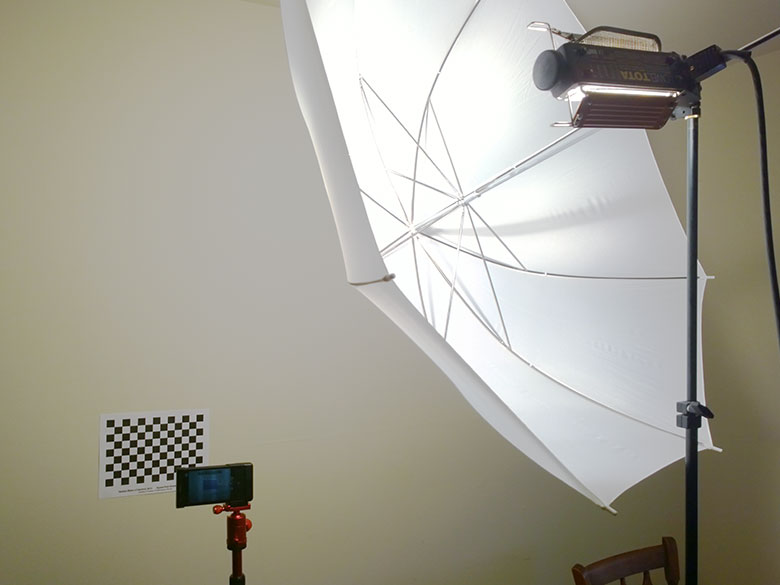
Next, you’re going to start with a shot of the checkerboard grid straight on in the middle of the frame. Then rotate the head of the tripod so that the checkerboard is placed on the top center edge, take another shot, turn it a bit more so the checkerboard is in the corner… and repeat until you have 4 shots for the corners, 4 shots for the middle of each edge, and 1 for the center.  That will give you 9 RAW DNG files.
Analyze the images with the profile creator
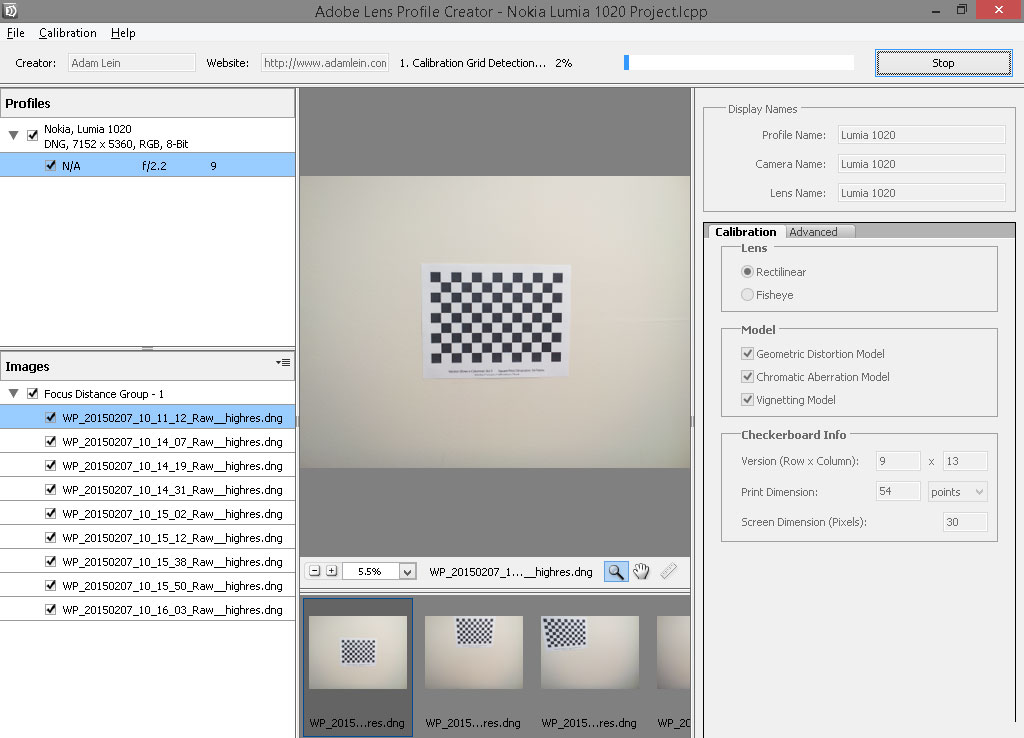
Now, just copy those DNG files from your phone to your desktop PC where you’ve got Adobe’s Profile Creator software.  Choose File > Add Images to Project and select all of the DNG files you just shot.  The software will organize them into a set on the left. In the right pane, you’ll have to type in the information about what type of checkerboard pattern you were photographing. In my case, it was the 9 x 13 version with 54 point dimensions. You can also fill out the Display name and Creator fields. Then press “Generate Profiles” and wait.  You’ll have to wait for quite a while. I believe mine took about an hour to process. When it’s finally finished, you’ll be prompted to save the newly created profile in the appropriate location.
On Windows, that would be: C:\ProgramData\Adobe\CameraRaw\LensProfiles\1.0
On Mac, the location would be: /Library/Application Support/Adobe/CameraRaw/LensProfiles/1.0
You can also save the profile to a similar folder within the user account folders, but I would rather have it accessible system-wide.
Putting it to use
Now all you have to do is open a DNG photo that was shot with your camera in the Adobe Camera Raw plug-in within Bridge or Photoshop… or open it within Lightroom.  I prefer Bridge, so below you’ll see the lens corrections tab along with the “Enable lens profile corrections” checkbox. In this screenshot, the vignetting and distortion is pretty obvious.  The corners are noticeably darker and scaled a bit differently than the center area. When I turn on the lens profile correction, the dark corners are adjusted to be far more consistent with the rest of the image, and the lens distortion is corrected as well.  Chromatic aberrations should be better, too, but I haven’t run into too many of those on the Lumia 1020’s Carl Zeiss lens.
Conclusion
This technique is naturally for the more advanced digital photographer and may be a bit daunting for average users, but since I started shooting RAW on my Lumia 1020 when it had that capability enabled, I can easily go back to my old DNG photos and apply my newly calculated lens correction profile in order to improve my old photos. You can also do this type of thing on a case-by-case basis with the manual sliders and just judge visually, but I like having a set profile that I can just apply globally. It’s probably not important if all you’re going to do is post some pictures to Instagram once in a while, but if you’re using something high-end like the Lumia 1020 for high-end photography like Steven Alvarez does for National Geographic.
Download the LCP file for the Nokia Lumia 1020.

How to make a lens correction profile for your smartphone


Britain's First Driverless Car
Britain’s first driverless car doesn’t look like a car at all. The electric-powered LUTZ Pathfinder launched Wednesday, wandering the sidewalks of London’s Greenwich neighborhood, and it’s closer in appearance to a runaway cockpit of a small airplane.
Transport Systems Catapult designed the two-seater vehicle to help people with shorter commutes. It has 19 sensors, including touch-sensitive strips, lasers, radar, and panoramic cameras. Inside, there are two screens: one informs the rider about the car’s journey, and the other is for entertainment. Behind the seats is thepower system, which has about the same strength as two high-end gaming computers.
These specs are all standard in today’s race of driverless cars, but there’s one component that’s clearly behind its competition. The LUTZ Pathfinder can only go up to about 15 miles per hour, and it runs for about eight hours before it needs recharging. But don’t laugh. For a car that’s meant to stay on sidewalks, its speed limit makes sense. Plus, the company plans on releasing a smart-phone app similar to Uber, which would allow users to hail one of these pods.
But if British Business secretary Vince Cable wants to achieve his goal of becoming a leader in this industry, the government knows it’s going to have to do better.
And the company's predecessors have set a high bar to beat. Google’s automated cars have been traversing the bridges and highways of California and Nevada since 2010. That same year, the National University of Defense Technology in China released the Hongqi HQ3, which drove 175 miles on an expressway. Apple and Tesla are also rumored to be throwing their hat in the ring together. And speaking of Uber, its CEO Travis Kalanick said the company may transition to driverless cars (though that's decades away).
Although far from a driverless hot rod, the LUTZ Pathfinder will soon have more powerful siblings. To face its competitors, the British government released an almost $29 million strategyto launch four other autonomous car projects in various locations.

Britain Launches First Driverless Car—And It’s Precious


According to The Information, Google is in the process of testing a contextually-aware mobile payment system codenamed "Plaso" around some of the company's offices in cooperation with popular businesses like Papa John's and Panera Bread. That a new Google mobile payment system is under development at all shouldn't be surprising: Wallet's abysmal adoption rate, along with competitor Softcard, have made it obvious that NFC payments aren't resonating with consumers enough to really change buying habits yet. While Apple Pay will go down this tried-and-failed road yet again, it's doing so on the hopes that wider partnerships and better marketing will finally lead to success where Wallet found only failure. Google, though, may be interested in moving beyond the NFC paradigm to something a little less hardware-dependent.
Plaso, according to this report, works thusly: you walk into a store, engage in a transaction to buy something (or potentially do so before you get there), and the cashier then asks for your initials. You reply, at which point the cashier looks at the Plaso interface (in this case, on a smartphone), finds those initials, and then [somehow] bills the purchase to you. The cashier locates your initials from a list of Plaso-enabled devices within Bluetooth range of the cashier's device, to ensure you're actually present in the store. Your device's Bluetooth connection is, essentially, a sort of mobile proximity identifier.
How Plaso payments are processed isn't explained, but TI's source claims that business owners need only a smartphone to conduct transactions , which may then feed the payment information into a backend operated by Google. It seems likely this is some kind of "middleware" approach, whereby the initial transaction goes through Google, but perhaps sees the actual vendor's payment processor complete the business end of the deal. The report isn't clear, though, so there's a lot of room for speculation.
Whether this new system is actually meant to replace NFC payments, too, isn't clear. While Google is probably unlikely to drop NFC support in Wallet any time soon, the lack of adoption may at least make Plaso a potential successor in the long term. What's weird about Plaso, though, is that it sounds a lot like Square Wallet, a service that Square discontinued about a year ago. Square's system was very similar - you ordered goods on your smartphone from the vendor, and when you got to the store you gave the cashier your name, they'd confirm it was you via your profile photo, and then give you whatever it is you ordered. Billing was completely hands-off.
If Plaso is basically this (which at this point it sounds like it is that exactly), there may yet be a potential for success where Square failed to find any.
A number of businesses in the food and drink sector are beginning to build ordering into their smartphone apps to keep customers out of the cashier line. Taco Bell, Starbucks, and Chipotle are just a few of the companies exploring the possibilities here, and it seems like a no-brainer that smaller businesses would look to a (presumably, free) middleware solution for similar functionality, even if it was a little less bespoke to their specific needs. Still, there's likely to be competition in this space, so it's impossible to say how compelling Plaso will be to business owners, or if it will even make it out of the testing stage. Regardless, we'll definitely keep an eye out for it in the future.

Google Is Testing A Mysterious New Mobile Payment System Called "Plaso" That Sounds A Lot Like Square Wallet

Wednesday, February 11, 2015

It's been almost a year since we learned of Google's experimental 3D-sensing tablet and phone technology, Project Tango. But now that Tango is in developers' hands, we're finally getting a look at what talented people can do with a radical technology.

When Google first announced Project Tango—which uses two computer vision processors, depth sensing, and a motion-tracking camera to give a tablet the same capabilities as a 3D scanner—there were plenty of ways to imagine it being useful:Gaming. Shopping. Yes, advertising, too.
But even then, it felt a little unimaginative. Luckily, since Google distributed a couple hundred tablets to independent developers, we're getting some very creative and interesting demo apps.
Case in point: Space Sketchr, a demo app developed by Left Field Labs, a Venice, California-based studio. You can think of it as a standard drawing app—pick your colors, your pen, your patterns, and touch the tablet's screen to make a mark. Simple. One caveat: You're drawing as you move through space. Thanks to Tango's ability to track how the tablet is moving through 3D space using its embedded motion-tracking camera, it can track where and when you draw a line in relationship to the tablet—recording those movements and turning them into a 3D drawing.
Take a look at the demo video above. The user can tap on the screen as they walk through a space, drawing a spiral circle that spans out through the room. Once it's recorded, other users can explore the drawing using Tango. It's an incredible cool glimpse as how something as simple as a sketching app can become a radical user experience when 3D sensing is involved.
As Left Hand points out, it's really more of a sculpture, than anything. "Imagine a new kind of sculpture or drawing with a timeline in space," they write. "A new dimension of applications is on the verge of being discovered. You can even get it in the Google Play store here, if you're one of the lucky Tango few.

This Drawing App Is the Coolest Look Yet at What Project Tango Can Do

Tuesday, February 10, 2015

Cyanogen, the startup seeking to offer a version of Android stripped of Google services, has sought funding from a wide range of technology companies for its next round of financing.

The company has talked to a broad range of companies that includes Amazon and Microsoft, people familiar with the discussions revealed. Cyanogen is hoping to appeal to strategic investors seeking a legitimate alternative to Google’s version of the Android mobile operating system. For this same reason, some potential investors have backed off for fear of reprisal from Google.
Google develops Android and releases the core version of the software under an open source license. However, those that want to use any of Google’s services — YouTube, Gmail, Chrome or the Google Play store — have to agree to use all of them, in addition to prominent placement of those apps on the home screen. Cyanogen’s vision is a more open version of Android that could come bundled with services from other companies. Open source versions of Android have made inroads in China, while Amazon has also used the open source version to power its Kindle Fire line of tablets.
Cyanogen is currently looking to raise a Series C round that would value the company at hundreds of millions of dollars, up from a valuation of around $100 million in its prior financing round, sources said.
Microsoft is seen as a likely investor, although it has not finalized a deal, and Amazon is less likely to play a part in this round, one source said. Cyanogen declined to comment on its fundraising efforts, as did representatives of Microsoft and Amazon. The Wall Street Journal reported that Microsoft would invest in a roughly $70 million financing round for Cyanogen. Sources say that figure is in the ballpark, but could vary depending on which strategic investors end up taking part.
This is not the first time Microsoft has explored trying to use Android for its own purposes. The company inherited a product as part of its Nokia deal, theNokia X, which was based on open source Android but used Microsoft’s services in place of those from Google. It updated the product once after the deal closed, but then scrapped Nokia Xas part of a series of cutbacks last year.
Beyond who ends up signing up for the round, Cyanogen’s valuation is significant, especially for a company that has yet to show how it can make significant revenue from its efforts. As with Google’s flavor of Android, the core of Cyanogen’s offering — CyanogenMod — is free and open source. Cyanogen the company, meanwhile, could make money by bundling other services and software on top of the open source core.
In theory, it could put together a flavor of Android that bundled together services from, say, Amazon, Facebook and Microsoft, in much the same way the Google version of Android bundles YouTube, Chrome, Gmail and the Google Play store, among other services.
The company’s most significant deal is one to provide its software on phones sold by India’s Micromax. It has alsomade a number of high-profile hires in the last year as it expands both its technical and business ranks.
Cyanogen has raised more than $30 million, having raised $23 million in a Series B round that closed in December 2013; it was led by Andreessen Horowitz and included Tencent, Benchmark and Redpoint. Benchmark and Redpoint were part of Cyanogen’s $7 million Series A round that closed in April 2013.

Cyanogen Tapping Tech Giants to Build War Chest for a Non-Google Android

So let's say that you live in China and aren't sure whether you want your next phone to be an Android flavored handset, or one powered by Windows 10. Why not have both? A device called the Wen Yan Sofia has been leaked via social media in the country. Allegedly, the handset features a Dual Boot function that will allow you to choose between the two operating systems depending on how you feel at the moment.
The Wen Yan Sofia will feature a 5-inch screen with a resolution of 1080 x 1920. Intel's low-priced Sofia chip is under the hood (hence the name of the phone). That is actually an acronym that stands for Smart or Featurephone with Intel Architecture. The chip is designed to compete with Qualcomm and MediaTek silicon used in entry level handsets. The device will also include 2GB of RAM, 32GB of native storage and a 13MP rear-facing camera. A 5MP "selfie" snapper will be found on the front of the phone.
Keep in mind that the manufacturer has not yet announced the device, and Windows Phone handsets haven't been compatible with Intel chipsets, although that might change with Windows 10 for Phone. If this is legit, it sounds like the perfect smartphone for those who can't make decisions or have multiple personalities.
Wen Yan Sofia is allegedly a Dual Boot phone that runs both Android and Windows 10

 Dual Boot phone that runs both Android and Windows 10

Monday, February 9, 2015

A smartphone without a battery is like a time machine without a 1.21-gigawatt nuclear power source. In other words, it is useless – the battery is what provides that magic juice every smartphone needs to operate. 
Unfortunately, even if you take good care of your smartphone's battery, it will inevitably degrade over time and lose some of its charge capacity. At that point, it might be hard to tell if the cell is still in good health or in need of a replacement. That's why we thought we'd share a few tips on the matter.

Perform a visual inspection

You don't need to be a rocket scientist to tell a faulty battery from a healthy one. In fact, some common battery failures are easy to spot with a naked eye. If the battery of your phone is removable, simply take it obut with caution (after turning the phone off, of course) and look for symptoms like bulging, corrosion near the metal terminals, and green or white-ish stains. These are all signs that the cell is about to kick the bucket. If you don't see anything wrong with it, proceed to the next tip. If you find suspicious stains or if your cell has developed a hump, however, it is a good idea to ask your carrier or vendor for advice as your battery most likely needs to be replaced. Don't put the old cell back inside the phone as you don't want it leaking any nasty chemicals; these may damage the phone's circuitry. Instead, seal the battery in a plastic zip bag and make sure you recycle it once it is confirmed to be faulty by a professional.

Do a spin Test Of Your Battery

Your battery should not spin like this

Lithium-based batteries degrade with each discharge cycle. Not storing them properly makes matters even worse – extreme heat or cold may seriously shorten their lifespan. Another way to ruin a perfectly good battery is to drain it and leave it with no charge for a long time. Eventually, a battery might swell if not treated with care. This swelling happens slowly, usually over the course of weeks and even months, which is why a hump that has just started forming on the battery's side can be pretty hard to notice. To check if your battery cell is fine, try spinning it on a flat surface – if it spins, it might have gone bad. Obviously, this tip applies to user-removable batteries only.

Observe how fast your battery level drops

Not all phones have batteries that can be easily inspected by the user. If that's the case with your handset, you can diagnose the health of its cell by monitoring how fast its charge level drops. It is not supposed to drop by two or more percentage points at a time. (Most phones allow you to have their battery level displayed as a percentage in the status bar. If you can't find the option in its settings menu, try using a widget.) And if your battery goes from full to zero in a matter of hours even when you barely use your phone, its is probably a goner.

More battery diagnostics tips

iPhone users, here's something you might not know. Your iPhone keeps track of how many times its battery gets charged, and it also monitors the actual capacity of the cell inside it. However, this information is meant to be accessed only by Apple's support staff, hence you won't find it in your settings menu. Thankfully, there's a workaround. You just need to get iBackupBot – an all-in-one utility for managing iDevices, available on both Mac and PC (Download link). As soon as you connect your iPhone to a computer with iBackupBot running, the application will detect it and let you access detailed information about it. In iBackupBot, highlight your phone in the list of devices and choose "More Information". There you'll find your iPhone's charge cycle count, as well as the actual capacity of its battery. If the FullChargeCapacity figure is much lower than the one under DesignCapacity, then the battery may have to be replaced. (Keep in mind that a lithium-based battery usually loses about 20% of its capacity after 500 charge cycles.)
Android users, your phone also stores data about the health of its battery cell. To access it, try entering the code *#*#4636#*#* in your dialer –this should take you to a service menu where battery details are shown. If the code doesn't work, try Battery by MicroPinch (Download link). It is a simple battery monitoring tool where the health status of your battery is displayed, along with its voltage and temperature. 

Battery health tips


1. iBackupBot gives you detailed information about the health of your battery

How to tell if your smartphone's battery is healthy or bad

Sunday, February 8, 2015

We know junk food can change the way bodies are shaped. Now, a study finds that those irresistible sweet and salty concoctions may also change the way brains are wired—at least in rats.

Researchers divided rats into two groups—one labeled Cafeteria, the other called Chow. Both groups got a typical rat food diet, but the Cafeteria rats also got a bonus: meat pies, cakes and cookies.

Both rat groups gained weight. But the Cafeteria rats gained significantly more than the Chows did—nearly half a pound more, which is a big body burden for a rat. But more important, over two weeks time the Cafeteria rats seemed to care less and less about even seeking out a balanced diet. This new behavior endured even after the rats were returned to their more healthy fare. The study is in the journalFrontiers in Psychology. [Amy C. Reichelt, Margaret J. Morris and R.F. Westbrook, Cafeteria diet impairs expression of sensory-specific satiety and stimulus-outcome learning]

The researchers think junk-food diets cause lasting changes in the rewards circuits part of the brain—which plays a big role in decision-making. So if you’re a regular cookie eater and the next time you mindlessly reach for a cookie you wonder why you can’t help yourself—well, it could be because you’re not in charge, your rewired brain is.

Junk Diet Rewires Rat Brains


Sometimes there's only the illusion of cheapness at dollar stores. (Tony Gutierrez/AP Photo)
Just because something is cheap doesn't mean it's a good deal.
Several of America's largest food manufacturers have been shifting their retail strategy, selling less of their packaged foods in traditional grocery stores and more of those foods in dollar and discount stores, according to a recent Reuters story. Kraft, which sells Veveeta sauce, has turned its attention to the cheaper retailers. So too have General Mills and Campbell's Soup.
"We're in the business of feeding all American families, and that's where consumers are going," Tom Lopez, vice president of growth channels at Kraft, told Reuters on Thursday.
That's mostly true. Packaged food sales havebeen lagging at supermarkets—sales of packaged food were flat last year, largely because of a trend in which Americans are opting for fresher alternatives at the grocery store. Dollar stores have been the rare exception—food sales at discount stores have greatly outpaced their higher priced counterparts, prompting chains like Dollar Tree to add more room for food products. General Mills' sales at discount stores rose by nearly 10 percent last year.
But there's a reason why large food companies are selling more of their packaged foods to America's poor: they have figured out a way to do it at a much higher profit margin.
In order to offer the facade of affordability, manufacturers like Kraft are selling food in smaller packages. These granola bars, sauces, cereals, and prepared mealslook like they cost less, but actually are far more expensive on a per ounce basis, according to Reuters.
Shrinking package sizes allows Kraft to reach higher profit margins on products, though it won't sell as many as it would in a larger store. For instance, a 12-ounce package of Velveeta Shells & Cheese cost $2.50 at the a Dollar Tree store in New York City. Meanwhile, a 2.4 ounce cup cost $1.25. That's 21 cents an ounce versus 52 cents an ounce.

There are caveats, of course. Charging less per ounce for bulkier packages is nothing new: entire business models—say, Costco's—are predicated on that strategy. Packaging is often a significant contributor to price, making it difficult if not impossible to change size and price on a similar scale. Bulk sellers make up for smaller profit margins by selling more product.
So long as the people you're selling to are actively deciding whether or not to stock up at a discount or buy only for the week at a sight mark-up, it's just a value proposition. But it's unclear whether most of the people who shop at dollar stores have that luxury. In fact, it's doubtful. As Dollar General's chief executive Rick Dreiling said on a recent earnings call, "the low to middle income consumer who is our core customer continues to look for ways to manage her budget."
In other words, people go to Dollar General to save, because they have to. And according to this Reuters story, they're buying food that looks cheaper but is ultimately costing them more.

How big food brands are boosting profits by targeting the poor

We know junk food can change the way bodies are shaped. Now, a study finds that those irresistible sweet and salty concoctions may also change the way brains are wired—at least in rats.

Researchers divided rats into two groups—one labeled Cafeteria, the other called Chow. Both groups got a typical rat food diet, but the Cafeteria rats also got a bonus: meat pies, cakes and cookies.

Both rat groups gained weight. But the Cafeteria rats gained significantly more than the Chows did—nearly half a pound more, which is a big body burden for a rat. But more important, over two weeks time the Cafeteria rats seemed to care less and less about even seeking out a balanced diet. This new behavior endured even after the rats were returned to their more healthy fare. The study is in the journalFrontiers in Psychology. [Amy C. Reichelt, Margaret J. Morris and R.F. Westbrook, Cafeteria diet impairs expression of sensory-specific satiety and stimulus-outcome learning]

The researchers think junk-food diets cause lasting changes in the rewards circuits part of the brain—which plays a big role in decision-making. So if you’re a regular cookie eater and the next time you mindlessly reach for a cookie you wonder why you can’t help yourself—well, it could be because you’re not in charge, your rewired brain is.

Junk Diet Rewires Rat Brains

 
Hi-Tech Talk © 2015 - Designed by Templateism.com