Monday, January 26, 2015

From learning how to nap anywhere to knowing what your tongue says about you, body hacks can improve your life.You’ll learn everything from how to nap tohow super foods can improve your life.

1. How to Start Running

Via healthy-living.global-endeavor.com

2. Eat Super Foods, Not Junk Foods

Via blendtec.com

Eat Super Foods, not junk food when it comes to your health.

Here’s the list of super foods that you should be eating for a better body.

3. Always Remember to Get Your Back

Via algra.com

4. When Walking, Make the Most of It

Via superskinnyme.com

5. Know the Best Time to Hydrate

Via lifehack.org

6. If You Have Irritations After Shaving, Try Baby Oil

Viarandomthoughtsfromastayathomemom.blogspot.ca

7. Know What Foods Are Great for Your Skin

Via specialsections.suntimes.com

8. If You Have Poor Posture, Try this Yoga Stretch

Via franlife.blogspot.com

9. Know the Shape of Your Face and Pick Sunglasses Accordingly

Via i.imgur.com

10. What Does Your Tongue Say About You?

Via pinterest.com

11. Hacks for Relieving Sunburn

Via dearmusketeer.blogspot.com

12. Know Your Hand’s Pressure Points

Via pure-and-simple-healing.com

13. Know How to Run (Correctly)

Via thelifethestyle.tumblr.com

14. 14. Household Items Good for the Body

Via saywhatuwanna.com

15. DIY Teeth Whitening

Via i.imgur.com

16. Hack Your Brain for Lucid Dreaming

Via 9gag.com

17. Learn How to Nap Anywhere

Via buzzfeed.com

18. This Can Also Apply to Your Dog

18 Amazing Body Hacks That Will Improve Your Life

Sunday, January 25, 2015


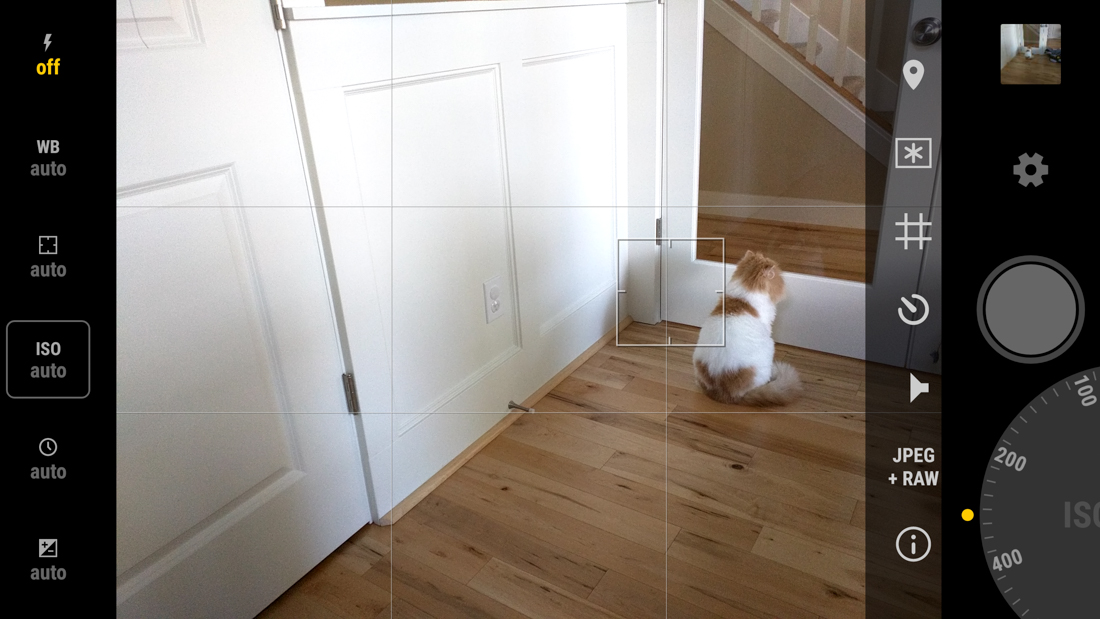
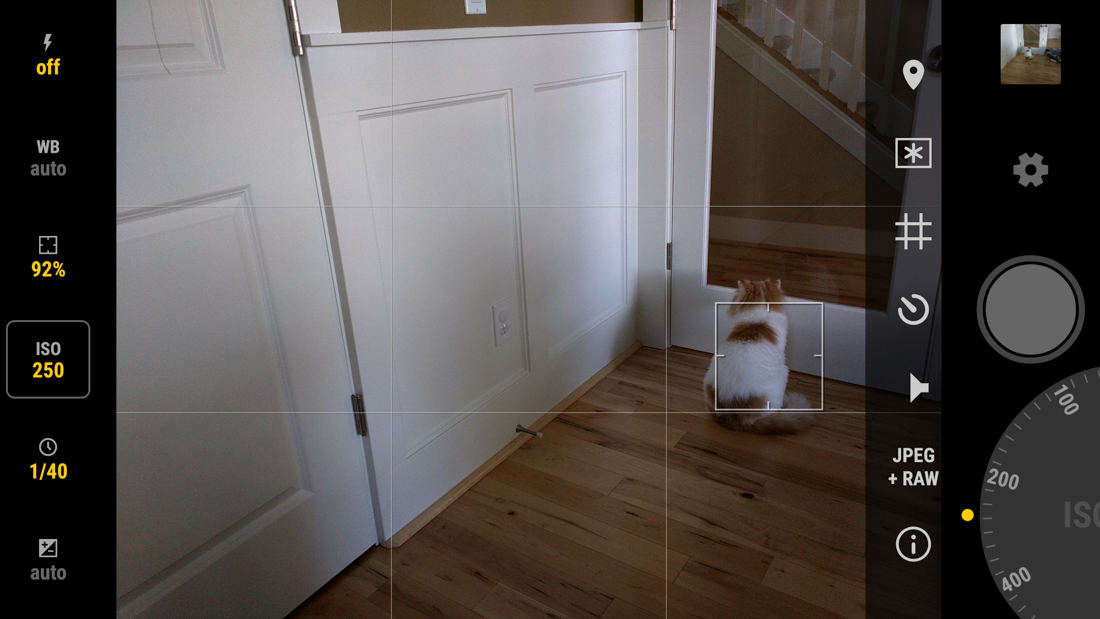
Looking for the next great camera app that can take advantage of the new camera API introduced with Android 5.0?Manual Camera may just be what you need. This app, in the short time I have spent with it, will without a doubt become my go-to camera app when I am using theNexus 6 or Nexus 5, the two devices it supports. 

With Manual Camera, you get a very clean and accessible layout, with shortcuts for flash, white balance, focus, ISO, shutter speed and exposure on the left side. On the right, you have gallery and settings shortcuts, a shutter button, and then a dial that lets you quickly control all of the settings from the left side. The camera starts in auto mode, which you should have no problems shooting in, but if you want to start tweaking the manual focus or ISO or shutter speed, you can do that with a tap on a button and spin on the dial. It’s pretty easy to figure out.

The camera also shoots in RAW, includes a few different shooting grids, and a shortcut to max out your phone’s brightness.

Also, did I mention how fast this camera app shoots? One of the problems I had with the Nexus 6 camera out of the box was the slow auto focus and shutter speeds, but those don’t seem to be a problem at all with this app. I haven’t been this excited to snap pictures with a Nexus in a long time.

Keep in mind that the app is brand new, so it should only get better over time.

Manual Camera App Should be Your Next Purchase if You Own a Nexus 5 or Nexus 6

Saturday, January 24, 2015

Google is among the most sought after employers in the world. Engineers are the rock stars at Google — and they’re paid like one.

Interns start at $70,000 to $90,000 salaries, while software engineers pull in $118,000 and senior software engineers make an average of $152,985. But one does not simply walk into the Googleplex.

The company receives upwards of 2.5 million job applications a year, but only hires about 4,000 people.

For would-be Googlers, the Google in Education team has released a list of skills that they want to see in potential engineers.

“Having a solid foundation in computer science is important in being a successful software engineer,” the company says. “This guide is a suggested path for university students to develop their technical skills academically and non-academically through self-paced, hands-on learning.”

Here are the skills Google wants its tech talent to master, complete with online resources to get you started…

1. Learn To Code

Learn to code in at least one object-oriented programming language, like C++, Java, or Python. Consult MIT or Udacity.

2. Test Your Code

It’s not just important to know how to code. You should also be able to test code, because Google wants you to be able to ‘catch bugs, create tests, and break your software.’

3. Have Some Background In Abstract Math

It is important to have some background in abstract math, like logical reasoning and discrete math, which lots of computer science draws on.

4. Get To Know Operating Systems

Get to know operating systems, for they’ll be where you do much of your work.

5. Become Familiar With Artificial Intelligence

Become familiar with artificial intelligence beacuse Google loves robots.

6. Understand Algorithms And Data Structures

Google wants you to learn about fundamental data types like stacks, queues and bags as well as grasp sorting algorithms like quicksort, mergesort and heapsort.

7. Learn Cryptography

Learn cryptography. Remember, cybersecurity is crucial and important for security.

8. Learn How To Build Compilers

Stanford says that when you do that, ‘you will learn how a program written in a high-level language designed for humans is systematically translated into a program written in low-level assembly more suited to machines.’

9. Learn Other Programming Languages

Add Java Script, CSS, Ruby and HTML to your skillset. W3school and CodeAcademy are there to help.

10. Learn Parallel Programming

Also, learn parallel programming because being able to carry out tons of computations at the same time is powerful.

10 Skills You Need To Get A Job At Google

Why whatsapp for web not available for iPhone?

WhatsApp for web browsers was launched this week — but not for anyone with an iPhone or people using any browser apart from Chrome. But the limited features are likely a result of WhatsApp commitment to mobiles and privacy.

The Facebook-owned company announced this week that users could send messages from their PCs over the web. But while the feature is available for everyone on Android, BlackBerry, Windows or Nokia Phones, it wasn’t launched for iPhone and other browsers like Safari or Firefox.

Whatsapp blamed Apple for not being able to put the feature on iOS — citing “platform limitations”.

While other chat services like iMessage and Google Hangouts offer the option to sync accounts across phones and computers, they don’t have the same wide adoption as WhatsApp. iMessage is also limited to use on Apple devices, and Hangouts is much easier to use on Google’s phones, web clients and browsers.

As well as requiring Android and Chrome, WhatsApp on PC uses the network connection from the phone. That means that it can’t be used if your Android phone is out of signal, or run out of battery — two of the most helpful uses for being able to access the client on other devices.

But the limitations likely stem from two of WhatsApp’s key principles for the app: that it should always remain mobile first, and that communications should have end-to-end encryption so that they can’t be snooped on.

The way the web app works means that WhatsApp is able to make messages viewable on desktop without sacrificing its priority to keep things mobile. The web browser is essentially just a way of mirroring what’s happening on the app on your desktop.

“This means all of your messages still live on your phone,” as WhatsApp said in its statement — and it ensures that the web app stays as a useful utility rather than the beginning of any move to offer WhatsApp to non-mobile users.

The process is also likely to be a result of WhatsApp’s commitment to end-to-end encryption, though the company hasn’t said so. The slightly difficult way of linking phones to the web client, as well as the complications that exist when users have done so, are probably at least in part a result of WhatsApp’s commitment  not to read users’ messages and to stop other people from doing so.

WhatsApp on web disappoints some with no support for iPhone and many browsers

Friday, January 23, 2015


VIRTUAL ASSISTANTS, NEW WEB BROWSERS, SEAMLESS GAMING


With its new version of Windows, Microsoft has done the seemingly impossible: It skipped right over version 9 and straight to 10. Really, though, the maker of the world's most popular operating system dropped a lot of major announcements during its press event about Windows 10 on Wednesday. Here are the top five most interesting decisions by Microsoft for its next OS update—not including the holograms.

Windows 10 is free!


When was the last time you paid for an operating system? Because it might have been the last time... period. Just as Apple has begun making OS X free -- iOS, Android, and Windows Phone updates have always been free -- Windows has finally joined the gratis club. Well, mostly: Microsoft says it will let customers of Windows 7, 8.1, and Windows Phone 8.1 upgrade to Windows 10 for free for the first year of Windows 10's availability. (There is, unsurprisingly, some fine print.) Once you've upgraded, though, you're supported on Windows 10 for life.


"We think of Windows as a Service," wrote Terry Myerson, Microsoft's executive vice president of operating systems. It's clear that Microsoft wants to push its customers to Windows 10 as much as possible, which would mean fewer platforms for both the company and its developers to support. A low, low price tag helps make that happen.

Cortana


As rumored, the virtual assistant Cortana from Windows Phone will debut on the desktop in Windows 10. You mainly interact with Cortana via a search box next to the Start button, and it can retrieve information when prompted, either by typing or by vocalizing your search terms. Besides searching your computer and the Internet, Cortana can retrieve specific information about things like flight information, appointments, weather, and more; it even learns about what you're interested in so it can provide tailored results. Additionally, the assistant is seamless across devices, so what it learns on your Windows Phone, it also knows on your desktop PC.

Universal experience

Microsoft is trying hard to prove that Windows is the same Windowseverywhere. Case in point: No matter which platform you're talking about, it's just "Windows 10"; the "Windows Phone" moniker has bitten the dust. The company also redesigned its apps, music, photos, mail, calendar, messaging, and so on to look and work similarly across all of its devices. The company's goal is to keep a consistent experience between its mobile platforms and desktop PCs, allowing users to seamlessly transition between the two. It's even rolling out a universal version of Office apps for tablet, phone, and PC, in which it elevates touch interfaces to the level of traditional keyboard and mouse input. Some people may balk at creating an Excel spreadsheet with a touch of the finger, but once you learn it one place, you'll know how to do it everywhere.

Project Spartan


Microsoft has finally realized that its Internet Explorer web browser seriously lags behind the rest of the competition, so the company has issued a brand new browser that's code named Project Spartan. While Microsoft didn't delve too deep into its capabilities, it called out a few, such as an engine built on modern web technology; its support for annotation via keyboard or stylus; and an updated and simplified layout that puts the emphasis on the content itself. The company said Spartan will make it to Windows Phone, too, but wasn't ready to demo it today.

Xbox App


Xbox on Windows 10

Want to play your Xbox games on your PC? No problemo. Windows 10includes an Xbox app that lets you stream games from your Xbox One to your Windows 10-compatible tablets and PCs, capture gameplay footage on your PC with Game DVR, and—perhaps best of all—provides full interoperability with the Xbox Live service. The feature finally lets you play games on your PC against your friends on their Xbox One consoles, as well as message and chat

THE 5 MOST INTERESTING ANNOUNCEMENTS FROM MICROSOFT'S WINDOWS 10 EVENT


THE TECHNIQUE COULD MAKE FASTER VEHICLES AND IMPROVE SANITATION IN THE DEVELOPING WORLD

Water, the key to life on our planet, can sometimes be one of our greatest enemies – especially when it comes to its interactions with metals. Air moisture triggers the formation of rust and corrosion on metal surfaces, while frozen water can render some metals temporarily worthless, e.g. an icy airplane wing.


Because of this, many have searched for ways to make metals hydrophobic – or water-repellent – usually by coating them with chemical additives. Researchers at the University of Rochester in New York say they have found a more effective way of making metals impervious to water’s tricks: Just shoot them with some lasers.

Dr. Chunlei Guo, a professor of optics and physics at Rochester, has been studying the effects of laser blasts on metal materials for many years, onceusing laser beams to turn metals hydrophilic, so they attract water. Now, Guo and his colleague Anatoliy Voroyev have done the reverse, figuring out a way to use short-pulse high-intensity laser bursts to alter the structure of a metal’s surface. The result: a highly water-repellent metal.

The energy the laser produces is about the same as the entire power grid of North America.


“When you radiate the short laser pulse on a metal surface, it transforms a smooth metal surface into a highly structured one, covered with a range of micro- and nano-scale structures,” explains Guo. “And those structures have the different water-repellent properties.”

The transformation lies in the laser’s power. Guo and Voroyev only shine the laser on the metal’s surface for a femtosecond; that’s one-quadrillionth of a second long. But the high-intensity laser is so powerful that within that short amount of time, the energy it produces is about the same as the entire power grid of North America. That tremendous amount of heat and energy dramatically alters the metal to produce the minuscule structures on the surface.


“If you put the new metal surface under a high-powered microscope, you see they have a hierarchal structure,” Guo says. “There are micro-scale groups and also on top of the micro groups, there are nano-scale structures. They look like a cloud on the nano-scale, with lots of protrusions and dips.”

Guo says this method of turning metals hydrophobic is superior to chemical coatings, like Teflon, in a couple of ways. First of all, these laser-generated metals repel water way better than any type of coat available. With a Teflon-coated metal surface, such as your average non-stick frying pan, it requires a tilt of 70 degrees to rid the surface of any water. With these laser-enhanced metals, an angle tilt of just 5 degrees is sufficient for getting water to slide off.

Additionally, the laser technique doesn’t require any extra ingredients. When Teflon is heated, it starts to decompose and detach from the metallic surface. Some studies have linked this deterioration to health problems in humans and birds. But Guo’s metallic transformations are not temporary and don’t peel away; the laser light fundamentally alters their structures. “This water-repellent structure is intrinsic to our metal surface,” says Guo. “It’s not a coating, so we don’t have to worry about it coming off over time.”

The research team envisions a number of applications for these metal materials, beyond making it easier to cook scrambled eggs. The metals are non-corrosive, remaining sturdier for longer periods of time, and they yield a number of transportation benefits, such as ensuring that ice never forms on a car or airplane wing. Even ships can become faster with these materials; a hull constructed with hydrophobic metals can reduce water friction and drag on the sea.

But more importantly, Guo is excited about the metal’s applications in the developing world. Hydrophobic metals can stay cleaner for much longer without requiring a lot of water to wash away dirt. The researchers tested this by throwing dust particles onto a piece of laser-blasted metal, watching as just a few dozen droplets cleared it of all the grime. This self-cleaning property could be very helpful for keeping latrines clean in developing nations, where clean water is scarce.

“We are very excited about applying this hydrophobic surface to prevent water contamination,” says Guo. “If you don’t allow water to stick on the surface, the water containing microbes and biomaterials will not be able to survive on the surface either, keeping the area clean.”

However, Guo still has a way to go before these metals can be mass-produced. To make a 1-inch by 1-inch hydrophobic metal piece, it takes an hour of laser blasting. So it may be some time before we have water-resistant cars and metal toilets.

LASER-BLASTED METAL FORMS A SELF-CLEANING NON-STICK SURFACE

What does it mean to have holograms on Windows 10?


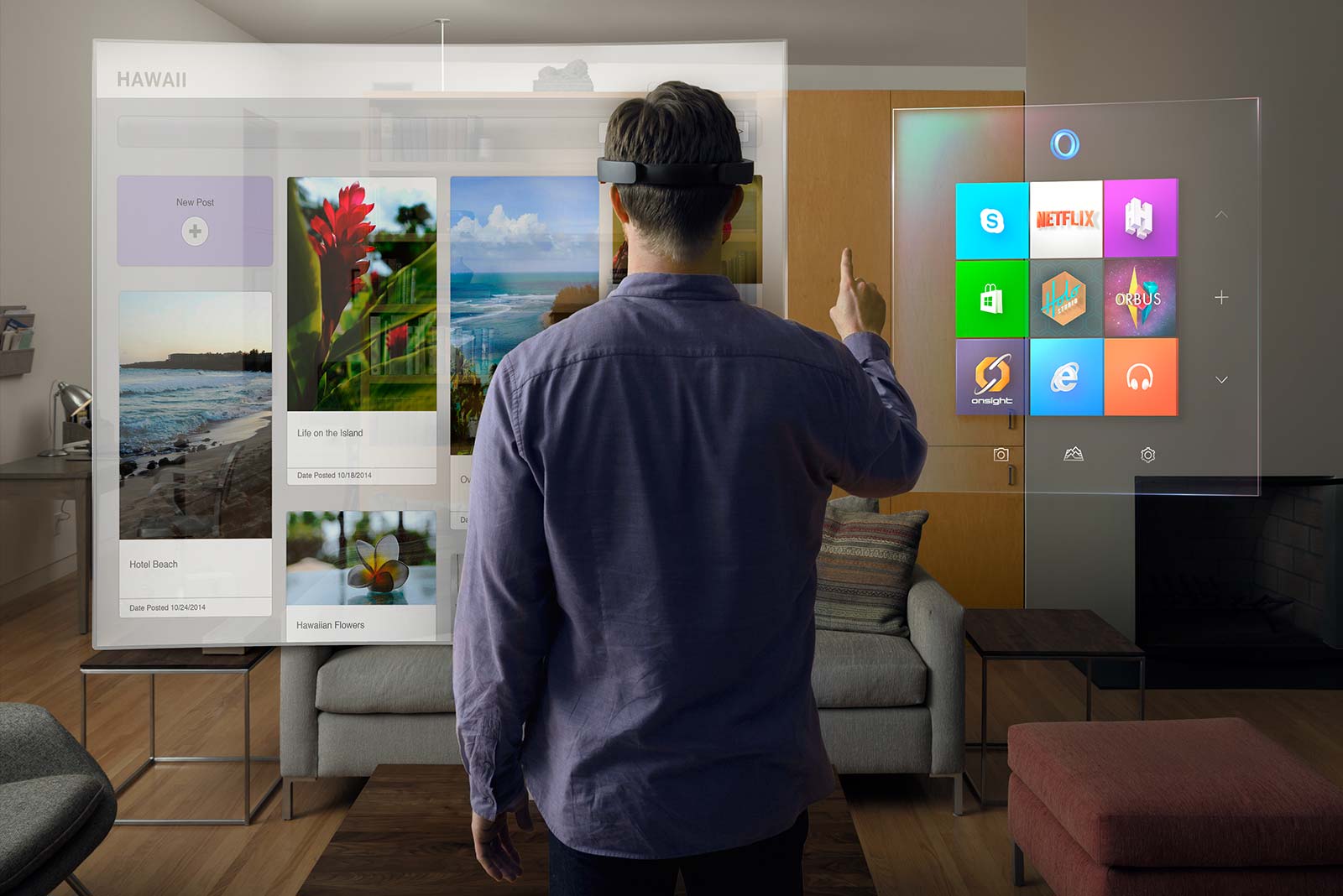
Windows 10 is the first platform to support holographic computing with APIs that enable gesture and environmental understanding on an untethered device. With Windows 10, holograms are Windows universal apps, and all Windows universal apps work as holograms. Holograms in Windows 10 will lead to entirely new ways for us to communicate, create, and explore.


What is Microsoft HoloLens, and how does it work?


Microsoft HoloLens is the first holographic computer running Windows 10. It is completely untethered – no wires, phones, or connection to a PC needed. Microsoft HoloLens allows you to pin holograms in your physical environment and provides a new way to see your world.


Microsoft HoloLens features see-through, holographic, high-definition lenses and spatial sound so you can see and hear holograms in the world around you. Complete with advanced sensors and a new Holographic Processing Unit (HPU) that understands the world around you, Microsoft HoloLens is able to run without any wires while processing terabytes of data from the sensors in real-time.

What is a hologram?


A hologram is an object like any other object in the real world, with only one difference: instead of being made of physical matter, a hologram is made entirely of light. Holographic objects can be viewed from different angles and distances, just like physical objects, but they do not offer any physical resistance when touched or pushed because they don’t have any mass. Holograms can be two-dimensional, like a piece of paper or a TV screen, or they can be three-dimensional, just like other physical objects in your real world. The holograms you’ll see with Microsoft HoloLens can appear life-like, and can move, be shaped, and change according to interaction with users or the physical environment in which they are visible.

Why would anyone want holograms in their real world?


While we’ve made incredible advances as an industry in the way in which we interact with computers, we are still constrained by the need to conform to the ways computers recognize our commands through mouse clicks or by touching a screen. Using holograms, you can pin your digital content, such as apps, information, and even multi-dimensional videos, in the physical space around you, so you can interact with them in the same ways that you interact with other physical objects.

How is this different from existing VR technologies?


Holographic experiences with Microsoft HoloLens are different from existing experiences, such as virtual reality (VR). With VR, the user is completely immersed in a computer-generated reality, or virtual world. While immersed in a virtual world, users are best advised to stay seated or keep still to avoid collisions with physical objects they cannot see in the real world. Holographic experiences on Windows 10 are about delivering a mixed reality that lets you enjoy your digital life while staying more connected to the world around you – transforming the ways you create, connect, and explore.

How do I learn more about designing and developing apps for Microsoft HoloLens?

Microsoft HoloLens runs on Windows 10, so developers building on Windows 10 will already know how to build for Microsoft HoloLens from a platform perspective. Having this same foundation means that developers will be familiar with the tools and benefits of the Windows Store.

The best way to get started is to become familiar with Windows 10 by joining the Windows Insider Program. Next, register for Build 2015. At Build, you’ll learn more about how to get started designing and developing for Microsoft HoloLens, receive details on the SDK, and meet members of our engineering team. If you can’t attend in person, plan to tune in via livestream or check out the recorded keynote and session presentations that will be available after the event.

HoloLens -Will Microsoft Change The Way We live in ?

Thursday, January 22, 2015

Reports indicate that Google has taken definitive steps towards launching their own cellular phone service, making a long-whispered rumor sound like more than just hearsay. Google is working on deals with bothSprint and T-Mobile to become a mobile virtual network operator (MVNO) on their infrastructure. While details are sparse for now, this might be your surest bet to avoid bloatware if there ever was one.

An MVNO is a third-party who uses a major carrier's network to provide service. For Sprint and T-Mobile, this is a key revenue source that helps justify their investments in improving their coverage. For consumers, current players like FreedomPop and Virgin Mobile provide additional choice and price competition. While most MVNOs offer non-contract plans, it is not clear at this time whether that would also be true for Google. This could be a venue for them to subsidize the Nexus line.

The report, first published by The Wall Street Journal, mentions that the program has been codenamed "Nova" internally. That sounded familiar to us, because we had been tipped about a similar program called "Nova" last year. We had not been able to get more info and did not report on it - until now.

Our tipster told us that Google Voice (now, that would probably be Hangouts) would be the backbone of the Google plans, which would be data-only. With access to mobile data and possession of a Voice number, the experience would theoretically be nearly equivalent to a conventional phone plus data plan. The tipster also told us that the plans would offer unlimited data, while leaning on WiFi where available.

Neither today's report nor our tip makes it clear what network(s) the plan would utilize. T-Mobile is a GSM carrier while Sprint uses CDMA. For high-speed data, these networks are interoperable provided devices have the right frequency radios. Legacy interoperability (that is, 3G) is dicier.

This isn't the first time you may have heard about Google as an MVNO, either. In April, we reported on a rumor that Google was planning some sort of venture to offer cell service in Google Fiber markets. Today's report is far less modest than just a small rollout, but don't be surprised if it does in fact start on a limited basis like the original rumor.

At this point, Google doesn't have to do much to keep the big carriers on its side. While years ago appeasement was necessary to make sure Android devices were given a fair shake, they now occupy a huge chunk of market share. The benefit that comes with that is things like this; pissing off AT&T and Verizon isn't much of a risk like it once was. Instead, a Google-led cell phone service could drive prices down and give Google control over distribution and software of their (and other OEMs') devices.

For those of you who have been claiming Google would launch their own carrier since the launch of the Nexus One, congratulations! You're sort of, kind of right. They're never going to build out their own towers and the like, but this is almost like being a carrier.

Google Reportedly On The Verge Of Launching 'Nova,' A Cellular Phone Service To Compete With Big Four Carriers

With the HoloLens, Microsoft promises it can deliver a true next-gen computing experience while other tech giants struggle to do the same.Microsoft

REDMOND, Wash. -- In the bowels of Building 92, hidden underneath the company's public visitor center in a secret series of labs, Microsoft let a few people try out what may be the most ambitious Windows device ever made: a holographic headset that aims to rival the most advanced virtual reality devices out there.

Microsoft's HoloLens is expected to run Windows 10 and apps -- holographic ones that will float in front of your line of vision and apps that can be run on phones, tablets, PCs and the Xbox One game console. With the holographic programs, Microsoft is trying to transform how we think about computing, productivity and communication. Just as VR rivals Oculus (owned by Facebook) and Google are trying to reimagine virtual experiences with their head-worn devices, Microsoft wants us to imagine a world without screens, where information merely floats in front of you.

"We're not talking about putting you into virtual worlds," HoloLens leader Alex Kipman said Wednesday during an event at Microsoft's headquarters here. "We're dreaming beyond virtual worlds, beyond screens, beyond pixels."

Kipman started working at Microsoft seven years ago, when he pitched the idea for the Kinect motion camera, a video game device that tracked a player's body movements. The Kinect went on to become one of the fastest-selling devices in history.

For the last five years, Kipman has been focused on taking the innovations inside the Kinect -- cheap and powerful motion-sensing cameras, voice control -- and packing them into a pair of transparent goggles.


Microsoft appears far along in realizing this augmented reality vision. With HoloLens today, the company has designed a convincing prototype that floats 3D images in front of you and that can change the look of real-world objects all around. But it's unclear how Microsoft expects to deliver on CEO Satya Nadella's commitment that such a device will be for both consumers and businesses.

Also unsaid: How much it will cost. Microsoft said it expects to release a finished HoloLens within the same time frame as Windows 10, which should arrive sometime this year. The Oculus Rift's various developer kits, on the other hand, have cost upward of $300 in the past, with its consumer model expected to come in between $200 and $400. Samsung's Gear VR headset runs around $350.

Microsoft's glasses are different from Oculus Rift goggles, which promise to transport you to a different world and open up numerous possibilities for film, TV, sports and other entertainment. HoloLens uses a technology called augmented reality, which overlays images onto real life and lets you interact with them. In theory, this is easy, but the biggest struggles competitors have had so far have been to design a headset that can stand alone, untethered from a computer or power source, and travel into various environments. Overcoming those challenges is necessary before mainstream consumers will buy into such a bold vision for next-generation computing.

From Mars to Minecraft

As we're led down the stairs into the basement, we're told that we can't try the more polished, all-in-one prototype Microsoft just showed onstage. Instead, we'll be using an earlier, uglier prototype. The company doesn't allow smartphones or cameras into the room.

The device's holographic processing unit, the special processor Microsoft designed to basically help the HoloLens interpret movement and sound, is cased in a separate, chunky box intended to be worn around your neck. The glasses aren't the sleek, space gray model Microsoft unveiled this morning, but a mass of metal. A long chord tethers me to a pair of PCs that are helping feed the goggles their images.

The demo was unique in that it showcased a feasible and realistic use of augmented reality that wasn't bombastic or meant to marvel. I was able to do something I can say I haven't done in quite a long time with help from a total stranger who was seeing through my eyes and drawing on my reality to direct me through a task.

After checking the voltage on the wires, wrapping coils around the respective screws and capping the loose wires, I picked up a remote control and tapped a button. The light came to life. I had only to look up so the person on the other end of my eyes could see the end result of our successful collaboration.

Microsoft's HoloLens is no joke: My reality augmented with Skype, Minecraft

Microsoft HoloLens


It’s the end of October, when the days have already grown short in Redmond, Washington, and gray sheets of rain are just beginning to let up. In several months, Microsoft will unveil its most ambitious undertaking in years, a head-mounted holographic computer called Project HoloLens. But at this point, even most people at Microsoft have never heard of it. I walk through the large atrium of Microsoft’s Studio C to meet its chief inventor, Alex Kipman.

The headset is still a prototype being developed under the codename Project Baraboo, or sometimes just “B.” Kipman, with shoulder-length hair and severely cropped bangs, is a nervous inventor, shifting from one red Converse All-Star to the other. Nervous, because he’s been working on this pair of holographic goggles for five years. No, even longer. Seven years, if you go back to the idea he first pitched to Microsoft, which became Kinect. When the motion-sensing Xbox accessory was released, just in time for the 2010 holidays, it became the fastest-selling consumer gaming device of all time. Right from the start, he makes it clear that Baraboo will make Kinect seem minor league.

Kipman leads me into a briefing room with a drop-down screen, plush couches, and a corner bar stocked with wine and soda (we abstain). He sits beside me, then stands, paces a bit, then sits down again. His wind-up is long. He gives me an abbreviated history of computing, speaking in complete paragraphs, with bushy, expressive eyebrows and saucer eyes that expand as he talks. The next era of computing, he explains, won’t be about that original digital universe. “It’s about the analog universe,” he says. “And the analog universe has a fundamentally different rule set.”
Translation: you used to compute on a screen, entering commands on a keyboard. Cyberspace was somewhere else. Computers responded to programs that detailed explicit commands. In the very near future, you’ll compute in the physical world, using voice and gesture to summon data and layer it atop physical objects. Computer programs will be able to digest so much data that they’ll be able to handle far more complex and nuanced situations. Cyberspace will be all around you.

What will this look like? Well, holograms.

First Impressions


That’s when I get my first look at Baraboo. Kipman cues a concept video in which a young woman wearing the slate gray headset moves through a series of scenarios, from collaborating with coworkers on a conference call to soaring, Oculus-style, over the Golden Gate Bridge. I watch the video, while Kipman watches me watch the video, while Microsoft’s public relations executives watch Kipman watch me watch the video. And the video is cool, but I’ve seen too much sci-fi for any of it to feel believable yet. I want to get my hands on the actual device. So Kipman pulls a box onto the couch. Gingerly, he lifts out a headset. “First toy of the day to show you,” he says, passing it to me to hold. “This is the actual industrial design.”

Oh Baraboo! It’s bigger and more substantial than Google Glass, but far less boxy than the Oculus Rift. If I were a betting woman, I’d say it probably looks something like the goggles made by Magic Leap, the mysterious Google-backed augmented reality startup that has $592 million in funding. But Magic Leap is not yet ready to unveil its device. Microsoft, on the other hand, plans to get Project HoloLens into the hands of developers by the spring.

Kipman’s prototype is amazing. It amplifies the special powers that Kinect introduced, using a small fraction of the energy. The depth camera has a field of vision that spans 120 by 120 degrees—far more than the original Kinect—so it can sense what your hands are doing even when they are nearly outstretched. Sensors flood the device with terabytes of data every second, all managed with an onboard CPU, GPU and first-of-its-kind HPU (holographic processing unit). Yet, Kipman points out, the computer doesn’t grow hot on your head, because the warm air is vented out through the sides. On the right side, buttons allow you to adjust the volume and to control the contrast of the hologram.


Microsoft’s Lorraine Bardeen demonstrates HoloLens at the Windows 10 event at the company’s headquarters in Redmond, Washington on Wednesday, Jan. 21, 2015.

Tricking Your Brain


Project HoloLens’ key achievement—realistic holograms—works by tricking your brain into seeing light as matter. “Ultimately, you know, you perceive the world because of light,” Kipman explains. “If I could magically turn the debugger on, we’d see photons bouncing throughout this world. Eventually they hit the back of your eyes, and through that, you reason about what the world is. You essentially hallucinate the world, or you see what your mind wants you to see.”

To create Project HoloLens’ images, light particles bounce around millions of times in the so-called light engine of the device. Then the photons enter the goggles’ two lenses, where they ricochet between layers of blue, green and red glass before they reach the back of your eye. “When you get the light to be at the exact angle,” Kipman tells me, “that’s where all the magic comes in.”

Thirty minutes later, after we’ve looked at another prototype and some more concept videos and talked about the importance of developers (you always have to talk about the importance of developers when launching a new product these days), I get to sample that magic. Kipman walks me across a courtyard and through the side door of a building that houses a secret basement lab. Each of the rooms has been outfitted as a scenario to test Project HoloLens.

A Quick Trip to Mars


The first is deceptively simple. I enter a makeshift living room, where wires jut from a hole in the wall where there should be a lightswitch. Tools are strewn on the West Elm sideboard just below it. Kipman hands me a HoloLens prototype and tells me to install the switch. After I put on the headset, an electrician pops up on a screen that floats directly in front of me. With a quick hand gesture I’m able to anchor the screen just to the left of the wires. The electrician is able to see exactly what I’m seeing. He draws a holographic circle around the voltage tester on the sideboard and instructs me to use it to check whether the wires are live. Once we establish that they aren’t, he walks me through the process of installing the switch, coaching me by sketching holographic arrows and diagrams on the wall in front of me. Five minutes later, I flip a switch, and the living room light turns on.

Another scenario lands me on a virtual Mars-scape. Kipman developed it in close collaboration with NASA rocket scientist Jeff Norris, who spent much of the first half of 2014 flying back and forth between Seattle and his Southern California home to help develop the scenario. With a quick upward gesture, I toggle from computer screens that monitor the Curiosity rover’s progress across the planet’s surface to the virtual experience of being on the planet. The ground is a parched, dusty sandstone, and so realistic that as I take a step, my legs begin to quiver. They don’t trust what my eyes are showing them. Behind me, the rover towers seven feet tall, its metal arm reaching out from its body like a tentacle. The sun shines brightly over the rover, creating short black shadows on the ground beneath its legs.


Microsoft

Norris joins me virtually, appearing as a three-dimensional human-shaped golden orb in the Mars-scape. (In reality, he’s in the room next door.) A dotted line extends from his eyes toward what he is looking at. “Check that out,” he says, and I squat down to see a rock shard up close. With an upward right-hand gesture, I bring up a series of controls. I choose the middle of three options, which drops a flag there, theoretically a signal to the rover to collect sediment.

After exploring Mars, I don’t want to remove the headset, which has provided a glimpse of a combination of computing tools that make the unimaginable feel real. NASA felt the same way. Norris will roll out Project HoloLens this summer so that agency scientists can use it to collaborate on a mission.

A Long Way Yet


Kipman’s voice eventually brings me back to Redmond. As I remove the goggles, he reminds me that it’s still early days for the project. This isn’t the kind of thing that will be, say, a holiday best seller. It’s a new interface, controlled by voice and gesture, and the controls have to work flawlessly before it will be commercially viable. I get that. I love voice controls, and I talk to Siri all the time. But half the time, she doesn’t give me a good answer and I have to pull up my keyboard to find what I’m looking for more quickly. Project HoloLens won’t have a keyboard. If the voice and gesture controls don’t work perfectly the first time, consumers will write it off. Quickly.

That said, there are no misfires during three other demos. I play a game in which a character jumps around a real room, collecting coins sprinkled atop a sofa and bouncing off springs placed on the floor. I sculpt a virtual toy (a fluorescent green snowman) that I can then produce with a 3-D printer. And I collaborate with a motorcycle designer Skyping in from Spain to paint a three-dimensional fender atop a physical prototype.

As I make my way through each, Kipman seems less nervous than when we began, but no less focused. It has been three hours since we met. In each scenario, he watches a screen that shows him what I am seeing, and he watches me trying to use his device for the first time. His eyebrows draw down in deep concentration as he checks to see if every calculation is perfect—noting the touch of my thumb and forefinger as I make an upward gesture, the words I reach for instinctively to instruct the computer. Seven years in, he is trying to see Project HoloLens as if for the first time. To see it through the eyes of a 30-something female New Yorker. But that is one thing his magical head-mounted holographic computer cannot do. At least not yet.

Project HoloLens: Our Exclusive Hands-On With Microsoft’s Holographic Goggles

 
Hi-Tech Talk © 2015 - Designed by Templateism.com